home chevron_right Apps chevron_right Productivity chevron_right Google NotebookLM


Todai: AI Life Coach & Planner
v1.2.1
• Unlocked
| Updated On | |
|---|---|
| Google Play ID | com.google.android.apps.labs.language.tailwind |
| Category | Productivity |
| Version | 2026.01.06.853388154 |
| Size | 54 MB |
| MOD Feature | Not available |
| Requires | Android 10 |
| Price | |
| Free | |
| Content Rating | |
| Everyone | |
| Internet Required | |
| Required | |

Google NotebookLM APK offers a smarter way to handle large amounts of information without spending hours reading documents manually. Powered by Google’s AI technology, this intelligent assistant can analyze uploaded materials, connect related ideas and generate useful answers supported by references. Whether you’re studying, conducting research or organizing professional projects, this tool helps turn scattered information into a structured knowledge resource.
Developed by Google, NotebookLM is an AI-powered research and note-taking platform designed to help users understand information more efficiently. Unlike conventional chatbots that primarily rely on broad knowledge and general prompts, this tool places your uploaded sources at the center of each notebook. It uses Google’s Gemini technology to analyze the materials you provide and generate responses grounded in their contents.
The platform is particularly useful for people who regularly work with lengthy reports, academic papers, business documents and other information-heavy resources. Instead of switching between multiple files to find relevant details, you can organize everything in one workspace and interact with the collected knowledge through natural language.
Google NotebookLM features a minimalist interface that keeps your attention on the materials you are studying. Its workspace is organized into three main sections: the source panel, the central notebook area and the AI chat interface. Each section serves a different purpose, making it easier to manage documents, review notes and ask questions without constantly switching between screens.
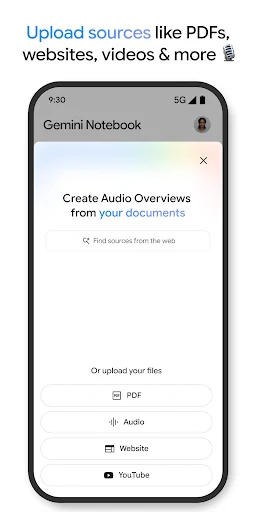
Adding reference materials is straightforward. Depending on the supported formats and available features, you can import PDFs, Google Docs, copied text and other source types. Once the materials are processed, NotebookLM identifies important information and prepares them for further exploration. You can then ask questions, request explanations or investigate specific details without manually searching through every page.
Reading several documents about the same subject can be time-consuming, especially when their arguments overlap or contradict one another. Google NotebookLM addresses this problem through its multi-source analysis capabilities, allowing you to examine information from different references within a single notebook.
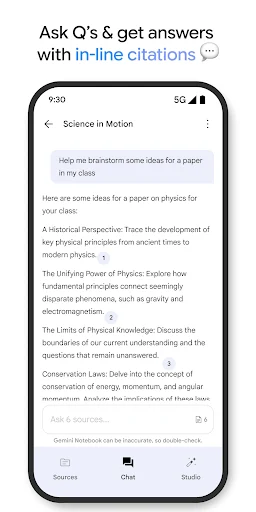
For example, imagine uploading five academic papers discussing the same scientific topic. You can ask whether their authors share similar conclusions, which arguments differ or what evidence supports a particular hypothesis. The AI analyzes the available materials and presents a consolidated response, including citations that direct you toward relevant passages.
This capability is valuable for academic assignments, professional reports, market research and content development. Rather than simply shortening individual documents, NotebookLM helps reveal connections between sources, identify recurring themes and organize complicated information into a more understandable format.
Research often involves discovering useful information that you may need to revisit later. Google NotebookLM makes this process easier through its note-taking capabilities, allowing you to preserve valuable insights generated during conversations with the AI.
You can save relevant responses as notes, organize your findings and edit the content to include personal observations. These notes can also serve as starting points for further exploration, helping you develop an initial idea into a more complete explanation or research outline.
Another useful aspect is the connection between notes and their original sources. Instead of keeping isolated summaries without any context, you can return to the referenced materials whenever you need to verify a detail. This creates a more organized workflow, particularly when working on projects that involve multiple research stages.
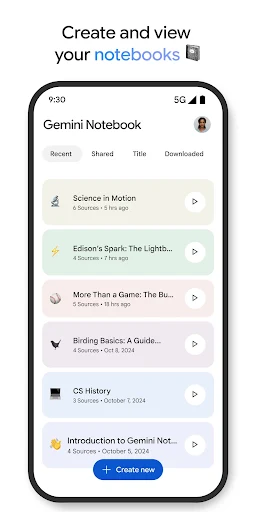
As your collection of documents grows, keeping track of everything becomes increasingly important. NotebookLM addresses this challenge with an overview area that brings essential notebook information together in one place.
Depending on the available interface features, you can review imported sources, saved notes, generated materials and other elements associated with your research. This provides a convenient starting point whenever you return to an ongoing project after several days or weeks.
For students handling multiple subjects or professionals managing several assignments, this organizational approach can save considerable time. You no longer need to remember where every important detail came from because the relevant materials remain grouped within their respective notebooks.
Starting a conversation with an AI assistant can sometimes be difficult, particularly when you have just uploaded a large collection of unfamiliar documents. Google NotebookLM helps overcome this issue by suggesting questions that encourage you to investigate the materials more deeply.
After processing your sources, the platform can recommend prompts related to their main arguments, important examples and potential connections. You might explore the central message of a particular chapter, identify evidence supporting an author’s conclusion or compare different viewpoints across several references.
These suggestions are especially helpful for beginners who are still learning how to interact with AI research tools. They provide practical starting points instead of requiring you to create complicated prompts from scratch. As a result, you can gradually develop better research questions and approach complex topics with greater confidence.
When working with personal documents, privacy and data management deserve particular attention. Google NotebookLM provides separate notebooks that help organize different projects, keeping their sources, notes and conversations within their respective workspaces.
You can also manage your uploaded materials and remove sources that are no longer necessary. This makes it easier to maintain an organized research environment without keeping outdated documents in every project.
Google provides privacy information explaining how NotebookLM handles submitted content and user data. However, you should review the current terms and applicable account policies before uploading confidential materials. Avoid sharing sensitive business records, personal information or unpublished documents unless you have confirmed that their use complies with your organization’s requirements.
Google NotebookLM is a convenient companion for anyone who wants to spend less time searching through documents and more time understanding their contents. If you prefer accessing its features on your smartphone, you can look for the Android installation package through APKMODY.
Get started with these simple steps:
Step 1 – Open APKMODY: Launch your mobile browser and access the APKMODY website.
Step 2 – Search For The Application: Enter Google NotebookLM into the search field to find its dedicated page.
Step 3 – Review The Release: Check the available APK version, compatibility details and application information before proceeding.
Step 4 – Save The Installation Package: Select the appropriate download link and wait for the file to finish downloading.
Step 5 – Complete The Setup: Open the downloaded APK, follow Android’s installation prompts and launch the application when the process is complete.