home chevron_right Apps chevron_right Productivity chevron_right Manus AI


HabitTick-Habit Tracker & Todo
v1.1.26
• Premium




| Updated On | |
|---|---|
| Google Play ID | tech.butterfly.app |
| Category | Productivity |
| Version | 26.19.17 |
| Size | 152 MB |
| MOD Feature | Not available |
| Requires | Android 7.0 |
| Price | |
| Free | |
| Content Rating | |
| Everyone | |
| Internet Required | |
| Required | |

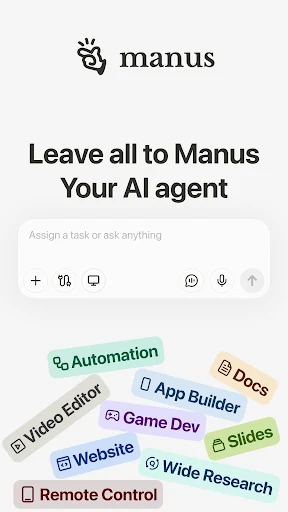
Manus AI takes artificial intelligence beyond ordinary conversations by introducing an autonomous agent capable of planning, organizing, and executing complex tasks. Instead of simply answering questions, it can break down your objectives into manageable steps, use available tools, and work toward completing the requested results. With workflow automation, external integrations, and an interface designed for task management, Manus AI offers an interesting approach to improving everyday productivity.
Manus AI is an AI Agent platform designed to handle tasks that require more than simple text generation. It analyzes user instructions, develops an execution plan, and coordinates different actions to achieve a specific objective. Whether you need assistance with research, content production, data organization, or other productivity activities, the platform aims to reduce repetitive manual work through automated processes.
One of the most interesting capabilities of Manus AI is its approach to workflow management. Rather than treating every instruction as an isolated request, the platform can divide a larger objective into smaller stages and arrange them in a logical sequence. Each stage has a particular purpose, helping users understand how the system intends to complete the overall assignment.
This structure also makes it easier to monitor progress and identify areas that require adjustments. When requirements change during execution, you can provide additional instructions so the agent can revise relevant parts of its plan. This approach helps maintain consistency across longer assignments while reducing unnecessary repetition and confusion.
Manus AI also provides opportunities to refine its output through user feedback. If a particular step does not meet your expectations, you can provide corrections or additional instructions to guide subsequent actions. Depending on the available memory and personalization features, the platform may also retain relevant preferences for future interactions.
For example, imagine asking Manus AI to prepare a blog post using a friendly, informative tone rather than aggressive promotional language. After reviewing the draft, you can explain which writing choices should be improved. When working on similar assignments later, saved preferences or contextual instructions can help maintain a more consistent style.
This feedback-driven approach is especially useful for people who regularly handle recurring projects. Instead of rebuilding every instruction from scratch, you can gradually refine the way the agent approaches familiar tasks.
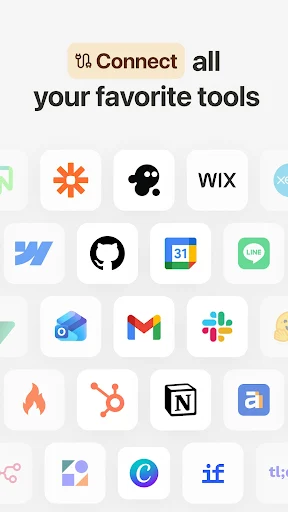
Manus AI becomes more useful when it can work alongside the services you already use. Its integration ecosystem supports connections with various productivity and development platforms, including Google Drive, Notion, GitHub, Slack, Gmail, and Zapier, subject to available integrations and account permissions.
These connections can help streamline activities such as organizing documents, managing project information, coordinating team communication, and handling development-related workflows. Rather than switching between several applications for every small operation, users can configure supported integrations to make different parts of their work more connected.
However, the available actions depend on the connected service, authorization settings, and the specific integration. Reviewing permissions before allowing an AI agent to access external accounts is important, particularly when handling confidential files or business information.
Manus AI is designed to accommodate tasks with varying levels of complexity. Users can explore the platform’s available usage plans and resource limits to determine which option suits their working habits. Depending on the account and current subscription, certain activities may consume credits or other usage resources.
The platform’s resource management tools help users understand how much capacity a particular task may require. More demanding assignments, such as extensive research or multi-stage automation, may consume more resources than simple requests. Checking the estimated usage before launching a workflow can therefore help prevent unexpected consumption.
For occasional users, available free access may provide an opportunity to experiment with basic capabilities before considering a paid plan. Nevertheless, daily allowances, credit amounts, and supported features can change, so consult the current account information rather than relying on fixed usage estimates.
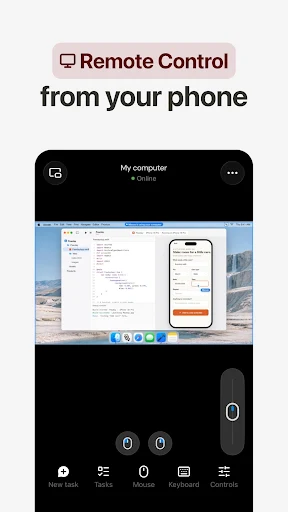
Manus AI uses a task-oriented interface that helps users follow the progress of their assignments. Once you submit a request, the platform can display the different stages involved in completing it, making the execution process easier to understand. You can review individual steps, inspect generated results, and provide additional instructions when something needs to be changed.
This organization is particularly helpful when handling assignments that involve multiple operations. Instead of receiving a single result without understanding how it was produced, you can follow the workflow and identify where adjustments are necessary. The ability to review intermediate outputs also gives users more opportunities to maintain control over the final result.
Whether you are organizing research, preparing documents, or coordinating several related activities, the interface provides a clearer overview of ongoing work and helps make AI-assisted productivity less overwhelming.
Manus AI introduces a different way to approach productivity by combining autonomous task execution, workflow organization, external integrations, and feedback-based improvements. It can be useful for people who want to delegate repetitive operations while maintaining control over important decisions and final results. If you want to explore Manus AI on your Android device, follow this alternative installation guide through APKMODY:
How to get Manus AI on Android:
Start at APKMODY: Open your Android browser and enter the APKMODY website address.
Look up the application: Use the website’s search function to find the Manus AI application page.
Review the package: Check the available version, Android requirements, and application information before proceeding.
Save the installer: Open the download section and select the APK package provided for your device.
Allow installation: Once the file has been downloaded, open your device’s security settings and authorize installation from the browser or file manager if necessary.
Complete the setup: Return to the downloaded file, launch the installer, and follow the instructions displayed on your screen.
Explore the features: Open Manus AI, sign in or create an account if required, and start experimenting with its available AI agent capabilities.