
Moodpress
v5.1.1
• Premium Unlocked
| Updated On | |
|---|---|
| Google Play ID | com.google.android.apps.subscriptions.red |
| Category | Utilities |
| Version | 1.335.1018429345 |
| Size | 20 MB |
| MOD Feature | Not available |
| Requires | Android 9 |
| Price | |
| Free | |
| Content Rating | |
| Everyone | |
| Internet Required | |
| Required | |
| Languages | |
| English, Afrikaans, Albanian, Amharic, Arabic, Armenian, Assamese, Azerbaijani, Basque, Belarusian, Bengali, Bulgarian, Burmese, Cambodian, Catalan, Croatian, Czech, Danish, Dutch, Estonian, Filipino, Finnish, French, Galician, Georgian, German, Greek, Gujarati, Hebrew, Hindi, Hungarian, Icelandic, Indonesian, Italian, Japanese, Kannada, Kazakh, Kirghiz, Korean, Laotian, Latvian, Lithuanian, Macedonian, Malay, Malayalam, Marathi, Mongolian, Nepali, Norwegian Bokmål, Oriya, Persian, Polish, Portuguese, Punjabi, Romanian, Russian, Serbian, Simplified Chinese, Singhalese, Slovak, Slovenian, Spanish, Swahili, Swedish, Tagalog, Tamil, Telugu, Thai, Traditional Chinese, Turkish, Ukrainian, Urdu, Uzbek, Vietnamese, Zulu | |

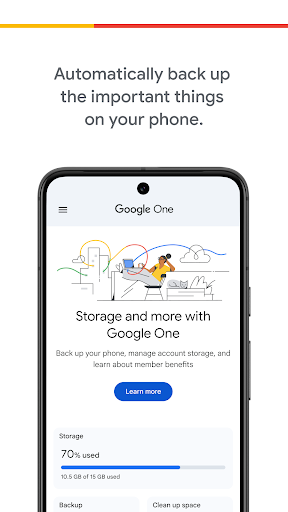
Google One makes protecting personal information easier by bringing automatic backups and cloud storage management together in one convenient application. From preserving photos and contacts to monitoring space across Google services, it helps you keep important digital content organized and accessible. Explore its useful tools, discover the advantages of premium membership, and learn how to download Google One through APKMODY.
A convenient solution for cloud storage, data protection, and account management!
Losing a phone, performing a factory reset, or accidentally deleting important information can cause plenty of inconvenience. Google One addresses these concerns by providing backup tools that help preserve essential content from your mobile device. Instead of manually transferring individual files whenever you change phones, you can configure backups and let the application handle supported data automatically.
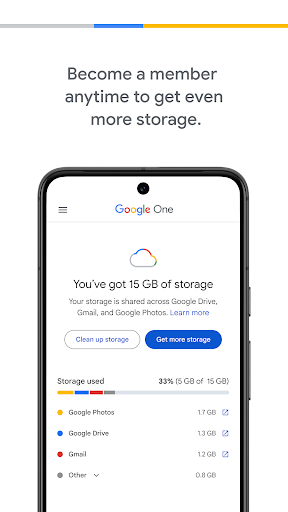
Depending on your device, settings, and available services, backups can include photos, videos, contacts, messages, and other supported information. Every Google Account also comes with 15 GB of free storage shared across Google Drive, Gmail, and Google Photos. When you purchase a new device or need to recover existing information, backed-up content can be restored through the supported recovery process. This makes Google One particularly useful for anyone who wants an additional layer of protection against unexpected data loss.
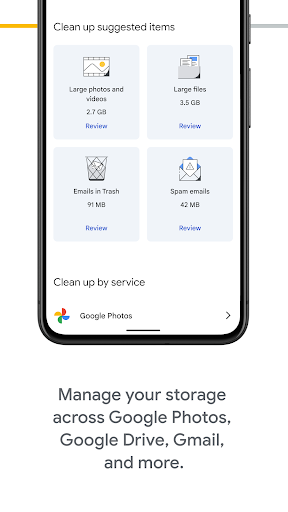
Managing several Google services separately can make it difficult to understand where your available space goes. Google One simplifies this process by displaying storage consumption across Google Drive, Gmail, and Google Photos in a centralized interface.
You can check how much capacity each service occupies, identify large files, and review content that might no longer be necessary. The application also provides recommendations for clearing unnecessary data, helping you reclaim valuable space without searching through every folder manually. These tools make routine account maintenance considerably more straightforward, especially when your cloud storage gradually fills up with attachments, photographs, and documents.
The free storage allowance is suitable for basic needs, but users who regularly save large files may eventually require more capacity. Upgrading to a Google One membership introduces additional services designed to improve storage flexibility and provide extra assistance.
Some notable benefits include:
Expanded cloud capacity: Choose a suitable membership plan with additional space for photographs, videos, documents, and other digital content.
Google expert assistance: Eligible members can access support from Google experts for questions involving supported Google products and services.
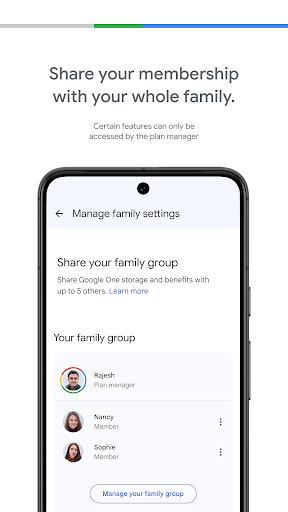
Family storage sharing: Share an eligible membership with up to five additional family members while keeping personal files private from one another.
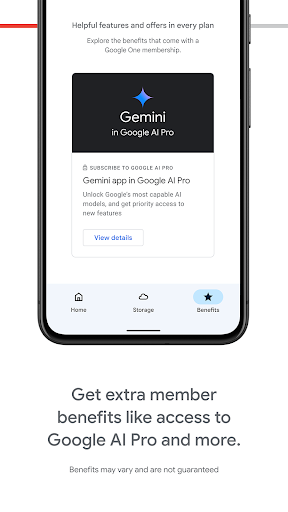
Additional membership perks: Depending on your country and subscription tier, certain plans may include extra benefits, promotional offers, or enhanced features.
The available benefits vary according to the selected plan and region. Therefore, checking the membership details before subscribing is a good way to determine whether the additional services match your requirements.
Although Google One and Google Drive are closely connected, they serve different purposes within Google’s ecosystem. Google Drive is primarily a cloud storage service that allows you to upload, organize, access, and share files online. Meanwhile, Google One provides subscription-based storage plans alongside tools for managing your Google Account’s shared capacity and accessing eligible membership benefits.
Previously, Google offered paid storage through Google Drive. In 2018, the company introduced Google One as a separate membership service, expanding the benefits associated with paid storage subscriptions. Importantly, Google One does not replace Google Drive; both services work together to provide a more complete storage experience.
Here is a general overview of the historical US monthly prices mentioned in earlier Google One plans. Actual prices and available tiers may change depending on the country and subscription date.
| Storage capacity | Historical monthly price |
|---|---|
| 100 GB | $1.99 |
| 200 GB | $2.99 |
| 2 TB | $9.99 |
| 10 TB, 20 TB, 30 TB | Varies |
Having 15 GB of free Google Account storage is useful, but that space must accommodate content from multiple services. As your collection of photographs, emails, and documents grows, keeping track of available capacity becomes increasingly important. Google One provides a more convenient way to monitor this shared storage and determine when an upgrade or cleanup is necessary.
Another advantage lies in its backup functionality. While Google Drive primarily focuses on storing and organizing files that you upload, Google One provides an interface for managing supported device backups and checking their status. This reduces the effort involved in protecting important mobile information.
Storage recommendations also make everyday maintenance easier. Rather than manually reviewing every item, you can identify large files, unnecessary attachments, and other content that might be suitable for deletion. Once you have reviewed the suggestions, simply select the items you no longer need and confirm the cleanup. By combining these capabilities, Google One helps users maintain better control over their digital storage without constantly switching between different applications.
If you want to access Google One on your Android device through APKMODY, follow this alternative installation guide:
Open APKMODY: Launch your preferred web browser and visit the APKMODY website.
Search for Google One: Use the website’s search function to locate the Google One application page.
Select the APK version: Review the available version information, then tap the appropriate download option to save the installation package.
Prepare your device: Once the download finishes, open your device settings and enable permission to install applications from the browser or file manager if Android requests it.
Complete installation: Find the downloaded APK in your device’s Downloads folder, open it, and follow the instructions displayed on the screen.
Connect your Google Account: Launch Google One, sign in with your account, and review the backup and storage settings to get started.