
V2Box
v6.2.3
• Utilities
| Updated On | |
|---|---|
| Google Play ID | com.fast.free.unblock.secure.vpn |
| Category | Utilities |
| Version | 4.4.5 |
| Size | 8 MB |
| MOD Features | VIP Unlocked |
| Requires | Android 6.0 |
| Price | |
| Free | |
| Content Rating | |
| Everyone | |
| Internet Required | |
| Required | |

Secure VPN helps you enjoy a more flexible internet experience by routing your connection through VPN servers in different countries. With a straightforward interface, quick connection process, and encrypted network traffic, the application makes online privacy easier to manage without complicated configurations. Whether you want to access region-restricted websites, protect your connection on public Wi-Fi, or browse with a different IP address, this tool provides several useful features in one place.
Secure VPN is a virtual private network application designed to help users establish encrypted connections and access the internet through remote servers. Instead of exposing your original public IP address to every website you visit, the application routes your traffic through a selected VPN server, making your connection appear to originate from another location.
The app focuses on accessibility, allowing beginners to use its main functions without dealing with advanced networking configurations. It also offers server locations across multiple countries, giving users more flexibility when connecting to online services. Its popularity on Google Play, reflected in more than 100 million downloads according to the provided app information, demonstrates its broad user reach.
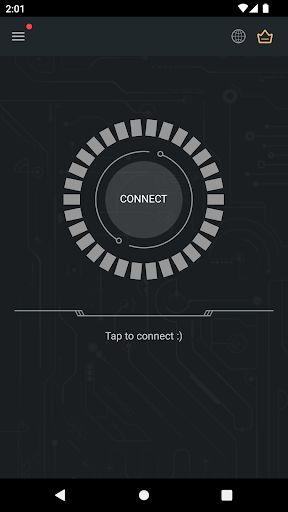
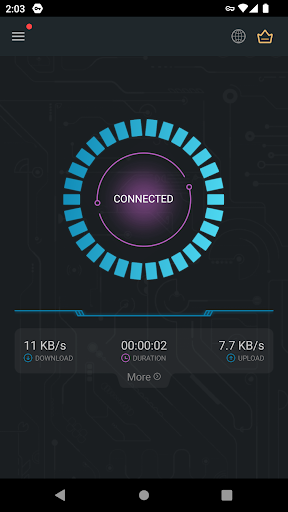
One of Secure VPN’s most convenient features is its straightforward connection mechanism. You do not need to spend time configuring complicated network parameters or manually adjusting technical settings before getting started. Simply launch the application, select the available connection option, and tap the main button to establish a VPN connection.
The interface makes the process easy to understand, even for people who have never used a VPN before. Once connected, your internet traffic is routed through the selected server, allowing you to browse with a different public IP address. This simple approach makes Secure VPN suitable for everyday use when you need a quick change of network location.
Connection quality is an important consideration when choosing a VPN, especially if you frequently stream videos, download files, or use online applications. Secure VPN aims to provide a smooth browsing experience through its available server network, although actual performance depends on factors such as server load, distance, and your original internet connection.
A stable connection can make common activities more convenient, including watching online videos, browsing social platforms, and accessing websites. However, VPN encryption and additional routing may affect latency or download speeds, so performance can vary between locations and usage conditions.
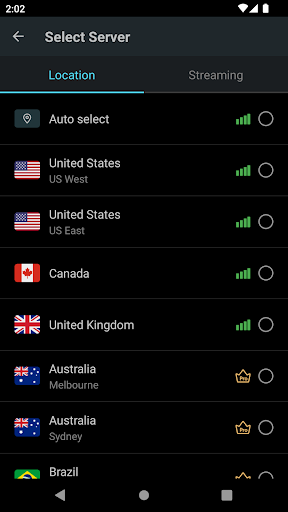
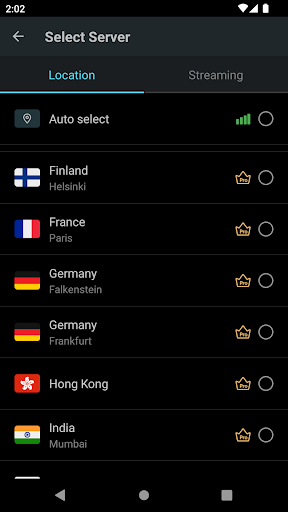
Secure VPN provides access to servers in various regions, allowing you to select a location based on your browsing requirements. Nearby servers are generally worth trying when connection speed is your priority, while servers in other countries may be useful when you need a different virtual location.
The application supports a range of everyday online activities, but you should not expect identical performance from every server. Switching locations when experiencing slowdowns can help you find a more suitable connection. For online gaming and video streaming, checking latency and stability is particularly useful.
Geographical restrictions can prevent users from accessing certain websites or online services from their current location. Secure VPN addresses this limitation by allowing you to connect through servers in different countries. Once connected, websites generally see the VPN server’s public IP address instead of your original one.
Available locations include countries such as the United States, United Kingdom, France, Japan, Singapore, and Germany. This selection gives you more flexibility when accessing international websites, checking region-specific information, or browsing services that support VPN connections.
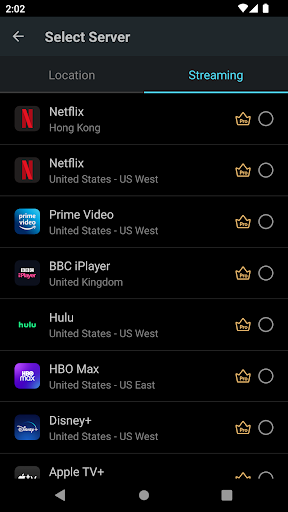
Changing your connection location is relatively straightforward. You can select a server in the country you want to connect through and establish a new VPN session. For example, choosing a US server makes your public IP address appear associated with that location, although it does not automatically guarantee access to every American streaming catalog.
Some platforms use additional verification methods, including account region, payment details, and device location. Therefore, availability may differ depending on the service’s policies. Secure VPN is best viewed as a convenient connection tool rather than a guarantee that every geographical restriction will disappear.
Online privacy is another reason people use VPN applications. When you connect to the internet through Secure VPN, your traffic is routed through an encrypted tunnel between your device and the VPN server. This helps protect data from being easily intercepted by other parties monitoring the local network.
The application also changes the public IP address visible to websites and online services. As a result, your original IP address is less directly exposed to the destinations you visit. Nevertheless, a VPN does not make you completely anonymous: websites may still identify you through cookies, account activity, browser fingerprints, and other tracking technologies.
Using a VPN can provide an additional privacy layer when accessing websites, particularly when connecting through unfamiliar networks. Instead of sending traffic directly through your usual internet connection, the application redirects it through its VPN infrastructure.
However, privacy protection also depends on the provider’s logging practices, security implementation, and data-handling policies. Users should review the application’s privacy policy and permissions before relying on it for sensitive activities. Avoid assuming that changing your IP address automatically removes every trace of your online activity.
Public wireless networks are convenient, but they may expose users to certain security risks, especially when connecting to poorly secured hotspots. Coffee shops, hotels, airports, and other shared spaces can contain networks that are vulnerable to interception or malicious activity.
Secure VPN adds encryption to your connection, helping prevent other people on the same local network from easily reading your traffic. This extra layer is particularly useful when browsing websites or accessing accounts while away from home.
Encrypted VPN traffic makes intercepted data more difficult to interpret without the necessary encryption keys. This reduces some risks associated with unsecured connections, although it does not replace other security measures.
You should still use HTTPS websites, enable two-factor authentication, and avoid entering sensitive information into suspicious pages. A VPN also cannot protect your device from malware or phishing attacks by itself. Combining encrypted connections with responsible browsing habits provides a more comprehensive approach to online safety.
Many free VPN applications impose usage restrictions that limit how much data you can transfer or how long you can remain connected. Secure VPN offers an alternative experience for users who prefer to access its connection features without constantly worrying about conventional data quotas.
Depending on the available version and service conditions, free access may be supported through advertisements. This arrangement allows users to enjoy VPN functionality without necessarily purchasing a subscription. However, unlimited connection time should not be confused with unlimited speed or guaranteed server availability, as performance and access conditions can still vary.
The modified edition introduces an additional benefit for users who want access to premium functionality without following the standard subscription process.
VIP Unlocked: Unlocks VIP features, providing access to additional application benefits that are normally associated with the premium version.
This modification is intended to make the app’s advanced options more accessible. However, the exact availability of individual features may depend on the MOD version, and modified applications may not receive the same updates or security assurances as the official release.
If you want to explore the unlocked features, APKMODY provides a place to find the Secure VPN MOD APK installation package. Use the following process to locate and install the application:
Visit APKMODY through your preferred web browser on Android.
Enter Secure VPN in the website’s search field and open the matching application page.
Scroll through the version information to find the MOD APK download option.
Tap the download link and wait until the installation package is saved to your device.
Open your Downloads folder, locate the APK file, and select it to begin installation.
If Android displays a security prompt, review the requested permissions and allow installation from that source only if you trust the file.
Launch Secure VPN and check the available VIP functions before establishing your first connection.