
EX File Manager
v1.6.2
• Unlocked
| Updated On | |
|---|---|
| Google Play ID | com.parizene.netmonitor |
| Category | Tools |
| Version | 1.28.14 |
| Size | 21 MB |
| MOD Features | Premium |
| Requires | Android |
| Price | |
| Free | |
| Content Rating | |
| Everyone | |
| Internet Required | |
| Unknow | |

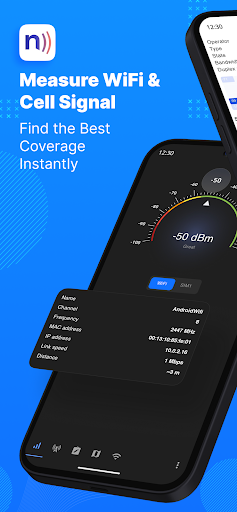
Netmonitor: 5G, Cell & WiFi is a network monitoring tool for Android users who want more detailed information about cellular and Wi-Fi connections. Instead of showing only basic signal bars, the app provides technical information about mobile networks, nearby cell towers, Wi-Fi access points, frequencies, channels, and signal strength. It supports monitoring across 2G, 3G, 4G, and 5G networks, including both 5G NSA and SA where supported. With mapping, signal graphs, background data collection, and network details, the app can be useful for troubleshooting connectivity and understanding how a device connects to nearby networks.
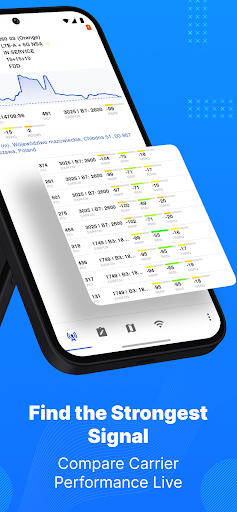
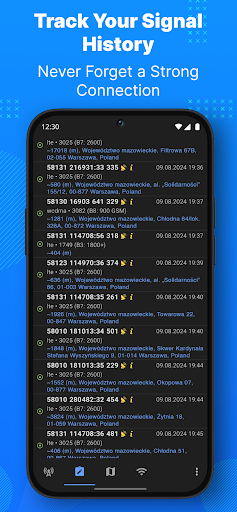
The main purpose of Netmonitor: 5G, Cell & WiFi is to provide detailed information about cellular connectivity. The app can display information about the current and neighboring cells, including MCC, MNC, LAC or TAC, cell IDs, channels, bandwidths, frequencies, and network bands. It supports several cellular technologies, including GSM, WCDMA, UMTS, LTE, TD-SCDMA, and 5G NR. This makes the app more informative than a standard Android network status screen.
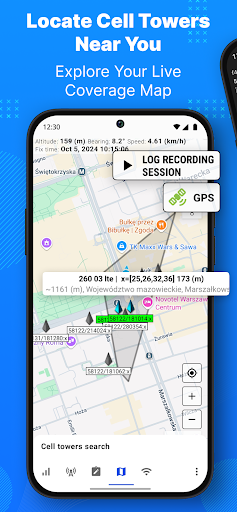
The application can visualize changes in signal strength over time and show approximate cell tower locations on a map. Users can explore nearby cells and group tower sectors to understand how cellular coverage is arranged around them. The app also includes a cell finder and locator for discovering network cells in the surrounding area. However, estimated tower positions should be interpreted carefully. When only one cell is detected, the displayed location may represent the center of the serving area rather than the physical position of a tower.
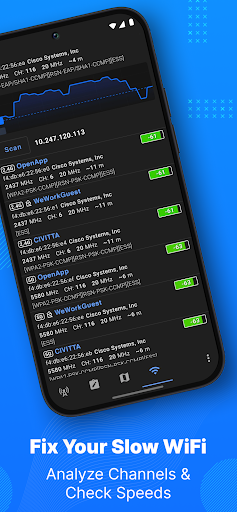
Netmonitor: 5G, Cell & WiFi also works as a Wi-Fi analysis tool. It can detect available wireless networks and display information such as SSID, BSSID, frequency, channel number, router manufacturer, and connection speed. Signal strength can be displayed as a graph over time, making it easier to identify areas with weaker coverage. The app supports 2.4 GHz, 5 GHz, and 6 GHz Wi-Fi bands, as well as different channel widths and Wi-Fi generations up to Wi-Fi 6E when supported by the device.
The Wi-Fi tools can help users investigate coverage problems at home or in an office. By checking signal strength in different locations, users can identify areas where reception is weaker. The application can also display technical network information such as the IP address, subnet mask, gateway, DHCP server, and DNS addresses. Information about Wi-Fi security options and encryption can also be viewed. These details can be useful when troubleshooting a wireless network or checking how a router is configured.
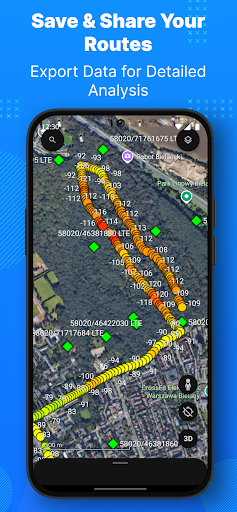
The app provides map support through Google Maps and OpenStreetMap. Users can export monitoring sessions to CSV or KML files, with KML data viewable in Google Earth. External base-station antenna data can also be loaded when more precise tower information is available. Background data collection allows the app to continue gathering network information without requiring constant interaction. Recent updates have also improved cell database operations, 5G NR band identification, and network monitoring notifications.
Open Netmonitor: 5G, Cell & WiFi and allow the permissions required for cellular and Wi-Fi information. Start with the cellular section to view the current network type, signal strength, connected cell, and neighboring cells. Move to different locations and watch the signal graph to compare reception. For Wi-Fi analysis, scan available networks and check their channels, frequencies, signal levels, and connection information. Use the map to explore cell locations when available. If you need to study network behavior over a longer period, enable background data collection and export the resulting session as CSV or KML for further analysis.
Netmonitor: 5G, Cell & WiFi is a detailed network analysis application that goes beyond basic signal indicators. Its cellular monitoring tools provide information about current and neighboring cells, network bands, frequencies, channels, and signal levels. Wi-Fi analysis adds coverage monitoring, channel information, connection details, and support for modern wireless standards. Mapping, background monitoring, cell discovery, and CSV or KML exports make the app useful for users who want to investigate network behavior in greater detail. Some advanced functions depend on the Android device, firmware, carrier, and available permissions, so not every feature will work on every phone. For users interested in understanding their cellular and Wi-Fi connections, the app provides a broad collection of technical monitoring tools in one place.