home chevron_right Apps chevron_right Communication chevron_right Zoom Workplace


Graph Messenger
v13.2.2.2
• Premium
| Updated On | |
|---|---|
| Google Play ID | us.zoom.videomeetings |
| Category | Communication |
| Version | 7.2.5.45052 |
| Size | 286 MB |
| MOD Features | Premium Unlocked |
| Requires | Android 9 |
| Rating Score | |
| Price | |
| Free | |
| Content Rating | |
| Everyone | |
| Internet Required | |
| Required | |
| Languages | |
| English, French, German, Indonesian, Italian, Japanese, Korean, Polish, Portuguese, Russian, Simplified Chinese, Spanish, Traditional Chinese, Turkish, Vietnamese | |

Zoom Workplace MOD APK helps people stay connected through online meetings, video calls, and team collaboration tools from almost anywhere. Originally known for its video conferencing capabilities, Zoom has expanded into a communication platform that supports remote work, online education, and everyday conversations. Whether you need to attend a virtual class, coordinate with colleagues, or catch up with friends, the app offers a convenient space for real-time interaction.
The way people communicate has changed significantly as remote work and online learning have become more common. Video conferencing is no longer limited to large companies or professional organizations; students, families, independent workers, and small teams also rely on digital platforms to stay in touch.
Zoom Workplace brings these activities together through a collection of meeting, messaging, and calling features. Its mobile application allows users to participate in conversations while away from their computers, making it easier to maintain communication throughout the day.
Zoom was founded in 2011 by Eric Yuan and officially launched its video conferencing service in 2013. Its straightforward meeting experience helped the platform gain recognition among businesses, educational institutions, and individual users.
The COVID-19 pandemic in 2020 accelerated this growth as schools, offices, and organizations moved many activities online. Zoom became a familiar tool for virtual classrooms, business discussions, webinars, and personal conversations.
Today, the platform has developed beyond its original meeting-focused identity. Zoom Workplace brings together several communication and productivity functions, giving users more ways to interact without depending on a single video call feature.
One of Zoom’s biggest strengths is its accessibility. Users can join meetings through an invitation link or meeting ID without needing complicated setup procedures. The platform also offers free access with certain limitations, alongside paid plans that provide additional capabilities for organizations and professional users.
Its cloud-based infrastructure supports communication across different devices and operating systems. Participants can join from Android phones, tablets, Windows computers, or Mac devices, depending on the meeting setup and available features.
Another important advantage is its approachable interface. Meeting controls, participant lists, chat functions, and screen-sharing options are arranged to make common tasks easier to locate. Security tools also help hosts manage access through features such as waiting rooms, meeting passwords, and participant permissions.
Zoom Workplace includes a broad collection of tools designed for different communication needs. Here are some of the functions that make the application useful for everyday collaboration:
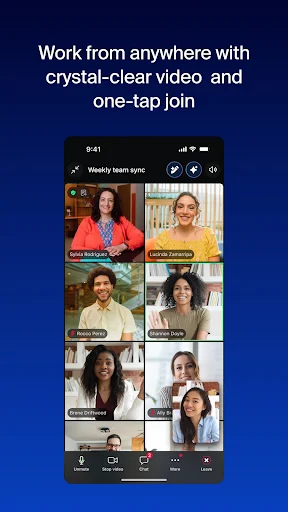
Video Conferencing: Start or join online meetings with colleagues, classmates, clients, or friends.
Group Meetings: Invite multiple participants to discuss projects, deliver lessons, or organize virtual events. The number of attendees and meeting duration depend on the selected plan.
Cross-Platform Access: Connect through supported Android and iOS devices, Windows and Mac computers, Zoom Rooms, and compatible conference room systems.
Screen Sharing: Present documents, applications, slides, or other content directly during a meeting.
Annotation Tools: Add comments and visual markings to shared content to explain important details.
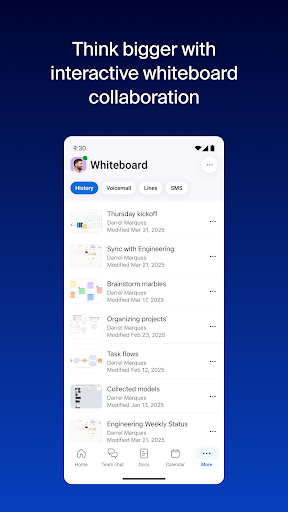
Digital Whiteboard: Collaborate on ideas and diagrams through supported whiteboard functions, particularly useful for lessons and brainstorming sessions.
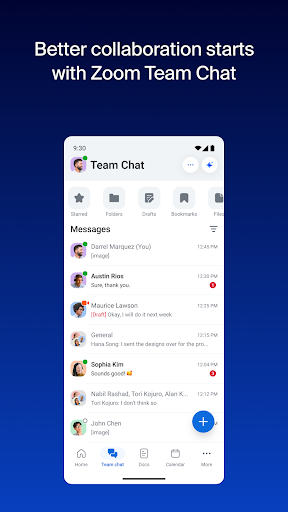
Meeting Chat: Exchange text messages, images, files, links, and other supported content with participants.
Emoji Reactions: Respond to conversations and meeting discussions without interrupting the speaker.
Team Channels: Create public or private spaces for ongoing discussions and group communication.
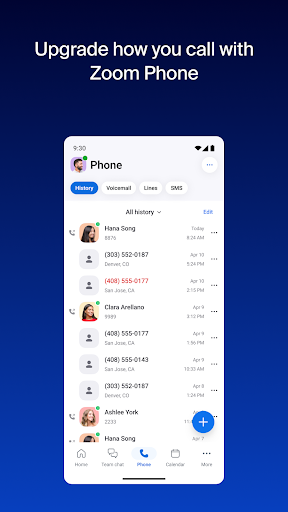
Zoom Phone: Access business calling functions, including supported voicemail and call management options, when included in your plan.
Webinars And Events: Attend or organize online presentations and virtual events through compatible Zoom services.
Network Flexibility: Connect through Wi-Fi or supported mobile networks, including 4G, 5G, and other available connections.
The availability of individual tools depends on your account, subscription, device, and regional service support. This makes Zoom suitable for both casual communication and more structured professional workflows.
Online meetings often involve sensitive discussions, shared documents, or private information. Zoom provides several host controls that help organizers decide who can enter a meeting and what participants are allowed to do.
Waiting rooms allow hosts to review incoming attendees before granting access. Meeting passwords add another layer of protection, while participant management options help control microphones, video, screen sharing, and other meeting activities.
For organizations, administrative settings provide additional ways to manage accounts and communication policies. These controls are particularly useful when meetings involve large groups or confidential business matters.
Video meetings are not always necessary for every conversation. Sometimes a quick message or voice call is enough to resolve a question, share a document, or coordinate the next task.
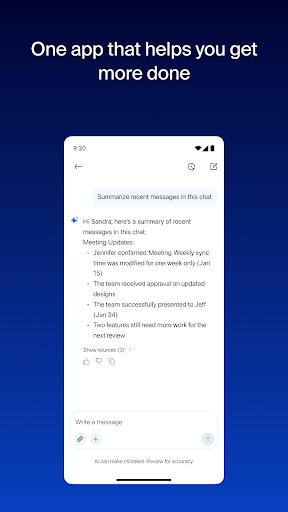
Zoom Workplace includes messaging tools that support individual conversations and group discussions. Users can exchange files, links, images, and reactions while keeping project-related communication organized in dedicated channels.
Business users may also access Zoom Phone features, depending on their subscription. These capabilities can include business-number calling, voicemail, call recording, and automated call routing, helping teams handle incoming communication more efficiently.
The modified edition is presented as an alternative for users interested in accessing additional Zoom features.
Premium Unlocked: Claims to unlock premium-related features within the modified application.
Zoom’s advanced services often rely on account entitlements and server-side subscription checks. Therefore, a modified APK does not necessarily provide access to paid cloud services, business calling plans, webinar tools, or other subscription-based capabilities. For sensitive meetings and professional communication, the official application is the safer option.
Zoom Workplace is a practical communication platform for anyone who needs to attend virtual meetings, exchange information, or collaborate with people in different locations. Its combination of video conferencing, messaging, screen sharing, and calling tools makes it useful for both personal and professional activities. If you want to explore the available Android package, visit APKMODY and look up Zoom Workplace MOD APK. On the download page, check the release information, Android compatibility, and package details before proceeding.
Select the APK file and wait until your browser finishes saving it. Next, open your device’s Downloads section, locate the package, and tap it to review the installation prompt. If your phone displays a security restriction, use Android settings to grant temporary installation permission to the relevant source, then return to the installer. Once the process finishes, open the application and sign in with your account to configure your meetings and communication preferences.