home chevron_right Apps chevron_right Communication chevron_right Getcontact


Speak and Translate Languages
v8.1.12
• Premium

| Updated On | |
|---|---|
| Google Play ID | app.source.getcontact |
| Category | Communication |
| Version | 8.19.0 |
| Size | 127 MB |
| MOD Feature | Not available |
| Requires | Android 8.0 |
| Price | |
| Free | |
| Content Rating | |
| Everyone | |
| Internet Required | |
| Required | |

Getcontact is a useful mobile application designed to identify incoming callers and reduce unwanted phone interruptions. Instead of answering every unfamiliar number, you can check available caller information, recognize potential spam, and decide which calls deserve your attention. With its caller identification and spam protection tools, the app makes everyday smartphone communication more manageable.
Take control of incoming calls with intelligent identification tools and convenient spam protection!
Smartphones make communication easier, but they also expose users to unwanted interruptions. Advertising calls, suspicious numbers, automated promotions, and unfamiliar callers can appear at inconvenient moments, disrupting work or personal activities. Some calls may even involve fraudulent schemes that attempt to obtain sensitive information. Constantly dealing with these interruptions can become frustrating, especially when you receive numerous calls throughout the day.
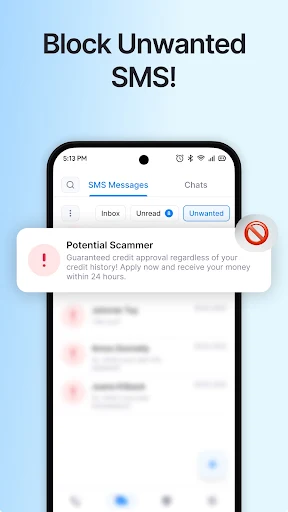
Getcontact offers a practical way to manage this problem by identifying incoming numbers and detecting potential spam. Instead of immediately answering an unfamiliar call, you can review the available information and decide how to respond. The application also allows you to block unwanted numbers, helping reduce repeated disturbances. These capabilities are particularly useful during meetings, working hours, or any situation that requires uninterrupted concentration.
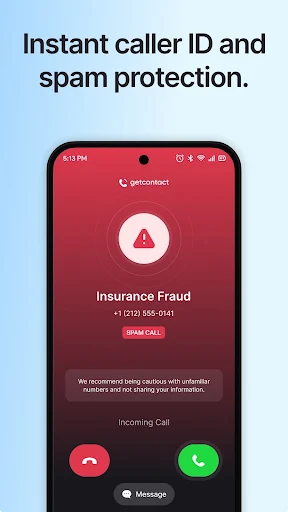
Getcontact is a caller identification and spam protection application that helps users recognize unfamiliar phone numbers. Its primary purpose is to provide additional information about incoming calls, making it easier to distinguish legitimate contacts from potentially unwanted callers. Depending on available database information and application permissions, users can see caller names, identification tags, or warnings associated with suspicious numbers.
Beyond identification, Getcontact includes tools for blocking unwanted calls and managing spam reports. You can mark suspicious numbers, prevent selected callers from contacting you again, and contribute information that may help improve spam detection for other users. Rather than relying entirely on manual screening, the application provides an additional layer of assistance whenever an unfamiliar number appears on your screen.
Getcontact relies on its phone number identification system and community-supported information to recognize incoming callers. When someone contacts you, the application checks the available data associated with that number and displays relevant identification details when possible. If the number has been reported or categorized as unwanted, Getcontact can provide a spam warning so you can evaluate the situation before answering. Its effectiveness depends on database coverage, user reports, regional availability, and the permissions granted on your device.
The main detection and protection process includes several useful capabilities:
Caller identification: Displays available names or identification tags associated with an incoming phone number.
Spam detection: Highlights numbers that have been reported or recognized as potentially unwanted.
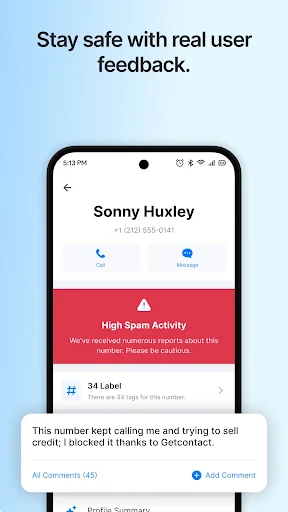
Community-based reporting: Allows users to contribute spam reports, helping improve the information available to other members.
Number blocking: Prevents selected unwanted callers from repeatedly disturbing you.
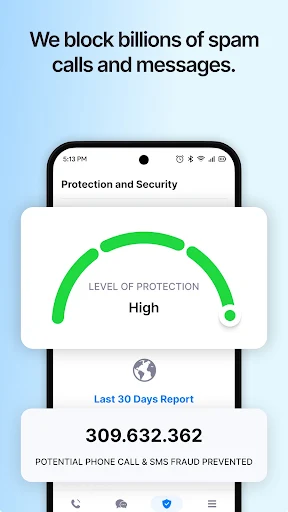
Spam protection: Provides additional screening options to help identify suspicious incoming calls.
These tools give you more control over incoming communication. However, caller identification is not always guaranteed to be accurate, and an unfamiliar number should not automatically be considered fraudulent. For better protection, avoid sharing passwords, verification codes, or financial information with callers you cannot verify.
Getting started with Getcontact does not require complicated technical knowledge. After installing the application, you can register using your phone number and complete the necessary verification steps. The interface provides access to its main caller identification and spam protection functions, allowing you to configure the features according to your preferences. You may also need to grant relevant permissions for the application to identify or manage incoming calls.
Once everything is configured, checking unfamiliar callers becomes more convenient. When a suspicious number appears, you can review its available information, assess the warning, and block it if necessary. You can also report unwanted numbers to contribute to the shared database. For people who frequently communicate with customers, colleagues, or new contacts, these features offer a practical way to screen calls without manually investigating every unfamiliar number.
Caller identification tools can involve sensitive information, so privacy settings deserve particular attention. Getcontact provides account and privacy-related options that allow users to manage aspects of their information and control how certain details are displayed. Before activating its features, review the requested permissions and understand how the application handles contact information, caller data, and other account-related details.
You should also explore the available privacy controls to adjust your preferences. Avoid granting unnecessary access, regularly review your account settings, and consult the application’s official privacy policy if you want to understand its data collection practices. Taking these precautions helps you benefit from spam protection while remaining more aware of your personal information.
Getcontact offers a convenient way to screen incoming calls without making everyday communication unnecessarily complicated. Its clean interface brings caller identification, spam warnings, and number blocking together in one application. Before installing the APK, check that your Android device is compatible and obtain the package from a reliable source.
Follow these steps to get started:
Find the APK package: Visit a trusted download page and locate the latest available Getcontact version.
Save the installation file: Tap the download option and wait until the package is completely downloaded.
Configure Android settings: If necessary, allow installation from the external source you selected.
Install the application: Open the APK file through your file manager and follow the on-screen instructions.
Set up your account: Launch Getcontact, register your phone number, and configure the caller identification and spam protection features.