home chevron_right Apps chevron_right Productivity chevron_right Gemmy AI


Daily Planner, To Do List
v109.0
• Unlocked



| Updated On | |
|---|---|
| Google Play ID | com.jetkite.gemmy |
| Category | Productivity |
| Version | 5.0.8 |
| Size | 90 MB |
| MOD Features | Premium Unlocked |
| Requires | Android 9 |
| Price | |
| Free | |
| Content Rating | |
| Everyone | |
| Internet Required | |
| Required | |

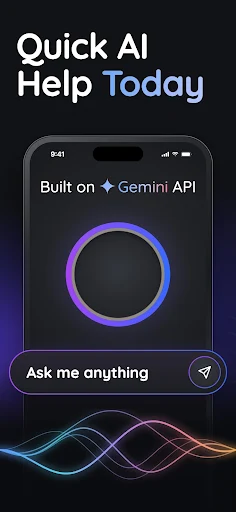
Gemmy AI MOD APK is an AI-powered mobile assistant developed by JETKITE YAZILIM SANAYI VE TICARET ANONIM SIRKETI, also known as Jetkite. Launched in early 2024, the application brings together intelligent conversations, content creation, document processing, and AI image generation in one convenient platform. Powered by Google’s Gemini technology and additional creative tools, it helps users handle everyday questions and more demanding tasks directly from their Android devices.
Gemmy AI is designed to make artificial intelligence more accessible through a collection of practical tools. Instead of switching between several applications for writing, research, and visual creation, users can manage different tasks within a single interface. Whether you need quick answers, fresh ideas, or assistance with personal projects, the app provides several ways to interact with AI.
One of the main attractions of Gemmy AI is its integration with Google’s Gemini models. This technology allows the application to process questions, understand different types of requests, and generate responses based on the information provided. The assistant can support various activities, ranging from everyday conversations to more complicated research and writing tasks.
By bringing these capabilities into a mobile-friendly interface, Gemmy AI makes AI assistance accessible without requiring users to navigate multiple services. The application also provides subscription options for those who want additional usage capacity and access to its premium tools. This combination makes it suitable for people who frequently rely on AI throughout their daily routines.
Chatting is the central feature of Gemmy AI, allowing you to ask questions, explore unfamiliar subjects, and request help with different activities. Simply enter a message into the conversation window or use voice input to communicate with the assistant. It can explain concepts, suggest solutions, generate written content, and help organize your thoughts according to your instructions.
More interestingly, conversations aren’t restricted to ordinary text. Gemmy AI supports several input methods that make interactions more flexible:
Image-based questions: Attach a photograph or screenshot and ask the assistant to identify objects, interpret visual information, or explain what appears in the picture.
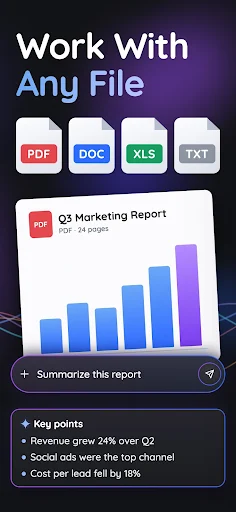
Document processing: Import supported files to request summaries, content revisions, explanations, or assistance with producing new material.
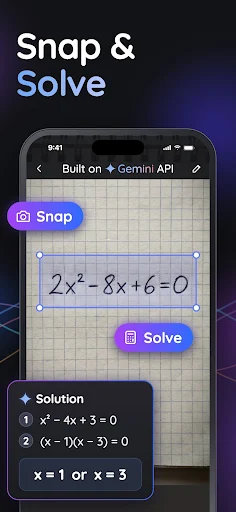
Photo-based problem solving: Capture exercises involving mathematics, physics, chemistry, or other subjects and ask the AI to analyze the problem with a step-by-step explanation.
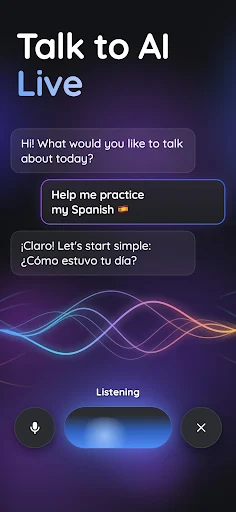
Voice interaction: Use your device’s microphone to submit questions verbally instead of typing. Remember to grant microphone access before using this function.
These input options make the assistant useful in different situations. For instance, students can submit exercise images for explanations, while office workers can upload documents to speed up their reading and editing process.
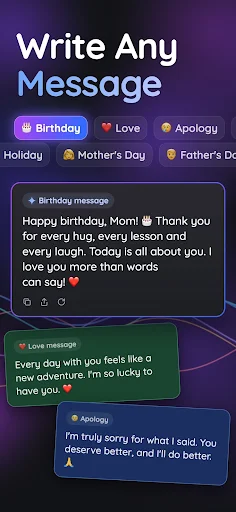
Not everyone knows how to write an effective prompt, especially when dealing with unfamiliar tasks. Gemmy AI addresses this issue through its Explore section, which provides ready-made suggestions and templates covering different subjects. Rather than starting with an empty conversation, you can browse available ideas and select a suitable request.
For example, if you want to create a birthday greeting, choose the corresponding writing suggestion and explore the available recipient categories. You can specify whether the message is intended for a friend, parent, loved one, colleague, or manager. Additional details such as the recipient’s name, age, and gender help the assistant produce a more relevant result. Once the draft is generated, you can request changes, adjust its tone, or develop the message further. This approach saves time while helping users who struggle to formulate detailed instructions.
Beyond text-based assistance, Gemmy AI also provides creative tools for transforming ideas into visual content. The application introduces Imagen 4 technology for image generation, allowing users to describe the scene they want and receive an AI-generated result. Depending on the selected feature and available settings, generated images can reach resolutions of up to 2K.
The Images section brings together several creative options that make visual experimentation more accessible:
AI photo editing: Import an existing picture and use AI-powered tools to modify its appearance according to your requirements.
Professional portraits: Transform ordinary selfies into polished portraits suitable for profiles or other personal uses.
Custom avatars: Create personalized digital characters by experimenting with different artistic styles and appearances.
Photo restoration: Improve older photographs and enhance their visual quality.
Image combination: Blend multiple visual elements to produce a new composition.
Sketch creation: Turn creative concepts into illustrated or sketch-style artwork.
These features offer more possibilities than basic image generation alone. You can experiment with different visual directions, improve existing photographs, or create artwork for personal projects without relying entirely on traditional editing software.
Although Gemmy AI offers free access, certain activities are restricted by usage limits. Depending on the available plan, users may encounter daily restrictions on conversations, message capacity, and image generation or editing. These limitations can become inconvenient when using the assistant frequently for work, studying, or creative projects.
The Premium subscription is designed to provide a more extensive experience, with benefits that include:
Expanded AI conversations: Enjoy a higher or unlimited allowance for asking questions and receiving responses, depending on the subscription terms.
Advanced prompt templates: Explore a broader collection of ready-made instructions for writing, research, and everyday tasks.
Live AI interaction: Access conversational features with fewer interruptions.
Additional image generation: Create more visual content using the available Imagen 4 tools.
Ad-free experience: Remove advertisements and enjoy a cleaner application interface.
Users can choose from different subscription periods, including weekly, monthly, and annual options. The actual benefits and usage allowances depend on the package offered by the developer.
The Gemmy AI MOD APK version is presented with Premium Unlocked functionality, providing access to upgraded features without following the standard subscription process. This modified edition is intended for users who want to explore the application’s premium tools, including expanded AI assistance and creative capabilities.
However, modified APK files are unofficial versions and may not provide the same security, reliability, or account compatibility as the original application. Some online features may also depend on the developer’s servers, so premium functionality is not necessarily guaranteed in every version.
Gemmy AI brings several useful AI technologies together, making it a convenient option for writing, learning, research, and visual creativity. Its combination of conversational assistance, document analysis, ready-made prompts, and image generation offers plenty of opportunities to explore. If you want to try the modified edition, follow this installation process through APKMODY:
Find the application: Visit APKMODY.COM and search for Gemmy AI MOD APK to access its dedicated download page.
Review the release: Check the version number, MOD information, file size, and Android compatibility before selecting a download option.
Save the installation package: Press the download link displayed on the page and wait until the APK file is fully downloaded.
Prepare your device: Open Android settings and allow installation from the browser or file manager used to download the package, if prompted.
Complete the installation: Locate the APK in your Downloads folder, open it, and follow the instructions displayed on your screen.
Explore the application: Launch Gemmy AI and test its available conversation, writing, and image creation tools.