home chevron_right Apps chevron_right Photos & Videos chevron_right Koda Cam
X Downloader & Video Player
v2.3.19
• Unlocked

| Updated On | |
|---|---|
| Google Play ID | com.camerafilter.kedakcam.insta.yellowsun.retrofilter |
| Category | Photos & Videos |
| Version | 2.6.6 |
| Size | 30 MB |
| MOD Features | Pro Unlocked |
| Requires | Android 8.1 |
| Price | |
| Free | |
| Content Rating | |
| Everyone 10+ | |
| Internet Required | |
| Not Required | |

Koda Cam is a vintage photo editing app that brings the nostalgic charm of classic Kodak cameras from the 80s and 90s to your smartphone. With a collection of retro film filters, realistic light effects, creative frames, and flexible editing tools, it helps transform ordinary pictures into artistic memories. Whether you prefer editing existing images or capturing new moments with a vintage touch, Koda Cam offers an enjoyable photography experience.
Modern smartphone cameras produce sharp, detailed images, but sometimes a little imperfection makes a photo more memorable. Koda Cam recreates the distinctive appearance of old-school film photography, allowing users to explore nostalgic colors, subtle grain, light leaks, and other visual details without needing a traditional camera.
The application supports two main photography methods: importing pictures from your gallery for editing or taking photos directly through its built-in camera. Both options provide access to a variety of creative effects, making it easy to achieve a consistent vintage aesthetic. Instead of relying on complicated editing software, you can experiment with different styles and personalize your pictures in just a few steps.
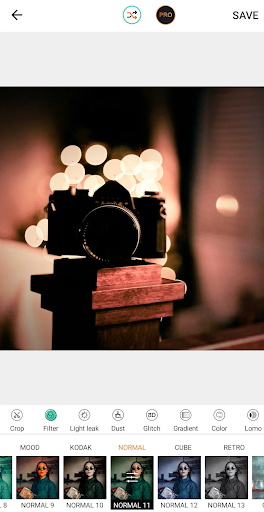
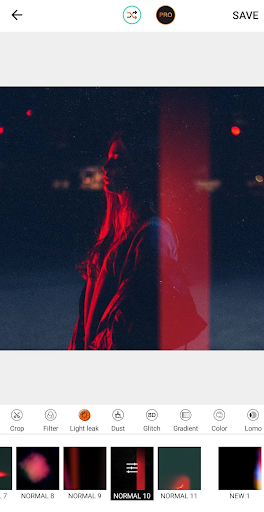
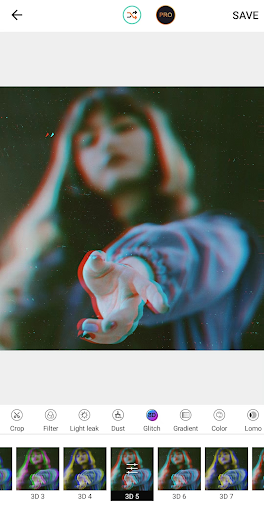
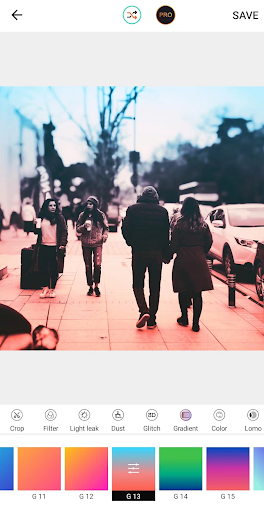
One of Koda Cam’s highlights is its extensive selection of visual effects inspired by traditional film cameras. Each filter offers a different atmosphere, from faded photographs and warm nostalgic tones to dramatic lighting and imperfect textures. These options allow users to experiment with different photographic moods rather than applying the same appearance to every picture.
Some notable effect categories include:
Dust: Adds grainy textures and tiny imperfections to recreate the appearance of aged photographs.
Glitch: Introduces distorted visual details for a more experimental and artistic result.
Lomo: Creates distinctive colors, contrast, and lighting inspired by Lomography photography.
Light Leaks: Adds glowing light streaks and subtle color variations to make pictures look more atmospheric.
Vintage Film: Reproduces classic film tones with faded colors and nostalgic visual characteristics.
You can preview different effects and choose the one that best matches your image. Combining these filters with other editing options also gives you more freedom to create a recognizable personal photography style.
Beyond its vintage filters, Koda Cam provides practical editing features for adjusting the appearance of your photos. Basic tools help you crop images, modify brightness, fine-tune contrast, adjust saturation, and control warmth. These adjustments are useful when a picture looks too dark, overly colorful, or different from the atmosphere you originally wanted.
For more creative projects, the app also offers additional customization options, including decorative borders, photo frames, stickers, and text overlays. You can select different font styles, sizes, and colors to add captions or personal messages. By combining these elements with film-inspired effects, you can turn an ordinary snapshot into a customized piece of visual artwork without switching between multiple applications.
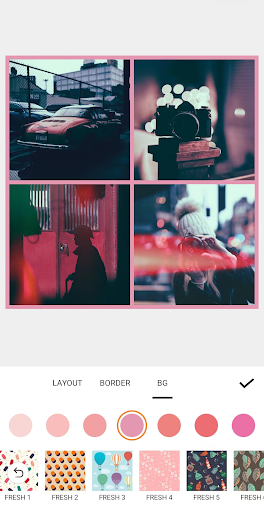
Koda Cam makes photo collage creation more interesting through its collection of vintage-inspired frames. Rather than simply placing several pictures next to each other, you can arrange them into scrapbook-style compositions featuring decorative details and different visual themes.
The application offers more than 20 frame designs, giving users several ways to combine their favorite memories. Themes include love, happiness, flowers, pets, and friendship, making the collection suitable for different occasions and personal projects.
These frames are particularly useful when you want to create memorable photo collections for social media or personal keepsakes. You can experiment with different arrangements, combine multiple images, and add decorative elements to produce a scrapbook that reflects your own taste. The result feels more personal than a standard photo collage because every detail can contribute to the overall nostalgic atmosphere.
Editing existing photographs is convenient, but taking pictures directly through a vintage-style camera offers a different experience. Koda Cam includes an integrated camera feature that lets you capture moments without leaving the application.
When you take a picture, you can explore its available film effects to recreate the distinctive appearance of photographs produced by older cameras. The combination of nostalgic color tones, lighting variations, and textured details helps give modern smartphone pictures a more timeless character.
You can also continue editing your newly captured images with the application’s other customization tools. Adjust the colors, apply additional effects, add a frame, or include a short caption before saving your finished creation. This integrated process makes Koda Cam useful for both spontaneous photography and more carefully prepared visual projects.
The MOD version of Koda Cam provides an alternative way to explore the application’s premium features. According to the supplied MOD information, this edition includes the following modification:
Pro Unlocked: Unlocks Pro features, allowing users to access the premium editing experience without the standard feature restrictions.
This version is intended for users who want to explore more of Koda Cam’s creative tools. However, specific unlocked items may vary depending on the MOD build, so check the version information before installing.
If you want to experience vintage photography on your Android device, follow these instructions to get Koda Cam from APKMODY.
Step 1: Visit APKMODY
Open your browser and access the APKMODY website. Search for Koda Cam using the website’s search function to find its download page.
Step 2: Select Your Preferred Version
Review the available download options and choose between the original Koda Cam APK and the MOD version with Pro Unlocked features.
Step 3: Download the APK File
Tap the appropriate download option and wait for the file to finish downloading. Make sure you select the correct version for your device.
Step 4: Install the Application
Locate the downloaded APK file in your device’s storage. If Android requests permission to install applications from that source, enable the relevant permission in your settings and continue with the installation.
Step 5: Open Koda Cam and Start Creating
Launch the application after installation. You can now import pictures from your gallery or use the built-in camera to explore its vintage photography features.