home chevron_right Apps chevron_right Photos & Videos chevron_right ihancer – AI image enhancer


Google Photos
v7.97.0.1000520730
• Premium
| Updated On | |
|---|---|
| Google Play ID | com.appsmotor.imageenhancer |
| Category | Photos & Videos |
| Version | 1.0.65 |
| Size | 17 MB |
| MOD Features | Premium |
| Requires | Android 7.0 |
| Price | |
| Free | |
| Content Rating | |
| Everyone | |
| Internet Required | |
| Unknow | |

ihancer – AI Image Enhancer is a mobile photo enhancement tool that uses artificial intelligence to improve the appearance of digital images. It can be useful for users who want to make blurry, low-resolution, or older photos look clearer without relying on complicated desktop editing software. By combining automated enhancement with a simple mobile workflow, the app provides an accessible option for improving everyday photos, portraits, personal memories, and other visual content. Its AI-based approach can save time for users who want noticeable improvements without manually adjusting many editing controls.
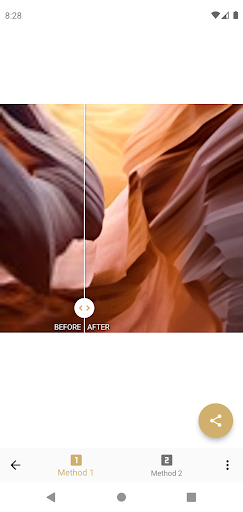
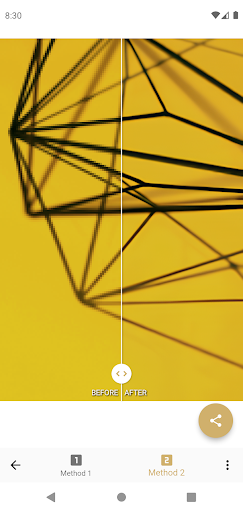
The main purpose of the app is to enhance image quality through automated processing. Users can select a photo and let the AI analyze areas such as details, edges, textures, and overall sharpness. This can be helpful when an image appears soft, slightly blurred, or lacks visible detail. The processing may make important elements look clearer while improving the overall appearance of the picture. However, the final result depends on the original photo, resolution, lighting, compression, and the type of enhancement being applied.
AI enhancement can also be useful for working with older pictures or images captured under less-than-ideal conditions. A low-resolution photo may gain additional apparent detail after processing, while faces and important objects can become easier to recognize. This can make the tool useful for personal photo collections, scanned memories, or images that were originally saved in limited quality. However, AI-generated details are not always an exact reconstruction of the original scene. Users should therefore review enhanced images carefully before treating them as accurate restorations.
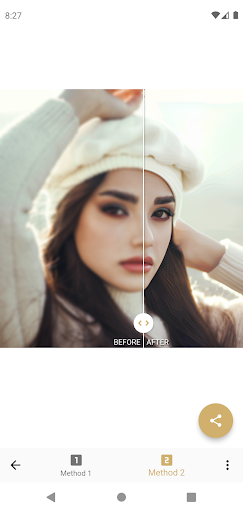
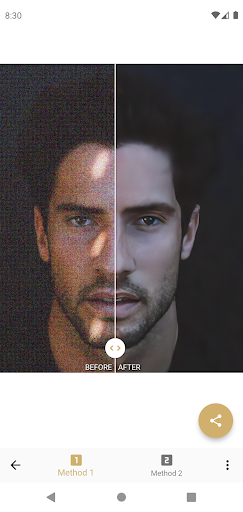
Portraits can benefit from automated sharpening and detail enhancement, especially when facial features appear slightly blurred. The tool can also be useful for improving general photos, social media images, screenshots, product pictures, or personal memories. Images with small details may become easier to view after processing. However, excessive enhancement can sometimes produce unnatural textures or overly sharp facial features. Comparing the processed version with the original is therefore an important step before saving or sharing the final image.
A major benefit of AI-based enhancement is convenience. Instead of manually adjusting multiple sliders for sharpness, contrast, texture, or detail, users can rely on automated processing for much of the work. This makes the app approachable for people with limited photo-editing experience. The simplified workflow can also be useful when users need to improve several pictures quickly. Processing speed and available features may vary depending on the device, image size, internet connection, and current version of the application.
The app can support different everyday editing situations. Users may want to improve a slightly blurry portrait, make an old photograph more presentable, or enhance an image before posting it online. It may also be useful when a photo contains small details that are difficult to see on a phone screen. The effectiveness of AI processing will vary between images, so users should not expect identical results from every photo. Good lighting and a reasonable original resolution can still make a significant difference.
Open ihancer – AI Image Enhancer and select the image you want to improve. Choose the appropriate enhancement option and allow the AI processing to complete. Depending on the available features, users may be able to preview the result and compare it with the original image. Check whether important details look natural before saving the enhanced version. If the result appears overly sharp, artificial, or inconsistent, try another setting or use a different source image. For portraits, pay particular attention to facial features, skin texture, hair, and small details. For other images, check text, patterns, edges, and background elements before sharing the result.
ihancer – AI Image Enhancer offers a convenient way to improve image clarity with automated AI processing. Its approach can be useful for soft photos, older images, portraits, screenshots, and other pictures that need additional visual detail. The simplified workflow makes enhancement accessible without requiring advanced editing skills or extensive knowledge of photo-editing software. At the same time, AI processing cannot perfectly recreate information that was never captured in the original image, and results can vary significantly between photos. Some images may also look less natural when enhancement is applied too strongly. For users seeking a quick mobile solution for improving everyday images, the app provides a practical way to experiment with AI-powered enhancement while keeping the editing process simple.