home chevron_right Apps chevron_right Music & Audio chevron_right Joytify


Stellio – Music and mp3 Player
v7.7.1
• Premium
| Updated On | |
|---|---|
| Google Play ID | music.ytstream.youtify |
| Category | Music & Audio |
| Version | 1.6.6 |
| Size | 36 MB |
| MOD Features | Premium Unlocked |
| Requires | Android 7.0 |
| Price | |
| Free | |
| Content Rating | |
| Everyone | |
| Internet Required | |
| Unknow | |

Music can express emotions that ordinary words sometimes fail to capture. Whether you need relaxing melodies after a long day or energetic tracks to keep yourself motivated, Joytify offers a convenient way to discover and enjoy music that suits different moments. With personalized recommendations, high-quality playback, playlist management, and several useful listening tools, this application turns your smartphone into a versatile music companion.
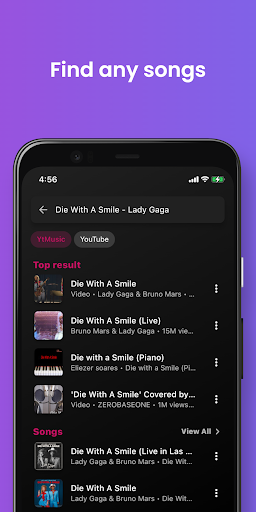
Joytify, also known as Youtify, is a music streaming application designed for users who want convenient access to their favorite songs and playlists. Similar to platforms such as YouTube Music and Spotify, it provides tools for discovering tracks, searching for artists, organizing personal collections, and enjoying music through different listening options.
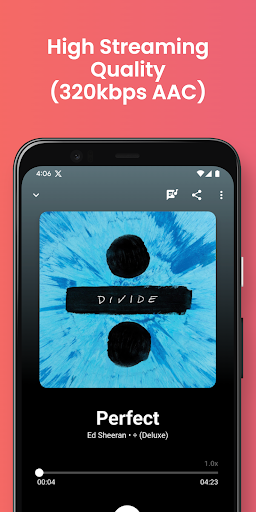
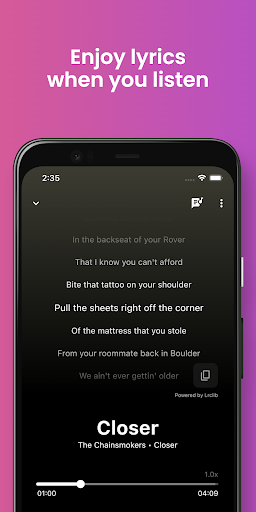
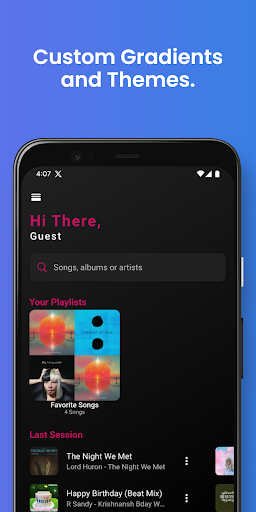
The application supports multiple languages and advertises audio playback of up to 320kbps AAC, offering a detailed listening experience for compatible content. You can explore songs, albums, artists, and playlists, save your favorite tracks, import playlists from YouTube, and share musical discoveries with friends. Additional features such as lyrics display, playback queue management, dark mode, and customizable themes make the interface more convenient for everyday use.
Discovering new music becomes much easier when an application helps narrow down the choices. Joytify provides recommendation and discovery tools that allow users to explore tracks based on their musical interests. Instead of repeatedly searching for individual songs, you can browse suggested collections and find compositions that match your preferred genres or listening habits.
You can also build personalized playlists around specific tracks. Simply choose a song you enjoy and explore similar recommendations to expand your collection with music that shares a comparable style or atmosphere. This approach is particularly useful when you want to create playlists for studying, exercising, relaxing, or traveling. Over time, exploring different suggestions can introduce you to artists and songs that might otherwise remain undiscovered.
Sound quality can significantly influence how much you enjoy a song, especially when listening through good headphones or speakers. Joytify supports playback at up to 320kbps AAC, providing an option for users who prefer clearer audio and more detailed musical reproduction. From subtle instrumental arrangements to powerful bass lines, higher-quality playback can help preserve more of the listening experience.
The application also offers audio customization options, including an equalizer for adjusting different frequency ranges. You can increase the bass for electronic music, refine the treble for brighter vocals, or experiment with other settings to achieve a sound profile that matches your preferences. Keep in mind that actual audio quality depends on the available source, network conditions, playback settings, and your listening equipment.
Everyone has different musical preferences, and Joytify provides access to a variety of categories for discovering new listening material. Whether you enjoy energetic rock, modern rap, classical compositions, or mellow indie tracks, you can explore different musical directions without limiting yourself to a single style.
The discovery section also helps users find unfamiliar songs and broaden their playlists. You can revisit older favorites, explore newer releases, and look for artists from different musical backgrounds. In addition to conventional songs, the application may provide access to other audio content, including podcasts and spoken-word programs, depending on its available catalog. This variety makes Joytify useful not only for entertainment but also for discovering interesting discussions and educational content.
Listening to music should not require keeping your phone locked inside a single application. Joytify supports background playback, allowing songs to continue playing while you switch to other activities. You can browse social media, respond to messages, read articles, or work with other applications without constantly returning to the music player.
Another convenient option is Picture-in-Picture mode, which provides a small floating video window when supported content and device settings allow it. This can be useful when watching music videos while handling other tasks. You can also turn off your screen and continue listening to audio, making the application more practical during commutes, workouts, or extended listening sessions.
Falling asleep to music is a relaxing habit, but leaving your player running throughout the night may consume unnecessary battery power. Joytify addresses this situation with a sleep timer that lets you determine when playback should stop automatically.
You can select a suitable duration based on your routine or choose an option that stops playback after the current song finishes, depending on the available timer settings. This feature is particularly helpful when listening to calming playlists before bedtime, as you do not need to wake up to pause the music manually. It also gives you better control over playback when using the application during short breaks or relaxation sessions.
An unstable internet connection can interrupt your favorite songs at the most inconvenient moments. Joytify offers offline listening functionality through its music download options, allowing users to save supported content for playback without continuously relying on Wi-Fi or mobile data.
This is especially convenient when traveling, commuting through areas with weak signals, or trying to reduce mobile data consumption. You can prepare your listening collection in advance and access downloaded tracks whenever an internet connection is unavailable. The availability of offline downloads may depend on the particular song, application version, and account or subscription restrictions.
The modified edition of Joytify is intended for users who want to explore additional benefits beyond the standard application experience. Its advertised modification focuses on premium access.
The Premium Unlocked feature claims to provide access to premium functions without following the usual subscription process. Depending on the specific release, this may allow users to explore additional listening and customization options. However, the exact unlocked features can vary between versions, and compatibility with online services is not guaranteed. Since modified applications are unofficial, users should also consider potential privacy, security, and account-related risks before installation.
Want to explore Joytify’s music collection and listening features? APKMODY is a convenient place to look for the Android installation package. Before getting started, follow this short preparation and installation guide:
Installation process:
Access APKMODY: Open your preferred browser and visit the APKMODY website.
Locate Joytify: Use the search function to find the Joytify MOD APK page.
Review the package: Check the available release, file size, Android compatibility, and advertised MOD features.
Save the APK: Select the download option on the page and wait for the installation file to be saved.
Install the application: Open your device’s file manager, locate the downloaded APK, and tap it to begin installation. Review any Android permission requests before proceeding.
Start listening: Once installation is complete, launch Joytify and explore its music discovery, playlist, and playback options.