home chevron_right Apps chevron_right Music & Audio chevron_right Wynk Music


Ongaku — Offline Music Player
v6.23.1-217
• Premium
| Updated On | |
|---|---|
| Google Play ID | com.bsbportal.music |
| Category | Music & Audio |
| Version | 3.72.0.5 |
| Size | 53 MB |
| MOD Features | No Ads |
| Requires | Android 7.0 |
| Price | |
| Free | |
| Content Rating | |
| Teen | |
| Internet Required | |
| Required | |
| Languages | |
| English, Hindi | |

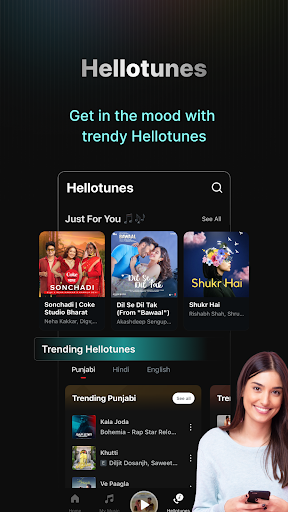
Wynk Music APK is a music streaming application designed for listeners who enjoy exploring different musical cultures, from Bollywood hits and Hindi classics to international chart-toppers. Its extensive library, personalized recommendations, and playlist tools make discovering new tracks more convenient. Whether you want to listen offline, follow popular artists, or explore podcasts, Wynk Music brings various entertainment options together in one application.
Finding an application that brings different genres together can make everyday listening more enjoyable. Wynk Music addresses this need with a diverse collection covering regional Indian music, international releases, and contemporary styles.
Wynk Music is a music and podcast streaming platform developed for users who want convenient access to a broad selection of audio content. Its library has been described as containing more than 50 million tracks, including Bollywood, Hindi Lofi, classical music, K-pop, and EDM.
Besides music, the application offers English-language podcasts featuring conversations, stories, and informative programs. This combination provides a flexible listening experience for people who enjoy different types of audio entertainment.
Beyond its extensive catalog, Wynk Music includes several tools for discovering new releases, organizing favorite songs, and enjoying music according to personal preferences.
The platform covers various musical styles, from Hindi songs and Bollywood soundtracks to American pop, British pop, K-pop, and electronic dance music. Users can also browse themed collections such as Tamil Music Hits, workout playlists, and nostalgic songs from the 1990s.
These categories make it easier to find suitable tracks for different activities, whether you need relaxing background music or energetic songs for exercise.
Wynk Music allows users to build personal music collections by adding their favorite tracks to playlists. You can organize songs according to genre, mood, or listening habits, then update the lists whenever your preferences change.
This feature makes returning to familiar music easier without repeatedly searching through the entire catalog.
Users can follow their favorite performers and receive music recommendations based on their interests. This helps them discover related tracks, explore new releases, and find artists with similar musical styles.
The integrated lyrics feature allows listeners to follow song words directly through the music player. It is useful when singing along, learning unfamiliar tracks, or understanding the meaning behind favorite songs without opening another application.
Wynk Music caters to listeners who enjoy both modern releases and older recordings. Its collections include classic Hindi songs, memorable Bollywood soundtracks, and nostalgic music from previous decades.
You can also explore international performers such as Ed Sheeran, Alan Walker, Justin Bieber, Taylor Swift, Billie Eilish, and BTS. This variety makes it easier to expand your musical interests.
The application supports downloading selected tracks for playback without an active Internet connection. Simply prepare your playlists while online and save the songs you want to access later.
This option is particularly useful when traveling, commuting, or trying to reduce mobile data consumption.
Advertisements can interrupt playlists and make continuous listening less enjoyable. Wynk Music’s advertised ad-free experience aims to minimize these distractions, allowing users to focus on their selected content.
The MOD edition also lists No Ads as its main modification, although availability depends on the specific release.
In addition to music, Wynk Music offers English-language podcasts covering different subjects and interests. Users can switch between songs and spoken programs whenever they want a change of pace, without needing another audio application.
The modified edition offers an additional feature for users who prefer a listening experience with fewer interruptions.
No Ads: Removes advertising interruptions to provide a more continuous listening experience.
Modified APK releases are unofficial and may differ in functionality. Check the release information before installation, as these versions may not receive the same updates or support as the original application.
Wynk Music has offered free access to music and audio content, allowing users to explore genres and create playlists. However, subscription conditions and available features may vary depending on the region and application version.
Yes. You can download your preferred tracks while connected to the Internet and access the saved content when your device goes offline.
You can also explore Spotify and Gaana Music. Both provide alternative music catalogs and listening features worth comparing.
Follow these steps to get Wynk Music running on your Android device:
Locate the Game Page: Visit APKMODY through your mobile browser and search for Wynk Music.
Choose an Edition: Open the application page and select the standard APK or MOD APK after reviewing the available features.
Save the APK: Tap the download option and wait for the installation package to finish downloading.
Adjust Installation Permissions: If Android displays a security prompt, open the relevant settings and allow your browser or file manager to install applications from that source.
Complete the Setup: Find the downloaded APK in your device’s Downloads folder, tap the file, and wait for installation to finish.
Explore the Application: Launch Wynk Music and start discovering songs, building playlists, or listening to podcasts.