
QuixVPN
v1.14.8
• Premium Unlocked

| Updated On | |
|---|---|
| Google Play ID | com.mindefy.phoneaddiction.mobilepe |
| Category | Utilities |
| Version | 4.5.6 |
| Size | 35 MB |
| MOD Features | Premium Unlocked |
| Requires | Android 6.0 |
| Price | |
| Free | |
| Content Rating | |
| Everyone | |
| Internet Required | |
| Unknow | |

YourHour APK is a smartphone usage tracker designed to help users understand and manage the time they spend on their devices. By recording screen activity, monitoring individual applications, and displaying daily statistics, it makes excessive phone use easier to recognize. With customizable limits, floating timers, and detailed reports, YourHour encourages healthier digital habits without forcing users to stop using their phones.
Do you often reach for your phone without a specific reason? A quick notification check can easily turn into hours of browsing social media or watching videos. Over time, these habits may interfere with concentration, sleep, and personal responsibilities.
YourHour addresses this problem through awareness rather than strict restrictions. It records smartphone activity and presents statistics that help you recognize unnecessary screen time, allowing you to make adjustments according to your daily routine.
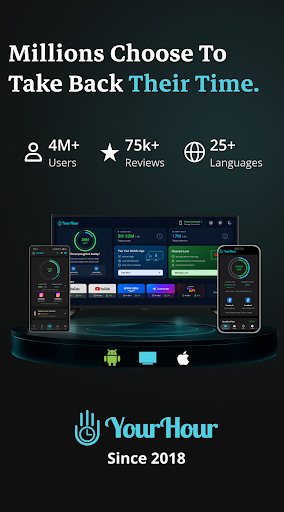
YourHour is a digital wellness application developed to help people monitor smartphone usage and reduce unproductive screen time. It has reportedly attracted more than two million users and supports over 21 languages, including English, German, French, and Spanish.
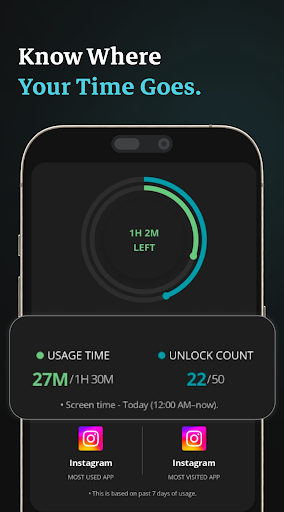
The application collects usage statistics in the background, showing how frequently you unlock your phone and how much time you spend on individual applications. These insights help you evaluate your habits instead of treating every minute of screen time as a problem.
After granting the necessary permissions, YourHour begins monitoring smartphone activity and organizing the results through its main dashboard.
Its tracking interface provides several useful indicators:
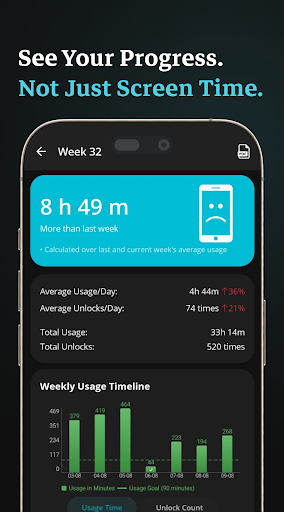
Total Usage Time: Shows how long you have actively used your smartphone throughout the day.
Unlock Count: Records how frequently you unlock the screen.
Weekly Comparison: Compares daily activity with the previous six days.
Usage Trends: Presents visual summaries to help identify changes in your routine.
YourHour also assigns users to six usage categories: Addicted, Obsessed, Dependent, Habitual, Achiever, and Champion. These labels offer a simplified interpretation of smartphone habits rather than a medical diagnosis.
The Floating Timer displays real-time usage information through a small movable overlay. You can drag it to a convenient position and check your activity without returning to the main dashboard.
Its color changes when usage reaches different thresholds associated with the application’s six categories. These visual reminders encourage you to pay attention to time spent on your phone without automatically blocking calls or applications.
This approach lets you maintain control of your device while becoming more conscious of your screen time.
Different applications serve different purposes, so applying the same daily allowance to everything may not be practical. YourHour allows users to configure separate usage limits based on their needs.
Detailed progress indicators show which applications consume the most time. You can then adjust their permitted durations and receive alerts when configured limits are exceeded.
This flexibility helps you focus on entertainment applications that contribute to unnecessary screen time while keeping essential work and communication tools accessible.
YourHour organizes collected statistics into reports that help users evaluate their habits over longer periods. Daily, weekly, and monthly summaries provide usage figures and visual comparisons, making recurring patterns easier to recognize.
For example, you may discover that certain applications consume more time in the evening or that your overall screen time increases on specific days.
Users can export statistics to Excel spreadsheets, while Premium accounts also have access to PDF exports for weekly and monthly reports. According to the developer, usage information is stored locally rather than retained on its servers. Nevertheless, review the current privacy policy to understand how your data is handled.
YourHour combines several practical tools to encourage more conscious smartphone use:
Comprehensive Activity Tracking: Monitor screen time, unlock frequency, and individual application usage.
Visual Usage Categories: Review your habits through six activity-based levels.
Movable Floating Timer: Check real-time statistics without leaving your current application.
Custom Application Limits: Set separate daily allowances for different programs.
Automatic Reminders: Receive alerts when usage exceeds configured limits.
Long-Term Reports: Compare daily, weekly, and monthly activity.
Data Export Options: Save statistics in Excel, with PDF exports available to Premium users.
Multilingual Interface: Access the main features in more than 21 languages.
These tools make YourHour a useful monitoring solution for people who want better control over their digital routines without giving up essential smartphone functions.
The modified edition includes Premium Unlocked, providing access to features associated with the Premium version. Depending on the release, these may include additional reporting and customization options.
Modified APKs are unofficial and may differ from the original application in functionality, compatibility, and security. Check the package information carefully before installation, especially when using the app to monitor personal activity.
Follow these steps to find and install YourHour through APKMODY:
Check Device Compatibility: Ensure your Android device has sufficient storage and meets the requirements listed on the download page.
Find YourHour: Visit APKMODY through your mobile browser, search for the application, and open its dedicated page.
Choose a Version: Compare the available packages and select the standard APK or Premium Unlocked MOD.
Download the File: Tap the appropriate download option and wait until the APK is saved to your device.
Install the Application: Open your file manager, locate the downloaded package, and follow Android’s installation prompts. Allow installation from that source in Settings if necessary.
Configure Tracking: Launch YourHour, grant the required usage access permissions, and customize application limits or enable the floating timer.