
Shizuku
v13.6.0.r1091.b844bc49
• Utilities
| Updated On | |
|---|---|
| Google Play ID | as.wps.wpatester |
| Category | Utilities |
| Version | 6.0 |
| Size | 43 MB |
| MOD Feature | Not available |
| Requires | Android 6.0 |
| Price | |
| $8.99 | |
| Content Rating | |
| Everyone | |
| Internet Required | |
| Required | |

Wps Wpa Tester Premium offers a collection of tools designed to help Android users examine wireless network security and understand potential weaknesses in their WiFi connections. The application focuses on WPS compatibility, network scanning, and access point analysis, providing useful information through a relatively straightforward interface. Whether you want to inspect your home router or learn more about nearby wireless networks, this utility makes basic WiFi security checks easier to perform.
Wireless connectivity has become essential for communication, entertainment, and everyday work. However, convenient access also brings security concerns, especially when networks use weak passwords or outdated protection methods. Wps Wpa Tester Premium addresses these concerns by providing tools for examining wireless access points and identifying certain configuration weaknesses.
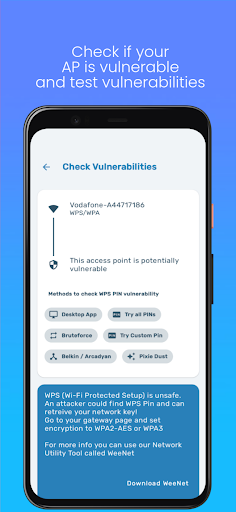
Wps Wpa Tester Premium is an Android application that helps users evaluate WiFi access points through technical information and WPS compatibility checks. It examines supported network configurations, including aspects related to PIN-based authentication and MAC addresses. These functions can help users understand whether their routers rely on potentially vulnerable connection methods.
The application is primarily intended for network diagnostics and security testing on networks you own or have permission to examine. Its results should be treated as technical indicators rather than definitive proof that a connection is completely safe. Actual network protection also depends on router firmware, encryption settings, password strength, and other security measures.
One of the application’s notable functions is its ability to examine access points and evaluate supported WPS configurations. By checking available technical information, users can identify certain weaknesses that may require attention. This is particularly useful when reviewing an older router or checking whether its current settings follow recommended security practices.
The app also provides network-related information that can help users investigate unfamiliar devices and connections. However, identifying connected clients or blocking unauthorized access depends on the router’s capabilities and permissions. For stronger protection, you should manage connected devices directly through your router’s administration interface.
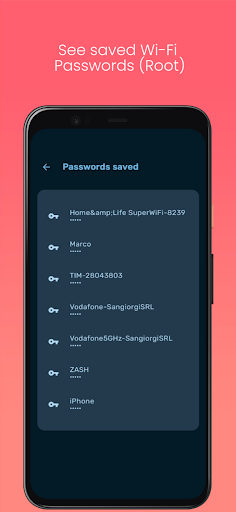
Wps Wpa Tester Premium includes functionality related to viewing and sharing saved WiFi credentials on supported devices. Instead of manually entering a long password every time someone needs access, users can rely on available sharing options to make the process more convenient.
Certain password-display functions require root access because Android restricts applications from reading protected system information. Therefore, availability may vary depending on your device model, Android version, and permission settings. The application should not be considered a universal method for retrieving passwords from networks you do not own.
Protecting wireless connections is another important purpose of Wps Wpa Tester Premium. The application helps users inspect network configurations and recognize potential issues associated with WPS authentication. This information can be useful when deciding whether to disable outdated connection methods or improve router security settings.
Nevertheless, no single application can guarantee complete protection against information theft or every type of network attack. For better security, combine regular network checks with WPA2-AES or WPA3 encryption, strong passwords, updated router firmware, and disabled WPS functionality when it is unnecessary. These measures provide a more reliable foundation for protecting personal information.
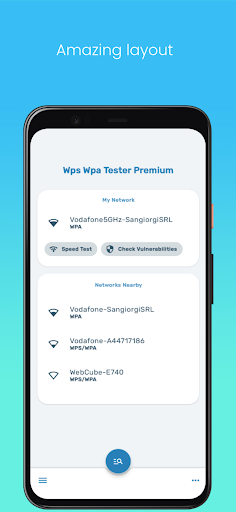
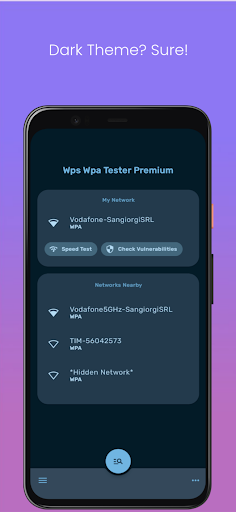
The network scanning feature allows users to view wireless access points detected within their surroundings. Depending on the device’s hardware and Android permissions, the app can display details such as network names, signal strength, and available technical information.
This feature is particularly helpful when comparing nearby connections or finding a suitable channel for your home router. Rather than attempting to access protected networks, use the information to assess signal quality and identify possible interference. Android may also require location or nearby-device permissions before applications can perform WiFi scans.
Wps Wpa Tester Premium keeps its main functions relatively accessible, making it easier for users to explore network information without dealing with complicated menus. Available access points can be displayed in a structured list, allowing you to select a connection and review its supported security details.
The interface is designed around practical network inspection rather than advanced customization. Some functions may require additional permissions or compatible hardware, so the experience can differ between Android devices. Users should also review permission requests carefully and avoid granting unnecessary access to personal information.
Encryption plays an essential role in preventing unauthorized parties from reading wireless network traffic. Wps Wpa Tester Premium provides information that can help users understand supported security configurations and evaluate certain aspects of their connections.
Actual encryption performance depends on several factors, including the router, connected device, wireless standard, and network conditions. The application does not independently determine every aspect of WiFi speed or guarantee that passwords can be decoded within a specific period. For optimal protection, prioritize modern encryption standards and follow your router manufacturer’s security recommendations.
The Premium edition is designed to provide a more convenient experience by reducing certain limitations found in the standard version. Depending on the release, users may receive access to additional tools and fewer advertising interruptions.
Some potential advantages include:
Fewer advertisements: Reduce interruptions while navigating the application’s available functions.
Additional utilities: Access supported network inspection and diagnostic features included in the Premium package.
More convenient usage: Explore available tools with fewer restrictions, depending on the purchased version.
Improved workflow: Keep network analysis functions accessible from one application instead of switching between multiple utilities.
Keep in mind that Premium access does not automatically grant root permissions or bypass Android’s security restrictions. Features also depend on the specific application release and device compatibility.
Before installing Wps Wpa Tester Premium, you may want to understand its pricing and security capabilities. The following answers address some common concerns.
Is Wps Wpa Tester Premium free to use?
The Premium edition has traditionally been offered as a paid application, with the original listing mentioned in the provided information priced at approximately $2.99. Actual pricing and availability may change depending on the store, region, and release. Check the current listing for accurate purchase information.
Can Wps Wpa Tester Premium guarantee complete device security?
No. The application can help identify certain WiFi configuration weaknesses, but it cannot guarantee that your device or personal information will remain protected against every threat. You should combine network analysis with updated software, strong passwords, trusted connections, and appropriate router security settings.
If you want to explore its WiFi diagnostic features, visit APKMODY and search for Wps Wpa Tester Premium. Before choosing a package, compare its version information, compatibility requirements, and available features to avoid installing an unsuitable release.
To get started, follow these instructions:
Visit APKMODY: Open the website through your Android browser and search for Wps Wpa Tester Premium.
Review the listing: Check the application description, version number, file size, and installation requirements.
Choose your APK: Select the available package that matches your device and download it.
Complete installation: Open the downloaded file and follow the on-screen instructions. If Android requests permission for installations from unknown sources, review the source and enable the setting only when appropriate.
Run a network check: Launch the application, grant only the necessary permissions, and inspect a WiFi network that you own or are authorized to test.