
Fast Scanner – PDF Scan App
v4.7.7
• Premium

| Updated On | |
|---|---|
| Google Play ID | com.clone.android.dual.space |
| Category | Tools |
| Version | 3.2.88 |
| Size | 448 MB |
| MOD Features | Unlocked |
| Requires | Android 5.1 |
| Price | |
| Free | |
| Content Rating | |
| Everyone | |
| Internet Required | |
| Unknow | |

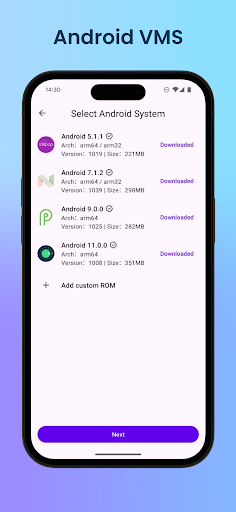
Virtual Master – Android Clone is built for anyone who wants to run several social media or game accounts side by side on one phone, without logging out of the main account every time they switch. Unlike ordinary app-cloning tools, Virtual Master creates an entire second Android system running independently inside the device.
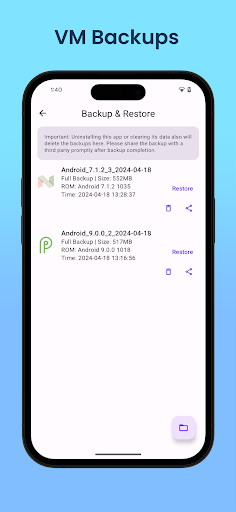
The app is developed by Eden Technology HongKong Limited and has passed 1 million downloads on Google Play. Virtual Master runs on Android-on-Android virtualization technology, spinning up a full Android 7.1.2 system that operates separately from the device’s native OS, similar to a Parallel Space or Cloud Phone concept but processed entirely on-device. It needs to download roughly 300MB of system data and takes up about 1.6GB of storage to set up.
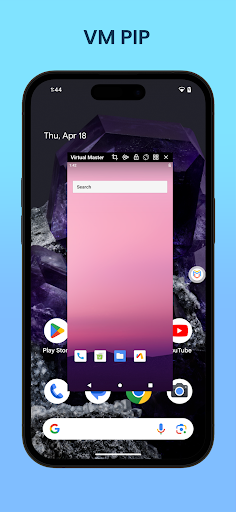
On first launch, Virtual Master takes about one to two minutes to install the virtual Android system; subsequent launches take only four to ten seconds depending on the device and how much load it’s under at that moment. Inside that virtual space, users can install their own apps, arrange the home screen, change the wallpaper, and customize it like a genuinely separate second phone. The app supports background running, meaning a game or app inside Virtual Master keeps operating even while the user switches to something else on the actual device.
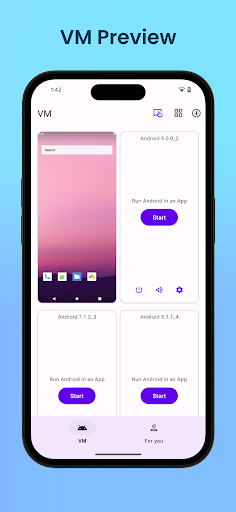
On the technical side, the virtual Android system inside Virtual Master supports Vulkan, which helps graphics-heavy games run more smoothly compared to older emulation-style solutions. Users can set up multiple separate Android systems for different purposes – one for work, one for gaming, one for privacy – similar to having a few extra phones packed into a single physical device. Because it runs an entire parallel operating system, the app does demand a fair amount of RAM and decent hardware to run smoothly.
One feature the developer highlights is privacy protection: apps and games running inside the virtual Android system cannot access information from the real device, such as contacts, messages, or the device ID, so it can double as a kind of isolated sandbox for installing unfamiliar apps. That said, some feedback from the technical community notes that the app can run into startup issues on certain newer Android versions, particularly Android 12 and above, due to the OS’s PhantomProcessKiller mechanism restricting virtual-machine-style apps – a technical limitation worth knowing about rather than a flaw specific to the app itself.
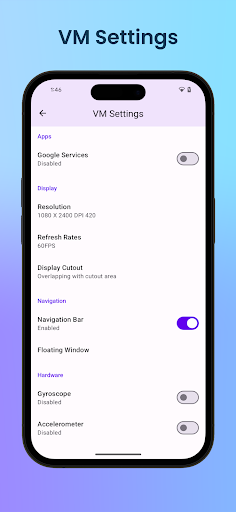
If the virtual space fails to boot, checking available storage first is a reasonable starting point, followed by force-closing the app and restarting the device. If that doesn’t help, the Repair VM option in settings can fix corrupted system files without requiring a full reinstall. On devices running Android 12 through 13, extra configuration may be needed to stop the OS from killing the virtual machine’s background process; on Android 14 and above, this issue is largely reduced thanks to a developer-option toggle built into the system. It’s worth installing one important app first to test stability rather than loading up several heavy apps all at once.
Overall, Virtual Master suits people who need a fully separate Android space for managing multiple accounts, gaming on a secondary account, or testing unfamiliar apps without risking the main device’s data. Background running and Vulkan support are strong points for gamers, while the hardware demands and potential startup issues on some newer Android versions are worth weighing before installing. It’s a solid option for anyone who genuinely needs a full virtual phone rather than a simple app-cloning tool.