home chevron_right Apps chevron_right Photos & Videos chevron_right PicTrick


PureStatus: ByeBye Blur Status
v2026.25
• Premium
| Updated On | |
|---|---|
| Google Play ID | org.chlabs.pictrick |
| Category | Photos & Videos |
| Version | v.22.07.29.15 |
| Size | 16 MB |
| MOD Features | Premium Unlocked |
| Requires | Android 5.0 |
| Price | |
| Free | |
| Content Rating | |
| Everyone | |
| Internet Required | |
| Not Required | |

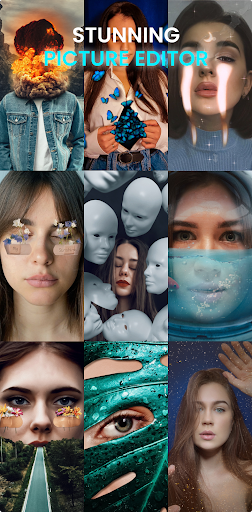
PicTrick is a creative photo editor designed for anyone who wants to turn ordinary selfies into extraordinary visual compositions. Its collection of fantasy presets, lighting effects, and artistic overlays makes experimenting with different photography styles surprisingly simple. Explore its standout editing tools and discover how PicTrick MOD APK Premium Unlocked can expand your creative options.
With so many photo editing applications available, finding one that offers something genuinely distinctive can be difficult. Many tools focus on basic adjustments, beauty filters, or conventional color effects, while PicTrick takes a more imaginative direction. It emphasizes surreal visuals, unusual lighting, and decorative overlays that help transform everyday pictures into eye-catching artwork.
Rather than requiring advanced editing knowledge, the app lets you experiment with different visual elements through a straightforward interface. You can select a preset, apply an effect, and combine additional layers to create a composition that reflects your personal taste. A few simple adjustments are often enough to give an ordinary selfie a completely different atmosphere.
Another appealing aspect is the freedom to mix and match effects. You are not limited to applying a single filter and accepting the result. Try different combinations, compare their appearances, and adjust the overall style until your picture looks the way you imagined.
PicTrick keeps its editing process accessible, even for users who have little experience with photo manipulation. You can import an existing image from your gallery or use the application’s camera to capture a new selfie before starting.
Once your picture is ready, browse the available effects and choose a style that matches your idea. You can then add overlays or experiment with different visual treatments to refine the composition. The process is designed to make creative editing feel approachable instead of overwhelming.
The best part is that you do not need to understand complicated editing techniques to produce an interesting result. By testing different presets and adjusting their combinations, you can gradually develop a personal style. This makes PicTrick suitable for casual users who simply want more expressive pictures as well as people who enjoy experimenting with digital art.
PicTrick also provides PicFrame, a feature that helps users present their pictures through distinctive frame designs. Instead of leaving a collection of photos looking plain, you can arrange them within decorative layouts that give the final composition more personality.
These frames are particularly useful for pictures taken with friends or family. A suitable design can bring several moments together, creating a visual keepsake that feels more carefully prepared than a standard gallery image. Different frame styles also allow you to adjust the mood, whether you prefer something playful, elegant, subtle, or expressive.
For users who regularly share photos on social platforms, PicFrame offers a convenient way to make their posts look more polished. It adds another creative option without requiring you to switch between multiple editing applications.
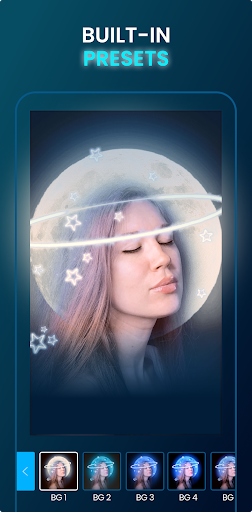
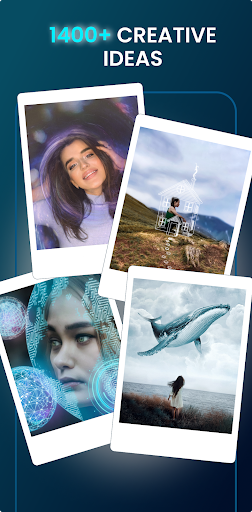
One of PicTrick’s most distinctive features is its collection of fantasy-inspired presets. These designs can place your portrait in imaginative scenes that would normally require considerable effort to create with professional editing software.
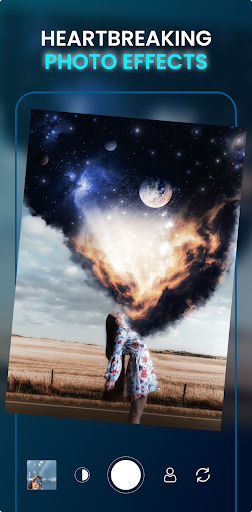
Imagine standing beneath an enormous burst of light, surrounded by glowing blue scenery, or appearing in a mysterious atmosphere inspired by science-fiction artwork. Instead of building every visual element manually, you simply select a preset that matches your concept and position your original photo accordingly.
PicTrick offers more than 1,000 presets in different visual styles, giving you plenty of room to experiment. Whether you enjoy dreamy compositions, dramatic lighting, or unusual fantasy scenes, the selection provides various starting points for your next creation. The developer may also introduce additional designs through updates, helping the editing experience remain fresh.
The preset system is especially useful when you have a creative idea but lack the skills or time to construct the entire scene yourself. Choose a suitable design, upload a compatible picture, and let the effect reshape its overall appearance.
For better results, pay attention to the original photo’s lighting, pose, and background. A portrait with a suitable angle can blend more naturally into certain presets, while a contrasting composition may produce a deliberately dramatic effect. Experimenting with these details helps you get more out of the available designs.
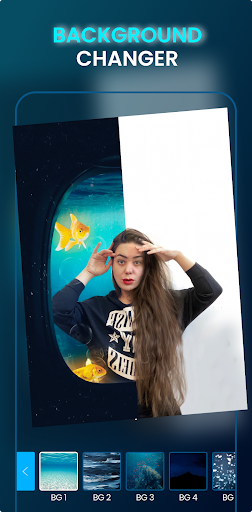
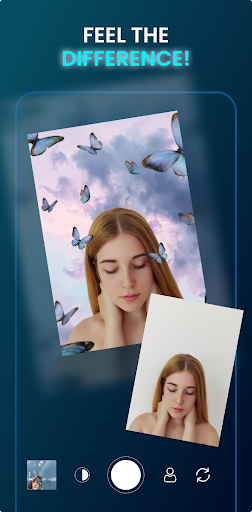
Beyond its preset library, PicTrick provides over 200 overlays that let you introduce additional visual elements into your pictures. These layers can add texture, color, and decorative details, helping a simple portrait develop a more elaborate appearance.
You can use overlays to highlight specific areas or give the entire composition a different atmosphere. Some designs create a dreamy appearance, while others introduce more dramatic or unconventional details. Combining several elements also gives you greater control over the final image instead of relying entirely on a ready-made filter.
Lighting is another important part of PicTrick’s creative toolkit. The application includes hundreds of specialized lighting effects that help change the mood and visual direction of your pictures.
You can experiment with neon-inspired illumination, sparkling highlights, galaxy-like colors, and other decorative light treatments. A subtle glow may be enough to make a portrait more appealing, while stronger effects can turn an ordinary selfie into a surreal composition.
The key is to choose lighting that complements the original image. Applying too many effects at once may make the picture look cluttered, so try different combinations and keep the elements that contribute to your intended style.
The modified edition is intended for users who want access to premium editing options without the restrictions found in the standard version. It offers the following advertised modification:
Premium Unlocked: Premium features are made available, allowing users to explore additional editing resources and creative options.
Feature availability may vary depending on the app version, so review the package details before installing it.
PicTrick is an appealing choice for anyone who enjoys experimenting with photography beyond conventional filters. Its extensive preset collection, decorative frames, lighting effects, and flexible overlays provide plenty of ways to create distinctive images without mastering complicated editing software.
If you want to explore PicTrick on Android, use the following guide to find the appropriate version on APKMODY:
Find the application: Visit APKMODY and search for PicTrick using the website’s search function.
Compare the available editions: Open the relevant listing and review the standard APK and MOD version details, including the advertised Premium Unlocked feature.
Check compatibility: Read the installation requirements and make sure your Android device supports the selected package.
Complete the installation: Download your chosen file, locate it in your device’s storage, and follow Android’s on-screen installation prompts.