home chevron_right Apps chevron_right Photos & Videos chevron_right SuperImage Pro


Face Over: AI Face Swap
v10.0
• Premium
| Updated On | |
|---|---|
| Google Play ID | com.zhenxiang.superimage.pro |
| Category | Photos & Videos |
| Version | 3.24.1 |
| Size | 93 MB |
| MOD Features | Premium |
| Requires | Android 6.0 |
| Price | |
| $3.49 | |
| Content Rating | |
| Everyone | |
| Internet Required | |
| Unknow | |

SuperImage Pro APK is an AI-powered image enhancement app designed to bring more clarity and detail to photos that have lost their original quality. Developed by Zhenxiang Chen, it focuses on repairing blurry images, increasing resolution, and transforming ordinary portraits into anime-inspired artwork. Instead of relying only on traditional filters, the app uses AI-based processing to help recover details and give old pictures a fresh appearance.
Not every photo turns out the way we expect. A memorable moment might be captured with an older phone, poor lighting, or an unstable camera, leaving behind an image that looks blurry or lacks detail. Traditional editing tools can adjust brightness and color, but they may not be enough to improve the underlying image quality.
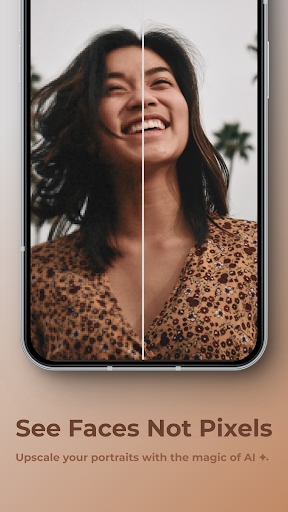
SuperImage Pro takes a different approach by using AI technology to enhance pictures and reconstruct visual details. Its main purpose is to improve existing photos rather than simply decorate them with filters. Whether you’re working with an old family picture or a recent snapshot that didn’t turn out well, the app provides tools to make the image clearer and more enjoyable to revisit.
Old photographs often carry sentimental value even when their visual condition has deteriorated. Some may contain noticeable pixelation, faded details, or blurry areas that make it difficult to recognize faces and objects. Restoring these images manually can require advanced editing knowledge, but SuperImage Pro aims to simplify the process.
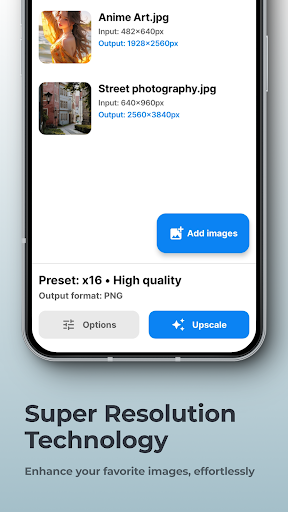
After importing a picture, you can select an available enhancement option and let the AI process the image. The technology analyzes visual patterns and attempts to reconstruct details, improving the overall sharpness and appearance. Results depend on the original photo’s condition, but the process can make certain images look noticeably cleaner without requiring complicated manual adjustments.
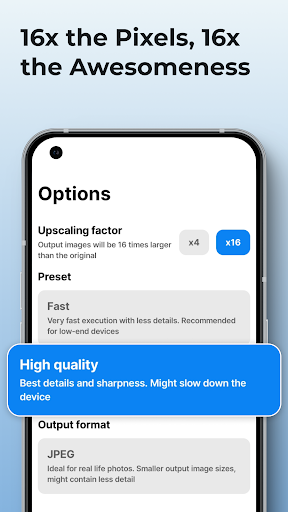
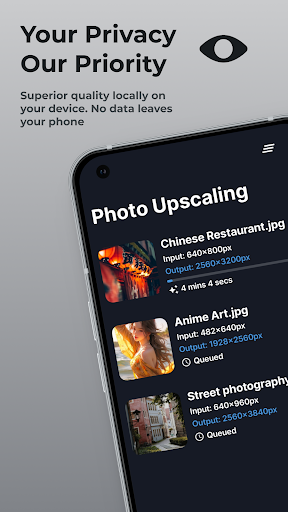
SuperImage Pro also focuses on image upscaling, allowing users to enlarge pictures while attempting to preserve or improve their visual details. According to the app’s advertised capabilities, resolution can be increased by up to 16 times, making this feature useful when working with small images that appear soft or pixelated at larger sizes.
Beyond resolution enhancement, the app provides additional adjustments for improving the appearance of a picture. You can work with sharpness, brightness, and contrast to achieve a more balanced result. Some editing options also support background removal and subject separation, making it easier to isolate the main object or create images with transparent backgrounds.
These tools give you more control over the final output instead of forcing every picture through the same enhancement process. However, AI upscaling cannot always recover details that were never captured in the original image, so it’s worth comparing the result with the source before saving your preferred version.
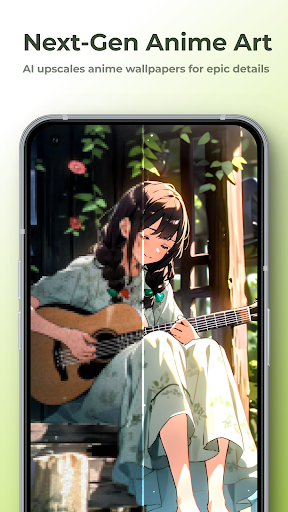
Photo enhancement isn’t the only creative direction available in SuperImage Pro. The Waifu Anime feature offers a way to transform ordinary portraits into anime-inspired images, giving personal photographs a different visual identity. It’s an interesting option for users who enjoy Japanese animation aesthetics or want a distinctive profile picture for social media.
The transformation applies an illustrated style while attempting to retain recognizable elements from the original portrait. This helps the final image feel connected to the person in the source photo rather than becoming an entirely unrelated character. You can experiment with different images and visual treatments to find an appearance that matches your preferences.
The feature is particularly suitable for creating avatars, sharing creative portraits, or giving familiar pictures a fresh look. As with other AI transformations, the final result may vary depending on image quality, lighting, and the subject’s position.
SuperImage Pro emphasizes a straightforward editing experience. You don’t have to go through a complicated registration process before getting started, which makes it convenient for users who simply want to improve a few pictures. The app is also designed to support offline use, allowing compatible image-processing tasks to be performed without relying on a constant internet connection.
Its privacy-focused approach is another notable aspect. The app describes edited photos as being stored locally rather than automatically uploaded to cloud storage. This gives users more direct control over their image files and reduces the need to share personal photographs with an online service. Nevertheless, it’s always sensible to review the app’s permissions and storage behavior on your own device.
Sometimes, a single photo deserves more than one editing approach. You might want a natural-looking restoration for personal use and a more dramatic version for sharing online. SuperImage Pro makes it easier to manage these variations by allowing you to save multiple versions of an image.
Edited files can include information about their output resolution and the changes made compared with the original picture. You can also assign names to your results, making it easier to distinguish between different edits. This organization is useful when experimenting with enhancement settings or comparing several AI-generated outcomes before deciding which one to keep.
SuperImage Pro offers a practical collection of AI tools for anyone who wants to improve old photographs, enlarge small images, or experiment with anime-style portraits. Its emphasis on image restoration and local photo management makes it different from apps that focus mainly on decorative filters. If you’re interested in trying these features on Android, you can find the available installer through APKMODY.
Use the following page-finding method to get started:
Open your Android browser and enter APKMODY.COM in the address bar.
Once the homepage loads, look for the search icon or search field.
Type SuperImage Pro APK and browse the matching results.
Open the relevant listing to check its version, app information, and device requirements.
Find the download section on that page and select the APK file.
After the file has been saved, open your phone’s Downloads folder and tap the installer. If Android blocks the installation, review the permission for installing apps from that source.
Complete the installation, launch SuperImage Pro, and import a picture to test its enhancement tools.