
Taleek – طليق: لتعلم اللغات
v9.8.2
• Premium
| Updated On | |
|---|---|
| Google Play ID | ai.metaverselabs.grammargpt |
| Category | Education |
| Version | 2.0.7 |
| Size | 115 MB |
| MOD Features | Premium Unlocked |
| Requires | Android 7.0 |
| Price | |
| Free | |
| Content Rating | |
| Everyone | |
| Internet Required | |
| Unknow | |

Grammar Check by AI Writing MOD APK is an AI-powered language assistant developed by Metaverse Labs, designed to help users improve their English writing and communication skills. From correcting spelling mistakes and finding word meanings to exploring synonyms and generating professional emails, the application brings several useful learning tools into one place. Whether you are a beginner, student or someone who regularly works with English, this app can make everyday language tasks more convenient.
Learning a foreign language requires more than memorizing vocabulary and grammar rules. You also need to understand how words work in different contexts and express your ideas naturally. Grammar Check by AI Writing addresses these needs through a collection of AI-powered tools that help you write, understand and refine English content.
Instead of switching between multiple applications, you can access grammar correction, dictionary searches, vocabulary exploration and email composition from one interface. Its straightforward design makes the features accessible even if you are still developing your English skills.
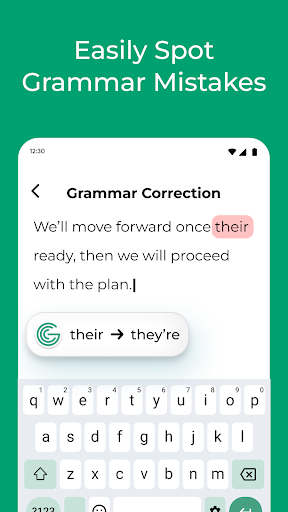
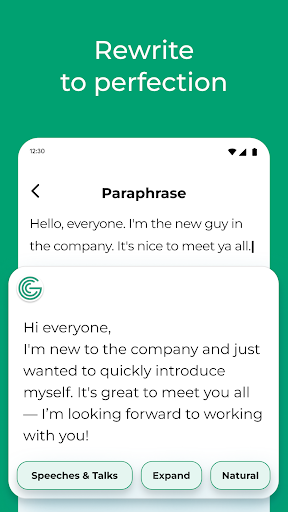
The main attraction of Grammar Check by AI Writing is its intelligent writing correction system. Think of it as a personal English editor that examines your sentences, identifies potential mistakes and suggests improvements. You simply type or paste the content you want to review into the input field, whether it is a short phrase, an individual sentence or an entire paragraph.
After entering your text, select the appropriate task, such as grammar correction, spelling checks or rewriting. The AI analyzes your content and generates an improved version based on your chosen purpose. If the first result does not match your expectations, you can experiment with alternative writing styles to find a more suitable expression. This feature is particularly helpful for beginners who want to understand their mistakes instead of repeatedly relying on manual corrections.
Grammar Check by AI Writing also includes an electronic dictionary that helps you understand unfamiliar words and expressions. Rather than providing only basic translations, the tool uses AI assistance to present additional information that makes vocabulary learning more practical.
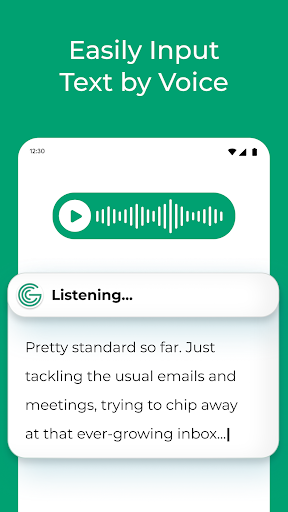
You can search for a word through several input methods, including traditional text entry, voice, audio and handwriting recognition through images. Once the system processes your request, it displays relevant definitions and explanations. Example sentences are also available to demonstrate how certain words or phrases are used in everyday situations.
This approach makes it easier to understand unfamiliar vocabulary in context. Instead of memorizing isolated meanings, you can learn how different expressions function in actual communication and gradually expand your English vocabulary.
Understanding connections between words is another effective way to improve language skills. The application includes a feature that helps you discover synonyms and antonyms, giving you more options when expressing the same idea.
Simply enter a word or phrase into the search field and choose the type of information you want to explore. The AI will generate related vocabulary, accompanied by explanations and examples to clarify how each expression differs in meaning. This is especially useful when you want to avoid repeating the same words throughout an essay, email or conversation.
Since many English words have several meanings depending on their context, exploring related expressions can also improve your understanding of sentence construction. Over time, this feature helps you develop a richer vocabulary and communicate with greater flexibility.
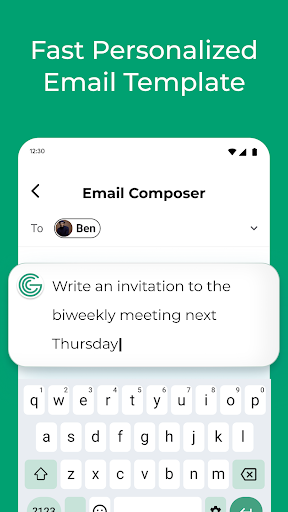
Writing emails in English can be challenging, particularly when you need to communicate professionally or maintain an appropriate tone. Grammar Check by AI Writing simplifies this process with an AI-powered email generator.
To get started, provide basic information about the recipient and briefly describe the purpose of your message. You can also select a preferred tone depending on whether the email is intended for business communication, academic purposes or casual correspondence. The AI then uses your information to generate a complete draft.
You are not limited to a single suggestion, either. The application can provide different versions and allow you to adjust the writing style to better match your intended audience. This saves time when preparing everyday correspondence while giving you useful examples of how professional English emails are structured.
Before upgrading, you should understand how the free edition of Grammar Check by AI Writing works. Although it provides access to the application’s main tools, usage is restricted. According to the available version information, free users can access the features only three times before being prompted to upgrade.
Advertising is another drawback that may affect the experience. Users who remain on the free edition may encounter frequent advertisements, including longer promotional content. These restrictions can become inconvenient if you regularly need to check lengthy documents or perform multiple vocabulary searches.
Nevertheless, the free version provides an opportunity to explore the available tools and determine whether they suit your learning or writing requirements before committing to a subscription.
The Premium subscription is designed for users who want unrestricted access to the application’s AI-powered features. Instead of working around the limitations of the free edition, you can use the available tools more freely and enjoy a less interrupted experience.
Depending on the subscription option, Premium provides several advantages:
Advanced Grammar Correction: Access more comprehensive writing checks with detailed explanations of detected mistakes.
Expanded Feature Access: Unlock additional options for working with text and improving your English.
Unlimited Usage: Perform repeated searches, corrections and writing tasks without the standard free-version usage restrictions.
Ad-Free Experience: Remove advertisements for a cleaner and more convenient interface.
The application offers different subscription periods, including weekly, monthly and yearly plans. You should compare the available prices and billing conditions before choosing an option.
For users interested in accessing the paid features, the MOD edition provides an alternative to the standard application. Its main modification focuses on removing the usual subscription restrictions.
Premium Unlocked: Unlock Premium features without following the standard subscription process.
Keep in mind that modified applications may behave differently depending on the version and device. Some online services or AI functions may still require a working connection to their respective servers.
Want to improve your English without dealing with the usual free-version restrictions? You can find the modified application through APKMODY by using the following download route:
Access APKMODY: Open APKMODY.COM in your mobile browser and search for Grammar Check by AI Writing.
Check the application details: Enter the download page and review the version information to make sure you have selected the correct app.
Locate the MOD package: Find the MOD APK download option and select the available server.
Save the file: Wait for the installation package to download completely before opening it.
Install on Android: Tap the downloaded APK file and follow the on-screen instructions. If necessary, allow installation from your chosen browser or file manager.
Explore Premium tools: Launch the application and test its available grammar, dictionary, vocabulary and email-writing features.