
Learn German for beginners
v3.5.38
• Premium
| Updated On | |
|---|---|
| Google Play ID | com.youdao.hindict |
| Category | Education |
| Version | 6.7.6 |
| Size | 68 MB |
| MOD Features | VIP Unlocked |
| Requires | Android 7.0 |
| Price | |
| Free | |
| Content Rating | |
| Everyone | |
| Internet Required | |
| Not Required | |
| Languages | |
| English, Arabic, French, German, Indonesian, Italian, Japanese, Korean, Portuguese, Russian, Simplified Chinese, Spanish, Thai, Traditional Chinese, Vietnamese | |

U-Dictionary is more than a traditional mobile dictionary. The app combines multilingual translation, vocabulary practice and writing assistance to help users overcome language barriers in everyday situations. Whether you need to understand a foreign message, translate a sign while traveling or improve your English, its collection of tools makes language learning more convenient.
U-Dictionary brings several language utilities into one application, allowing users to switch between translation, dictionary searches and learning activities without installing separate tools.
U-Dictionary is a multilingual dictionary and translation app designed for students, professionals and travelers. It has attracted a large international audience, with its original promotional materials reporting more than 100 million users across 150 countries.
Beyond providing word definitions, the app helps users explore synonyms, antonyms, pronunciation and example sentences. Its translation functions also support different forms of content, making it useful for both quick lookups and regular language practice.
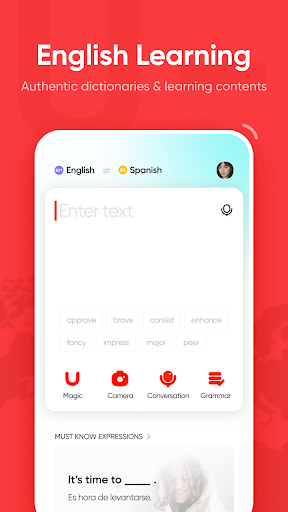
U-Dictionary offers several ways to understand unfamiliar languages. Instead of manually typing every sentence, users can choose a translation method that suits the content they are working with.
Text translation: Enter or paste words and sentences to receive translations in supported languages.
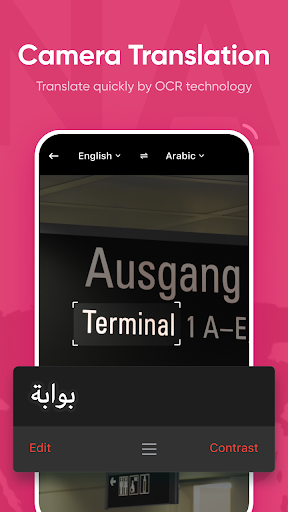
Image translation: Use the camera or upload a picture to recognize and translate text found on signs, menus and documents.
Voice translation: Convert spoken phrases into another language, helping users communicate during everyday conversations.
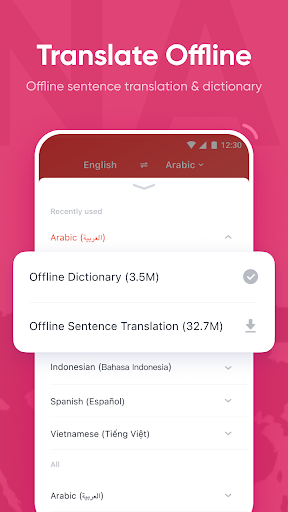
Offline dictionary: Download supported language resources to look up words without an internet connection.
Translation results can be copied, shared or inserted into other applications. However, language availability differs between tools, and some advanced functions may require an internet connection or premium access.
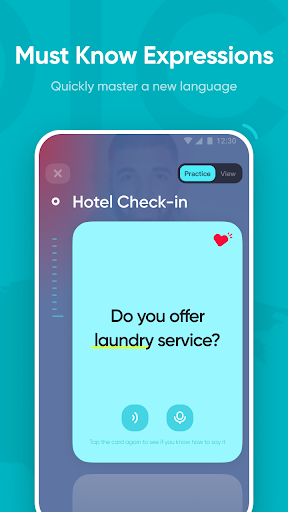
U-Dictionary makes vocabulary practice more engaging through short videos, quizzes and mini-games. These activities encourage users to encounter new words in different contexts instead of memorizing definitions alone.
When looking up an unfamiliar expression, learners can explore its meaning, synonyms, antonyms and example sentences. Saving useful entries for later review also helps create a more organized learning routine.
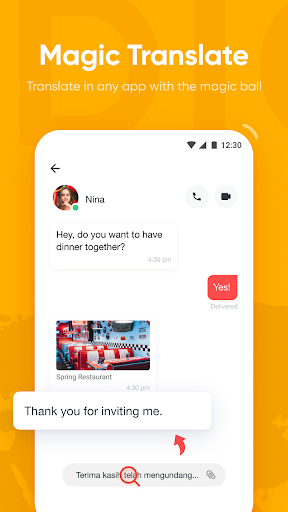
Magic Translation provides a convenient way to understand selected text without repeatedly switching between applications. Users can activate the supported on-screen translation function to look up content while browsing social networks, reading messages or watching online material.
This feature is particularly useful for translating short comments and unfamiliar expressions. Its availability may depend on the device, operating system permissions and the applications being used.
U-Dictionary also includes a grammar-checking tool for reviewing English sentences and passages. Users can enter their writing and examine suggested corrections for potential grammatical or spelling mistakes.
This function is useful when preparing messages, assignments or everyday documents. Reviewing the suggestions and understanding the reasons behind corrections can gradually improve writing skills.
Alongside its main learning functions, U-Dictionary provides several smaller utilities:
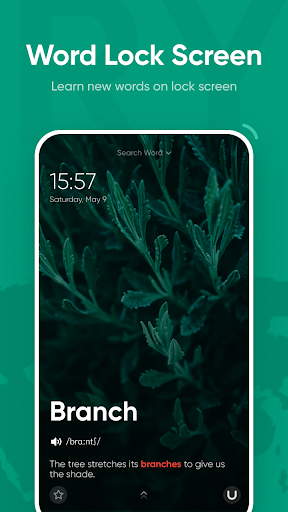
Word Lock Screen: Displays selected vocabulary on the lock screen for quick revision throughout the day.
My Words: Saves important entries in personal folders for easier organization.
Dark Mode: Offers a darker interface that may feel more comfortable in low-light environments.
Some unofficial U-Dictionary MOD APK releases advertise unlocked premium functions. However, these packages are modified by third parties, so their advertised features and reliability are not guaranteed.
VIP Unlocked: Claims to provide access to selected premium tools without the standard subscription.
Modified APKs may contain security vulnerabilities, cause compatibility problems or fail to work as expected. Users should consider these risks before installation. The official application remains the more reliable option for supported updates and account services.
The application has incorporated reference materials from established sources such as Collins and WordNet, alongside selected Oxford Dictionary resources. Depending on the entry, users may find definitions, pronunciation, synonyms, antonyms and contextual examples.
U-Dictionary provides free dictionary and translation functions, although certain tools may be restricted to premium subscribers or subject to usage limits. Available plans and benefits can vary by region and app version, so check the current subscription details before purchasing.
Yes. Its combination of quizzes, videos, saved words and example sentences gives learners several ways to review unfamiliar expressions. For better results, practice using new vocabulary in your own sentences instead of relying only on repeated exposure.
Login requirements depend on the specific modified release and the functions being accessed. Even if a package advertises account-free use, avoid entering personal information into unofficial applications unless you understand the associated risks.
Saved vocabulary may be stored locally or synchronized with an account, depending on the application’s settings. Check your backup or synchronization status before updating or reinstalling, particularly when switching between different APK versions.
U-Dictionary offers a practical combination of dictionary searches, multilingual translation and vocabulary exercises. If you want to try the application on Android, visit APKMODY and search for U-Dictionary to review the available packages and version details.
Before installing an APK, check its compatibility with your device and review the requested permissions. Pay particular attention to access involving your camera, microphone and other applications.