

AutoTap Pro
v1.03.7
• Utilities
| Updated On | |
|---|---|
| Google Play ID | com.cpuid.cpu_z |
| Category | Utilities |
| Version | 1.60 |
| Size | 5 MB |
| MOD Features | Premium Unlocked |
| Requires | Android 6.0 |
| Price | |
| Free | |
| Content Rating | |
| Everyone | |
| Internet Required | |
| Unknow | |

CPU-Z MOD APK is a useful hardware monitoring application developed by CPUID, helping users discover the specifications and operating details of their Android devices. From processor architecture and memory capacity to battery conditions and sensor activity, it gathers essential technical information in one convenient interface. Explore its main functions, premium features, and installation process before downloading CPU-Z through APKMODY.
Have you ever wondered which processor powers your smartphone, how much RAM it has, or what Android version it currently runs? Although the default system settings provide some basic details, they rarely offer the level of technical information that hardware enthusiasts and experienced users want. CPU-Z addresses this limitation by collecting various hardware and software specifications in a single application.
Developed by CPUID, this tool has established a strong reputation among technology enthusiasts thanks to its straightforward interface and detailed reporting capabilities. Its Android edition follows the same general approach as the familiar PC version, allowing users to inspect important device components without complicated procedures. The application has also surpassed 100 million downloads on Google Play, demonstrating its widespread popularity.
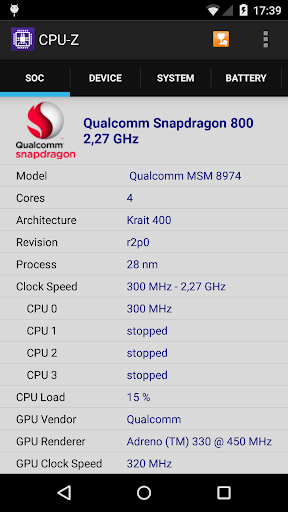
The CPU section is one of the most important parts of CPU-Z because it provides an overview of the processor currently installed in your smartphone or tablet. Instead of relying solely on the manufacturer’s advertised specifications, you can inspect the information detected directly from your device.
Depending on the processor architecture and Android hardware, the application can display details such as:
Processor Name: Identifies the CPU model powering your device.
Model: Shows the processor’s hardware model information.
Cores: Indicates the number of available processing cores.
Topology: Provides details about the CPU core configuration.
Clock Speed: Displays the operating frequency of individual cores, which may change depending on workload.
GPU Vendor: Identifies the manufacturer of the graphics processing unit.
GPU Renderer: Shows the graphics renderer detected by the application.
GPU Load: Provides information about the current graphics processing workload when supported.
These specifications are particularly helpful when comparing smartphones, checking hardware configurations, or investigating performance differences between devices.
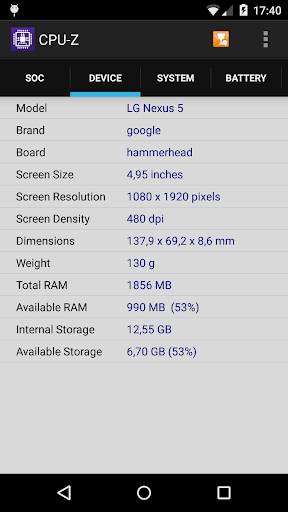
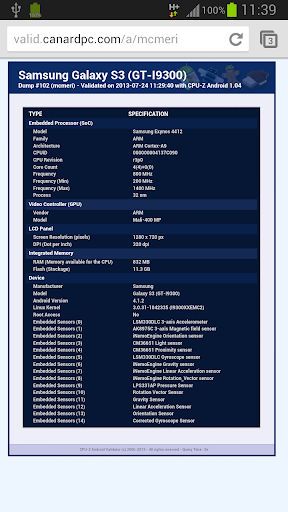
If you are more interested in general device specifications than processor architecture, the Device tab provides a convenient overview. Here, CPU-Z gathers essential information about the smartphone or tablet, helping you understand its physical configuration without navigating through multiple system menus.
The displayed details may include the device name, manufacturer, hardware version, screen dimensions, RAM capacity, and internal storage information. This is especially useful when purchasing a second-hand smartphone or checking whether a device matches the specifications advertised by its seller. Having these details collected in one place makes hardware inspection considerably more convenient.
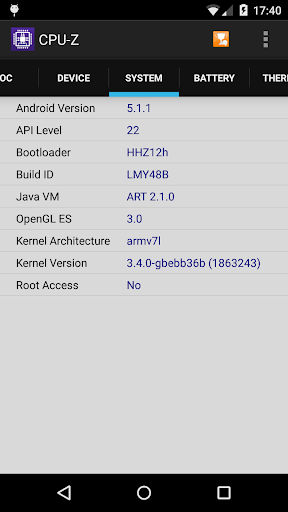
Hardware is only one part of a mobile device. Its operating system, security configuration, and underlying software components also influence compatibility and everyday performance. CPU-Z includes a dedicated section that provides technical details about the Android environment.
Some of the available information includes:
Android Version: Identifies the operating system currently installed.
API Level: Displays the Android application programming interface version.
Security Patch Level: Shows the date of the installed security update.
Bootloader: Provides information about the device’s bootloader configuration.
Build ID: Identifies the current system software build.
Java VM: Displays details about the Java virtual machine environment.
OpenGL ES: Reports the supported graphics interface version.
Kernel Version: Shows information about the operating system kernel.
Root Access: Indicates whether root access is detected.
These details are particularly relevant to developers and advanced Android users who experiment with custom ROMs, rooting, or system modifications. Even if you are not planning to modify your device, checking this section can help you better understand its software environment.
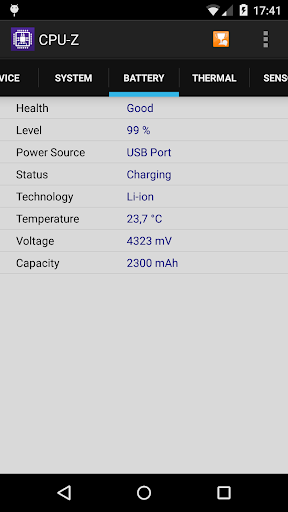
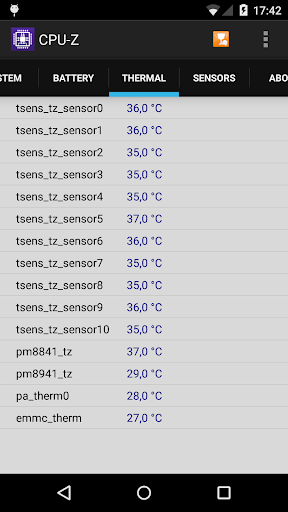
Battery performance is another important aspect of smartphone maintenance. Excessive heat, unstable voltage, or unusual charging behavior may affect the overall user experience, so keeping track of basic battery information is worthwhile.
CPU-Z provides a dedicated Battery tab where you can inspect the current charge percentage, voltage, temperature, and battery manufacturer when the device reports this information. Although it does not offer a comprehensive battery health diagnosis or an accurate remaining-capacity assessment, these readings can help you monitor operating conditions. For example, checking battery temperature during intensive gaming or charging sessions provides a quick way to identify unusual heat levels.
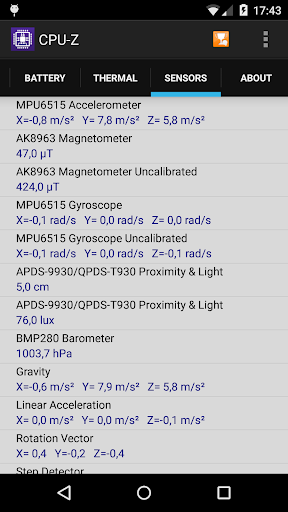
Modern smartphones rely on various sensors to support navigation, screen rotation, motion detection, and other interactive functions. CPU-Z makes it easier to inspect these components through its Sensors section, which displays available sensor information and readings in real time.
Depending on the hardware installed, you may find details about the accelerometer, gyroscope, proximity sensor, light sensor, and other components. These readings can help identify whether a sensor is responding to changes in the device’s surroundings. This feature is particularly useful when troubleshooting rotation problems, testing a second-hand phone, or checking whether certain hardware functions are working as expected.
The modified edition of CPU-Z is presented with an unlocked premium feature, providing access to functionality that may otherwise require an upgrade in the original application.
MOD feature:
Premium Unlocked: Unlocks premium functionality for a more complete application experience.
The actual availability of modified features depends on the specific APK release. Since this is an unofficial distribution, users should check the package carefully before installation and understand that modified applications may not receive the same security guarantees as the original version.
Want to inspect your smartphone’s hardware and system configuration? You can obtain the CPU-Z installation package through APKMODY by following this download procedure:
Installation guide:
Search for CPU-Z: Access APKMODY through your Android browser and enter the application name in the website’s search function.
Open the download page: Select the correct CPU-Z result and review its description, version details, and available MOD information.
Choose an APK package: Find the download section and select the installation file compatible with your device.
Prepare Android for installation: If your browser or file manager is not authorized to install external applications, open Android settings and allow installation from that particular source.
Finish setting up: Locate the downloaded package, tap the APK file, and follow the on-screen instructions. Once installation is complete, open CPU-Z and start examining your device.