

Duo Mobile
v4.126.0
• Utilities



| Updated On | |
|---|---|
| Google Play ID | com.click.rushpro |
| Category | Utilities |
| Version | 1.03.7 |
| Size | 58 MB |
| MOD Feature | Not available |
| Requires | Android 8.0 |
| Price | |
| Free | |
| Content Rating | |
| Mature 17+ | |
| Internet Required | |
| Unknow | |

AutoTap Pro helps you automate repetitive screen interactions without having to touch your Android device constantly. Featuring adjustable clicking speeds, multiple touch points, and automatic swiping, this utility makes routine operations faster and more convenient. Below, we take a closer look at its main functions, practical applications, and privacy considerations before showing you how to download AutoTap Pro APK through APKMODY.
Released in March 2025, AutoTap Pro is designed for Android users who frequently perform repetitive touchscreen operations. Instead of manually tapping the same positions over and over, you can configure the application to execute these actions automatically according to your preferences.
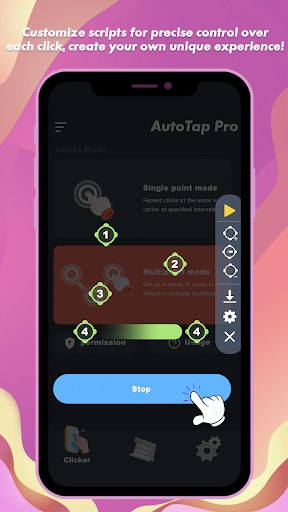
The utility provides several control options, including single-position clicking, sequential multi-target tapping, and automatic swiping. Its floating toolbar also allows you to manage settings while using other applications, making it easier to switch between tasks without repeatedly opening the main interface.
AutoTap Pro focuses on accessibility and straightforward operation. Once the necessary permissions have been granted, the application can display a floating control panel over other running applications. From there, you can add click points, reposition them, and adjust their behavior directly on the screen.
Setting up an automatic action does not require advanced technical knowledge. Simply select the desired location, configure the clicking interval, and activate the function when everything is ready. You can also move or remove existing targets whenever your requirements change.
This flexible setup is particularly useful when working with applications that require frequent interaction with the same interface elements.
Not every task requires the same clicking speed. Some operations benefit from rapid interactions, while others need longer pauses to ensure that the application has enough time to respond.
AutoTap Pro allows you to customize the delay between consecutive clicks, including adjustments measured in milliseconds. This gives you greater control over how frequently the application performs each action.
You should choose an interval that matches both the task and your device’s performance. Extremely short delays may cause unnecessary resource consumption, interface instability, or missed interactions on certain Android devices.
One of AutoTap Pro’s main advantages is its ability to handle different types of touchscreen operations. Rather than limiting users to a single clicking position, the application provides several automation modes that accommodate more complicated interaction patterns.
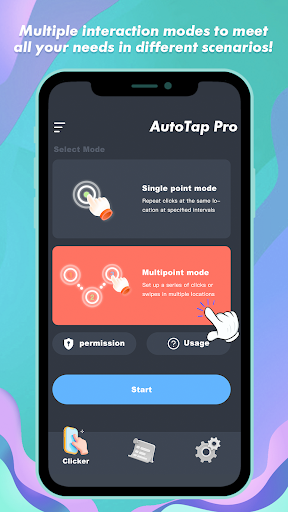
Single-target mode is suitable for situations where you repeatedly need to interact with one specific area. After placing a click marker on the screen, you can configure its interval and let the application repeat the action automatically.
For more complicated tasks, multi-target mode allows you to create several clicking positions. Each target receives a corresponding number, indicating the sequence in which the application will execute the commands.
This arrangement is helpful when you need to interact with multiple buttons or interface elements in a particular order. You can reposition individual targets and adjust their placement to match the layout of the application currently in use.
Besides tapping, AutoTap Pro also supports automatic screen swiping. This function allows you to simulate dragging gestures between selected positions instead of manually moving your finger across the display.
You can configure the starting and ending points to determine the direction and distance of each swipe. Adjusting these positions is important because different applications may require different gesture lengths to produce the intended result.
It is a convenient option for repetitive scrolling, navigating long interfaces, or performing other tasks that involve repeated dragging movements.
Automatic tapping is not limited to one particular type of application. Its flexible controls make it useful in several situations where users regularly perform identical touchscreen actions.
Social applications often contain buttons that users interact with repeatedly, such as navigation controls, content selection, or other interface elements. AutoTap Pro can help automate supported repetitive actions, reducing the need for continuous manual input.
For example, you can configure click targets for routine navigation or repeated interactions within an application. However, automated engagement should follow each platform’s rules. Artificially generating likes, views, or other engagement metrics may violate service policies and does not guarantee better content recommendations.
Some mobile games require players to tap repeatedly to collect rewards, open menus, activate certain functions, or complete simple activities. These interactions can become tiring when performed for extended periods.
With AutoTap Pro, you can configure a target over the required button and let the application repeat the action. Multi-target mode may also help with tasks that involve several interface positions.
Nevertheless, not every game supports automated input. Some titles restrict third-party automation tools, particularly in competitive environments. Check the relevant game policies before using this functionality to avoid potential account penalties.
Online shopping applications sometimes require users to repeat similar actions when browsing products, navigating menus, or interacting with interface controls. AutoTap Pro can simplify certain repetitive steps by executing predefined tapping sequences.
However, using automated clicks to purchase limited-stock products or bypass purchase restrictions may conflict with a retailer’s terms of service. You should also review every transaction manually before confirming payment to avoid accidental orders.
Beyond these examples, the application can assist with many other routine operations, provided that the target interface responds consistently to simulated touch input.
Because AutoTap Pro simulates touchscreen interactions, it requires Android Accessibility permission to perform its main functions. This permission allows the application to recognize and execute certain actions on your behalf.
Accessibility access is essential for the application to place click targets, execute tapping sequences, and perform automated gestures across other interfaces. Without this permission, many of its primary functions may not work correctly.
Before granting access, carefully review the permission request and make sure you understand what the application is allowed to do. Accessibility services can have broad capabilities, so you should only enable them for applications you trust.
The publisher states that the application does not collect or share personal information. However, privacy practices can vary between versions, so it is worth checking the latest privacy policy and Google Play Data Safety information rather than relying entirely on general descriptions.
For additional protection, consider these precautions:
Download the application from a trustworthy source.
Review accessibility permissions before activating the service.
Avoid using automation on banking or other sensitive applications.
Disable accessibility access when you no longer need automatic controls.
Check the application’s privacy policy for updated data-handling information.
Taking these precautions helps you benefit from automation while maintaining greater control over your device.
AutoTap Pro provides a convenient way to handle repetitive touchscreen activities through customizable clicking, multi-target sequences, and automatic swiping. Its floating toolbar makes configuration straightforward, while adjustable delays allow you to adapt the tool to different situations.
If you want to explore its features on your Android device, follow this alternative download process through APKMODY.
Open The APKMODY Homepage: Launch Chrome or another browser and navigate to the APKMODY website.
Locate AutoTap Pro: Use the website’s search function and enter the complete application name.
Inspect The App Listing: Open the relevant result and review its version number, compatibility information, and available features.
Save The APK Package: Select the download source provided on the page and wait for the file to finish downloading.
Verify And Install: Locate the saved APK, check that it comes from the expected source, and proceed with Android’s installation prompts.
Configure Your First Automation: Open AutoTap Pro, review its permissions, enable the required accessibility service, and create your first click target.