home chevron_right Apps chevron_right Photos & Videos chevron_right Background Eraser

Winkit
v2.0.1
• Photos & Videos






| Updated On | |
|---|---|
| Google Play ID | photoeditor.cutout.backgrounderaser |
| Category | Photos & Videos |
| Version | 2.381.110 |
| Size | 40 MB |
| MOD Features | Pro Unlocked |
| Requires | Android 8.0 |
| Price | |
| Free | |
| Content Rating | |
| Everyone | |
| Internet Required | |
| Unknow | |

Background Eraser MOD APK makes removing unwanted backgrounds from photos much easier, even if you have little experience with image editing. Its combination of AI-powered detection and manual adjustment tools allows you to isolate objects, create transparent images, and prepare pictures for different creative projects. Whether you’re designing social media content, editing product photos, or making personalized collages, this application offers a convenient solution right on your Android device.
Background Eraser is an image editing application designed to separate subjects from their original backgrounds without requiring complicated desktop software such as Photoshop Express. It provides automatic background detection alongside several manual editing options, giving users flexibility when working with different types of photographs.
You can use the application to prepare transparent PNG images, create custom compositions, or produce cleaner product pictures for online stores. Its straightforward interface also makes the editing process approachable for beginners, while more detailed tools offer additional control for users who want accurate results.
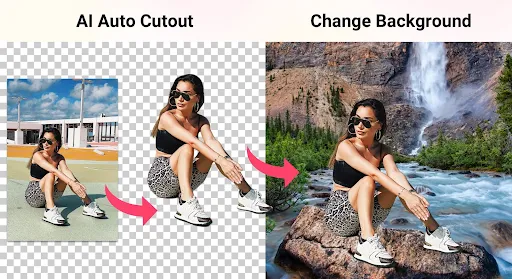
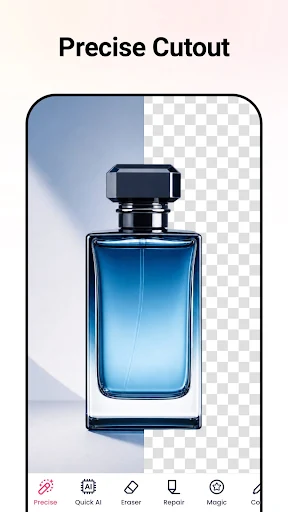
The automatic removal feature is particularly useful when you need to process an image quickly. Simply import a photograph, and the AI-powered system attempts to recognize the main subject before separating it from the surrounding environment. This eliminates much of the repetitive work involved in manually tracing an object’s outline.
For example, a picture of a Shiba Inu sitting on green grass can be processed automatically, leaving the dog isolated against a transparent background. The tool is designed to preserve important details such as fur and fine edges, which are often difficult to handle with basic selection methods. However, complicated scenes containing similar colors, overlapping objects, or busy lighting conditions may produce imperfect results. In those situations, additional editing tools can help you correct the selection.
Automatic detection doesn’t always distinguish every object perfectly, especially when the foreground and background share similar colors. Magic Mode provides another way to refine your selection by allowing you to tap specific areas that need to be removed. The application then identifies surrounding regions with similar color characteristics and applies the adjustment accordingly.
Imagine editing a photograph of someone wearing a red shirt against a plain white wall. If automatic processing leaves small white patches around the subject, you can use Magic Mode to select those remaining areas. This approach makes cleanup faster without requiring you to trace every edge manually, helping produce a more polished cutout.
For photographs containing intricate shapes or delicate details, manual editing provides greater control over the final result. Background Eraser allows you to zoom in on specific sections and work directly along the subject’s outline. This is especially helpful when dealing with hair, flower petals, fur, or objects with irregular edges that automatic selection may struggle to recognize.
You can carefully adjust the selection until unwanted background areas disappear while preserving the important parts of your subject. Although this process requires more patience than automatic removal, it offers greater precision when preparing images for professional-looking compositions. Combining manual adjustments with AI selection can also reduce editing time while maintaining better control over difficult sections.
Even careful editing can sometimes remove portions of the main subject by mistake. A small section of clothing, a strand of hair, or part of an object’s outline might disappear while you’re cleaning up the background. Background Eraser includes a Repair function that helps restore areas that were unintentionally erased, reducing the need to restart the entire editing process.
The feature is particularly useful when you notice mistakes during the editing session. You can brush over affected sections to recover details from the original image, depending on the available restoration capabilities. However, large erased regions or edits made after multiple additional adjustments may be more difficult to restore accurately. It’s therefore a good idea to inspect your selection regularly and correct errors as soon as you notice them.
Once your subject has been separated successfully, saving the result in the appropriate format is essential. Background Eraser supports PNG exports, allowing you to preserve transparent areas instead of filling them with a solid color. This makes the resulting images suitable for graphic design, presentations, digital artwork, and product photography.
Unlike JPEG, PNG supports transparency, so you can place the isolated subject over different backgrounds without manually removing the original surroundings again. This is especially convenient when preparing reusable image assets for multiple projects. You can save your edited pictures and incorporate them into other applications whenever additional design work is required.
Removing the original background is only one part of the editing process. Background Eraser also provides options for placing your selected subject into a different environment, allowing you to create new compositions without switching between multiple applications.
You can choose from available background options or import your own image to create a customized scene. For example, a portrait originally taken indoors can be placed against a beach landscape, city view, or simple studio-style background. The application combines the separated subject with your chosen image, making basic photo compositing more accessible. Although the final blending quality may vary depending on lighting and image conditions, this feature is useful for quick edits and everyday creative projects.
The modified edition advertises additional access to premium tools, making more editing options available within the application.
Pro Unlocked: Advertised premium functionality is unlocked, providing access to enhanced editing features available in the supported MOD build.
Note: The availability of unlocked features may differ between modified versions. Unofficial APK files may also carry security and compatibility risks.
Want to remove unwanted backgrounds and create transparent images directly on your phone? Use the following checklist to install Background Eraser through APKMODY:
Open APKMODY: Access the website from your Android browser and enter Background Eraser in the search field.
Find the MOD listing: Select the matching application page and check its version information and advertised Pro features.
Get the installation package: Scroll to the download section and choose the available MOD APK link to save the file.
Prepare your device: Open Android settings and authorize installation from the browser or file manager if a security prompt appears.
Finish setting up: Return to your Downloads folder, tap the APK package, and follow the on-screen instructions to complete installation.
Edit your first picture: Open Background Eraser, import a photograph, and experiment with automatic removal, Magic Mode, or manual editing.