home chevron_right Apps chevron_right Entertainment chevron_right VIU


MinuteDrama – Short Drama
v7.0.0.5
• Premium





| Updated On | |
|---|---|
| Google Play ID | com.vuclip.viu |
| Category | Entertainment |
| Version | 2.31.0 |
| Size | 27 MB |
| MOD Features | Premium Unlocked |
| Requires | Android 7.1 |
| Price | |
| Free | |
| Content Rating | |
| Teen | |
| Internet Required | |
| Required | |
| Languages | |
| English, Arabic, Burmese, Indonesian, Malay, Simplified Chinese, Thai, Traditional Chinese | |

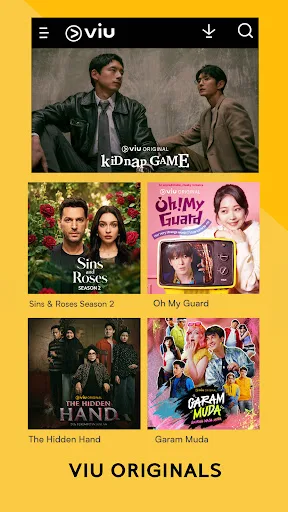
VIU MOD APK opens the door to a diverse entertainment library filled with popular Asian dramas, romantic movies, reality shows, and television programs. Designed for viewers who enjoy content from South Korea, China, Japan, India, and other countries, this streaming application brings different entertainment genres together in one place. With convenient playback, personalized recommendations, and offline viewing options, VIU makes it easier to enjoy your favorite shows whenever you have free time.
VIU combines an extensive content collection with practical viewing tools, creating a convenient destination for Asian entertainment fans. Before exploring its individual features, let’s take a closer look at the platform.
Developed by Hong Kong-based PCCW Media, VIU is an over-the-top streaming platform specializing in Asian entertainment. Its library includes television dramas, feature films, variety shows, and original productions from several countries. Korean entertainment is particularly prominent, making the service attractive to viewers who regularly follow K-dramas and reality programs.
The platform is designed for different viewing habits, whether you prefer watching an entire series over the weekend or catching up with newly released episodes during short breaks. Its mobile application also provides a straightforward interface, allowing users to browse categories, discover popular titles, and manage their personal watchlists without complicated navigation.
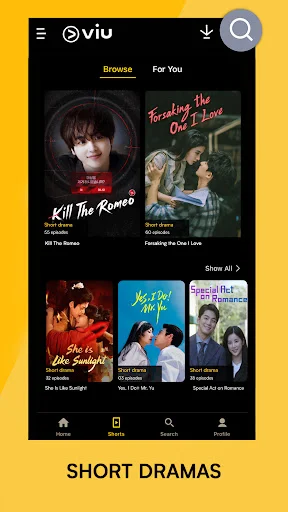
Content variety is one of VIU’s main attractions. Instead of focusing on a single genre, the platform brings together romantic dramas, comedy, action, horror, documentaries, animation, and reality television. Viewers can explore productions from South Korea, China, Japan, Thailand, India, and other entertainment markets, depending on regional availability.
The library also features different types of programs, from internationally recognized dramas to local productions and exclusive entertainment content. New titles and episodes are added according to the platform’s release schedule, giving subscribers more opportunities to discover something interesting. Whether you enjoy emotional love stories or competitive reality shows, there are plenty of categories to explore.
Following several ongoing series can become difficult, especially when new episodes arrive on different schedules. VIU addresses this issue with notification options that help viewers keep track of updates and newly released content. By enabling relevant alerts, you can receive reminders when your favorite programs have fresh episodes available.
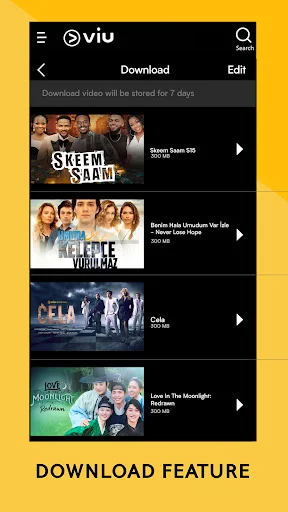
Offline downloading is another convenient feature, particularly for people who frequently travel or have unstable internet connections. Supported content can be saved to your device for viewing later without continuous network access. This is useful when commuting, waiting for appointments, or relaxing somewhere without reliable Wi-Fi. Keep in mind that download availability may depend on your subscription, region, and individual title.
Language differences do not have to prevent you from enjoying international entertainment. VIU provides subtitle options for supported titles, helping viewers follow conversations and understand storylines more easily. Available languages vary depending on the country and specific program.
The recommendation system also helps users discover content based on their viewing interests. You can save interesting titles to a personal list, revisit previously watched programs, and explore suggestions related to your preferences. These tools make browsing more convenient, especially when the library contains numerous movies and television series.
VIU provides several browsing and playback options that help users organize their entertainment experience. You can explore different content categories, search for specific titles, and access recommendations without spending too much time navigating the application. Its familiar interface also makes it easier for new users to get comfortable with the main functions.
Additionally, supported sharing options allow you to introduce interesting programs to friends and family. Depending on the device and available settings, you may also adjust playback quality and other viewing preferences to suit your internet connection and screen.
A reliable streaming experience is essential when watching long episodes or movies. VIU supports online playback through its mobile application, allowing users to access available entertainment whenever they have an internet connection. Streaming quality may adjust according to network conditions and device capabilities, helping maintain smoother playback.
Account registration also allows users to access features associated with their profile and subscription. This makes it easier to manage viewing activity and continue exploring content across supported devices.
The modified edition introduces changes to the standard application experience, focusing on access to selected premium functions.
The Premium Unlocked feature is intended to provide access to selected premium benefits without following the usual subscription process. Depending on the modified build, these benefits may include an expanded viewing experience and fewer restrictions on certain content or functions. However, not every premium feature is guaranteed to work, and availability can vary between versions.
Before installing the application, you may want to understand how its subscription system works and what to do if the service is unavailable in your region.
What is the difference between free and Premium VIU?
The free version provides access to selected movies and entertainment programs, although some content may include advertisements or require a paid subscription. VIU Premium generally offers additional benefits, such as access to a broader content library, fewer advertisements, and offline downloads for eligible titles. Exact privileges depend on the subscription plan and regional service policies.
Which Premium subscription plans are available?
VIU has offered different subscription arrangements depending on the market, including monthly and longer-term packages. Promotional trials, introductory discounts, and prepaid plans may also appear at certain times. The prices and benefits mentioned in older descriptions may no longer apply, so check the official VIU application or website for current plans before making a payment.
What should I do if VIU is unavailable in my country?
VIU operates in selected markets, meaning its services and content catalogs are not available everywhere. You should first check the official list of supported countries and regional restrictions. A VPN service such as Psiphon Pro may help with general network access, but it does not guarantee access to VIU or bypass account, licensing, and subscription restrictions.
If you want to explore VIU on your Android device, APKMODY provides a convenient place to find its available APK releases. Use the following process to locate the version that suits your needs:
Open APKMODY: Visit the APKMODY website through your Android browser.
Locate the application: Enter VIU in the website’s search bar and open the corresponding app page.
Review the release information: Check the available version, file details, Android compatibility, and MOD description before proceeding.
Select your download: Choose the regular APK or MOD edition if available, then follow the download instructions displayed on the page.
Install the application: Once the file has been saved, open it from your Downloads folder and complete the installation. You may need to authorize installations from your browser or file manager.
Start watching: Launch VIU, review the available content, and sign in if the selected features require an account.