UnWX (Severe Weather Alerts)
v5.5.8
• Unlocked
| Updated On | |
|---|---|
| Google Play ID | mobi.lockdown.weather |
| Category | Weather |
| Version | 2.6.1-4 |
| Size | 31 MB |
| MOD Features | Premium Unlocked |
| Requires | Android |
| Price | |
| Free | |
| Content Rating | |
| Everyone | |
| Internet Required | |
| Required | |

Today Weather MOD APK is a convenient weather forecasting application developed by todayweather.co, offering detailed meteorological information through a clean and modern interface. With data from multiple weather providers, users can monitor current conditions, check upcoming forecasts, and explore useful details such as air quality, wind speed, and UV levels. Whether you are preparing for daily activities or planning an outdoor trip, this application helps you stay informed about changing weather conditions.
Weather conditions can change unexpectedly, especially with increasingly unpredictable climate patterns. Having access to reliable forecasts allows you to prepare for outdoor activities, arrange travel schedules, and avoid unfavorable conditions. Today Weather brings several useful forecasting tools together in one application, making it easier to follow local weather developments without navigating complicated menus.
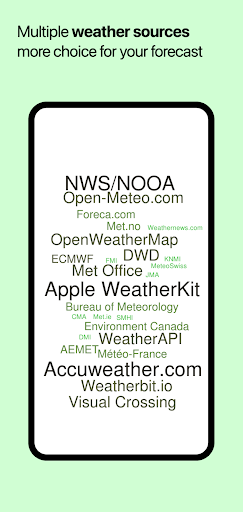
Today Weather gathers meteorological information from various providers to give users a comprehensive overview of current and upcoming conditions. Depending on the available configuration and subscription, its supported sources may include Apple WeatherKit, AccuWeather, Dark Sky, and Foreca. Using multiple providers gives users different forecasting options, although actual accuracy still depends on the selected source, location, and weather conditions.
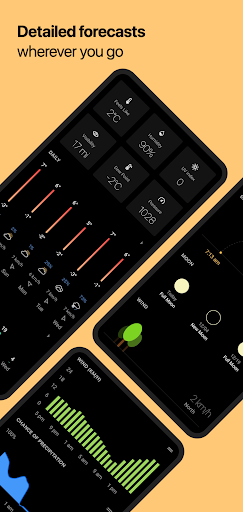
Beyond basic temperature readings, the application displays several important indicators, including humidity, atmospheric pressure, UV index, and visibility. These details help you understand the surrounding environment more thoroughly instead of relying solely on a simple temperature forecast. You can use the information to decide what to wear, prepare for outdoor activities, or adjust your plans when unfavorable weather approaches.
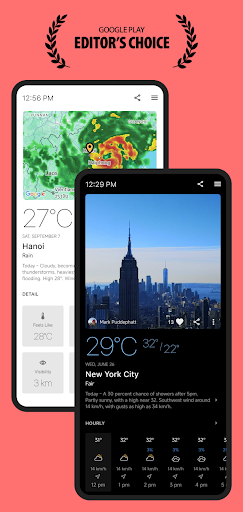
One of the appealing aspects of Today Weather is its straightforward presentation. The application combines a minimalist layout with contrasting colors, making important weather indicators easy to recognize. Its dark-themed appearance gives the interface a modern feel, while carefully arranged information prevents the screen from becoming unnecessarily cluttered.
Despite displaying numerous meteorological details, the application maintains a clear visual hierarchy. Temperature, weather conditions, and forecast information are presented prominently, while secondary indicators are organized into separate sections. The interface also adapts to different screen sizes, allowing users to enjoy a consistent experience on smartphones and tablets.
Today Weather is not limited to forecasting conditions in your immediate surroundings. It also allows you to save multiple locations and switch between them whenever you need information about another area. This feature is particularly useful for people who travel frequently, have family members living elsewhere, or need to monitor weather conditions before visiting a particular destination.
To get started, allow the application to access your device’s location so it can automatically identify your current area. If you want to check another place, simply search for its name or address and select the matching result. The selected location can then be added to your saved list, making future weather checks much faster.
Apart from standard daily and weekly forecasts, Today Weather includes several tools that provide a broader understanding of local environmental conditions. These features are particularly helpful when you want to make decisions based on more than temperature alone.
Some notable information categories include:
Daily Rainfall Graph: Displays precipitation information throughout the day, helping you identify periods when rain is more likely.
Weekly Air Quality Chart: Presents air quality readings through different color indicators, making it easier to recognize changes in environmental conditions.
Sunrise And Sunset: Shows the expected times of sunrise and sunset, which can help you arrange outdoor activities and photography sessions.
Lunar Phase Calendar: Provides information about the current moon phase, along with upcoming new moon and full moon dates.
Wind Information: Displays current wind speed and direction, offering useful details for outdoor activities.
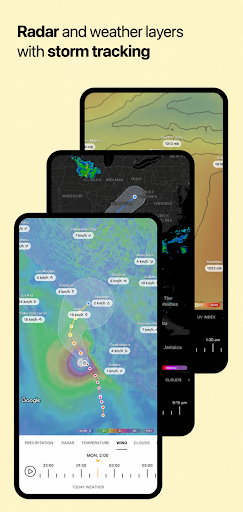
Weather Radar: Provides visual representations of weather patterns through supported radar sources. Users familiar with meteorological maps can use these visuals to examine approaching weather systems.
Having these indicators in one place makes Today Weather more than a basic temperature-checking tool. However, radar interpretation and environmental measurements may require additional knowledge, and some information depends on the availability of local data providers.
Today Weather offers several personalization options, allowing users to adjust the application’s appearance according to their preferences. You can experiment with different color schemes, backgrounds, wallpapers, and icon styles to create a more appealing interface. The settings also let you rearrange certain weather information so that the indicators you care about are easier to access.
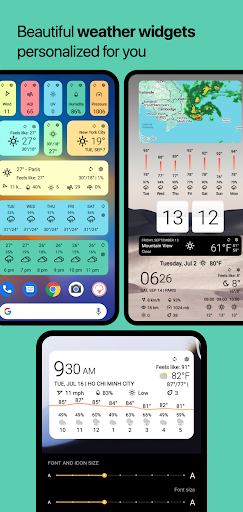
Another useful addition is its collection of home screen widgets. Instead of opening the application whenever you want to check the forecast, you can place selected information directly on your Android home screen. Some available widget designs include:
| Widget | Displayed Information |
|---|---|
| TW 04 1×1 | Basic daily temperature |
| TW 05 1×1 | Wind direction and speed |
| TW 26 1×1 | Current air quality |
| TW 09 4×1 | Weekly weather overview |
| TW 30 Radar 4×2 | Weather radar map |
These compact displays provide quick access to essential information while reducing the need to navigate through the application. You can choose different widget sizes depending on the available space and the type of forecast you want to monitor.
Today Weather provides basic forecasting functions for free, but certain advanced options may require a paid subscription. Premium access is designed for users who want additional customization and more flexibility when working with weather information.
Some of the advertised Premium benefits include:
Ad-Free Experience: Removes advertisements from the application, creating a cleaner interface and more comfortable browsing experience.
Additional Weather Sources: Unlocks more data providers, giving users greater flexibility when comparing forecasts and meteorological information.
Complete Icon Collection: Provides access to additional icon designs, allowing you to personalize the application’s appearance more extensively.
These additions are particularly useful for people who frequently monitor weather conditions and prefer having more control over how information is displayed.
The MOD edition of Today Weather highlights an unlocked Premium experience, allowing users to explore features normally associated with the paid subscription.
MOD Feature:
Premium Unlocked: Advertises access to premium functions, including an ad-free interface, additional weather sources, and expanded icon customization.
The exact availability of these features may depend on the modified APK build. Since this is an unofficial version, it may also differ from the original application in terms of compatibility, updates, and security. Weather information should be checked against trusted sources when making important decisions.
APKMODY provides a convenient place to find Android application packages. If you want to try Today Weather on your device, use this download checklist:
Find The App Page: Visit APKMODY and enter Today Weather MOD APK into the search function.
Inspect The Release: Open the matching result and review its version information, file size, and available MOD details.
Select The APK Package: Choose the appropriate download option displayed on the page and follow the provided instructions.
Save The File: Wait until the installation package has finished downloading before opening it.
Finish The Setup: Locate the APK through your file manager, review Android’s installation prompts, and proceed only if you trust the file source.
Start Checking The Forecast: Launch Today Weather after installation and configure your preferred location and weather settings.