
Flowx: Weather Map Forecast
v4.654
• Unlocked
| Updated On | |
|---|---|
| Google Play ID | com.weather.realinfo.really |
| Category | Weather |
| Version | 1.4.3 |
| Size | 67 MB |
| MOD Features | No Ads |
| Requires | Android 7.0 |
| Price | |
| Free | |
| Content Rating | |
| Everyone | |
| Internet Required | |
| Unknow | |

Nice Weather MOD APK makes it easier to prepare for changing weather with real-time updates, detailed forecasts, and convenient location tracking. Its minimalist interface keeps essential meteorological information within reach, helping you organize daily activities without dealing with unnecessary complexity. In this article, we will explore the app’s most useful features and show you how to download it through APKMODY.
Weather conditions can change unexpectedly, turning an ordinary day into an inconvenient experience if you are not prepared. Whether you are commuting to work, planning a weekend getaway, or arranging outdoor activities, having access to reliable forecasts makes a noticeable difference. A dedicated weather application helps you stay informed and adjust your schedule before unfavorable conditions interfere with your plans.
Nice Weather is designed for users who prefer straightforward weather information presented in an accessible format. Rather than overwhelming the screen with complicated charts and unnecessary details, the application prioritizes essential data, including temperature, rainfall, humidity, and wind conditions. Its combination of live updates, extended forecasts, and location-based information makes checking the weather a convenient part of your daily routine.
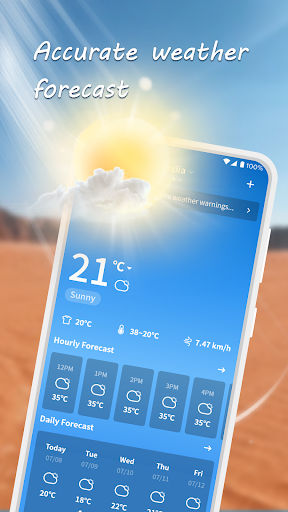
One of the most useful functions of Nice Weather is its ability to display current meteorological conditions. Whenever you open the application, the main screen presents important details such as actual temperature, feels-like temperature, cloud coverage, and precipitation. This information gives you a quick overview of the environment without requiring you to navigate through multiple menus.
The application also refreshes weather information regularly, helping you keep track of changing conditions throughout the day. If you are preparing to leave home or deciding whether an outdoor activity is still a good idea, these updates provide useful references for making timely decisions. Instead of relying on guesswork, you can check the latest available information directly from your phone.
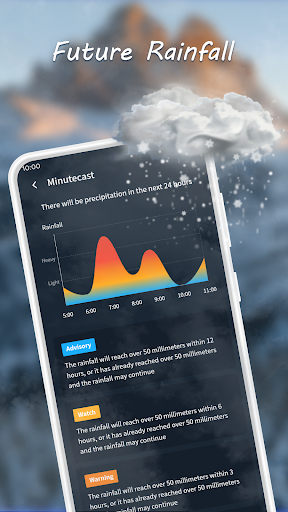
Looking beyond current conditions is equally important, especially when you have several appointments or activities scheduled throughout the week. Nice Weather provides a seven-day forecast that displays expected high and low temperatures, precipitation probabilities, wind speeds, and humidity levels. Having these details together makes it easier to recognize upcoming weather patterns and prepare suitable clothing or equipment.
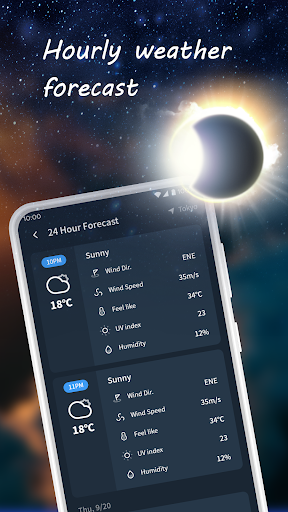
Another useful aspect is the ability to examine forecast information at different times of the day. You can check whether the morning is expected to remain sunny, whether showers might arrive around lunchtime, or whether stronger winds are likely in the evening. Such details are particularly helpful when organizing outdoor gatherings, commuting, or planning short trips. However, forecasts are estimates and may change as new meteorological data becomes available.
Traveling between different locations often means dealing with unfamiliar weather conditions. Nice Weather simplifies this process through location-based updates, allowing the application to display forecasts corresponding to your current area. With GPS access enabled, it can identify your position and retrieve relevant weather information without requiring you to enter a new city every time you move.
This functionality is particularly convenient for people who frequently travel for work, visit different cities, or spend considerable time outdoors. You can also follow weather conditions in other locations when preparing for an upcoming journey. By checking the destination’s forecast beforehand, you will have a better idea of what to expect and can make appropriate adjustments to your itinerary.
Not everyone prefers to view weather measurements in the same format. Nice Weather addresses this through several customization options that allow users to adjust how information appears on the screen. Depending on the available settings, you can switch between Celsius and Fahrenheit, change wind speed units, and save favorite cities for convenient access.
These small adjustments make the application more comfortable to use in different regions and situations. For example, travelers can choose familiar measurement units when visiting another country, while users monitoring multiple destinations can quickly switch between saved locations. The settings are arranged in an accessible manner, so personalizing the experience does not require much effort.
A weather application should make information easy to understand rather than turn a quick check into a complicated process. Nice Weather follows this principle with a minimalist layout that places important details, including temperature, sunlight, rainfall, wind, and humidity, in clearly organized sections. Its visual presentation helps users identify relevant information at a glance, even when they only have a few seconds to spare.
The application also uses horizontal scrolling to present hourly and daily forecasts. Instead of repeatedly opening different tabs, you can swipe across the screen to explore upcoming changes in weather conditions. Its color scheme is designed to maintain comfortable visibility in different lighting environments, while dynamic background appearances add a visual touch that complements the displayed weather information.
The modified version of Nice Weather provides an alternative experience for users who prefer accessing weather information without interruptions. It retains the application’s essential forecasting tools and straightforward interface while introducing an additional convenience for everyday use.
– No Ads: Removes advertising interruptions, allowing you to browse weather conditions and check forecasts with a cleaner, more comfortable experience.
Nice Weather brings together the essential tools needed to monitor daily weather conditions without making the experience unnecessarily complicated. From real-time temperature updates to seven-day forecasts and GPS-based location tracking, its features help you stay prepared for different situations. The ad-free MOD edition is also worth considering if you prefer checking weather information without promotional interruptions.
To install the application through APKMODY, follow this alternative guide:
Find the download area: Navigate to the Nice Weather download section on APKMODY and review the available Android package information.
Choose the MOD edition: Select the version labeled MOD APK to access the modified installation file.
Save the package: Start the download and wait until your browser confirms that the APK file has been saved successfully.
Install the application: Open your file manager, locate the downloaded package, and tap it to begin installation. Allow installation from the selected source if Android displays a permission request.
Set up your weather preferences: Launch Nice Weather, grant location access if needed, select your preferred temperature unit, and start checking forecasts.