

Nicegram: AI x Dual Telegram
v1.65.0
• Unlocked

| Updated On | |
|---|---|
| Google Play ID | org.thunderdog.challegram |
| Category | Social |
| Version | 12.2.10 |
| Size | 50 MB |
| MOD Feature | Not available |
| Requires | Android |
| Rating Score | |
| Price | |
| Free | |
| Content Rating | |
| Mature 17+ | |
| Internet Required | |
| Required | |

Telegram X APK offers an alternative way to enjoy Telegram’s messaging features through a streamlined interface and performance-focused design. Built around Telegram’s TDLib technology, the application aims to deliver smoother navigation, efficient resource usage, and seamless synchronization with your existing account. If you want to explore a different version of Telegram on Android, this app is worth a closer look.
Before exploring Telegram X, it helps to understand the messaging platform behind it. Launched in 2013 by brothers Nikolai and Pavel Durov, <Entity value=”Telegram” category=”mobile_app” disambig=”Instant messaging application”/> quickly gained recognition for its speed, privacy-focused communication tools, and support across multiple devices. Users can access their conversations through smartphones, tablets, and desktop computers without being restricted to a single platform.
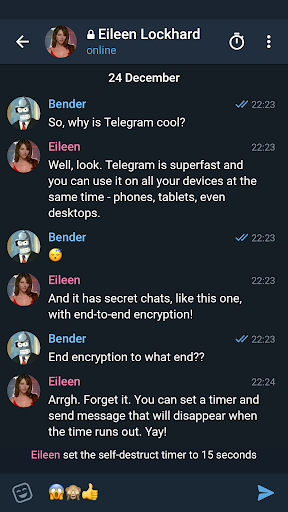
Telegram also provides a broad collection of communication features. These include large group chats, file sharing, cloud-based message synchronization, and Secret Chats with additional privacy protections. Many of these tools are available without requiring a paid subscription, making Telegram an attractive option for everyday communication.
Telegram X originally emerged as an experimental project designed to explore alternative ways of building and improving the messaging experience. Rather than introducing experimental changes directly into the main application, Telegram could use this separate client to evaluate new interface ideas, performance improvements, and interaction methods.
Over time, Telegram X developed into an alternative Telegram client with its own identity. Its main appeal shifted toward a lightweight design, smooth navigation, and a different approach to displaying conversations. Although it shares much of Telegram’s core functionality, the two applications do not always receive identical features or updates at the same time.
One of Telegram X’s defining characteristics is its use of TDLib, short for Telegram Database Library. This technology provides the application with a foundation for handling important messaging operations, including network communication, data processing, local storage, and synchronization.
By relying on this library, Telegram X can focus on delivering a responsive interface while using Telegram’s underlying infrastructure for essential tasks. The result is an alternative experience that emphasizes speed and usability rather than introducing an entirely different messaging service.
TDLib is a development library created by Telegram to help developers build applications that communicate with the Telegram network. It handles many complex operations behind the scenes, reducing the amount of core messaging functionality that individual clients need to implement themselves.
This approach can simplify development and allow teams to spend more time improving interface design and application-specific features. For users, the main benefit is a messaging client built on established Telegram technology rather than a completely independent communication system.
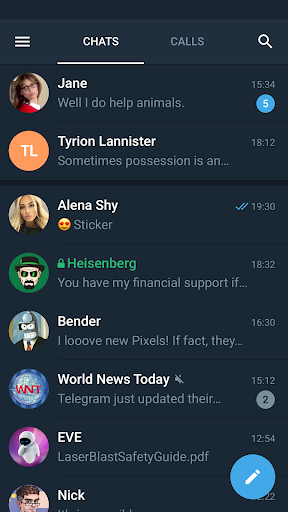
Telegram X places considerable emphasis on its visual presentation and interaction design. Its interface uses a relatively minimalist layout, helping users move between conversations and navigate common functions without unnecessary visual clutter.
The application also includes interface behaviors that distinguish it from the standard Telegram client. Depending on the version, users may notice differences in animations, gestures, and chat navigation. These details make Telegram X appealing to people who prefer a more fluid and simplified messaging environment.
A lightweight interface can help reduce unnecessary processing during everyday navigation. Telegram X is designed with performance in mind, aiming to provide responsive interactions without placing excessive demands on the device.
However, actual battery consumption and memory usage depend on several factors, including your Android version, device hardware, network conditions, and messaging activity. It is therefore better to view Telegram X as a performance-oriented alternative rather than assume it will always consume less power or storage than the original application.
One convenient aspect of Telegram X is its integration with the Telegram account system. After signing in with the same account, users can access their cloud-based conversations, contacts, and other synchronized information without manually transferring everything from one application to another.
This makes switching between Telegram and Telegram X relatively straightforward. For example, you can use the standard client on one occasion and open Telegram X when you want to experience its alternative interface. Your cloud conversations remain associated with the same account.
Keep in mind that some information, particularly content stored locally or protected by device-specific settings, may not behave exactly like regular cloud chats. Secret Chats, for example, are device-specific and should not be expected to synchronize between separate clients in the same way as ordinary conversations.
Although Telegram X offers an interesting alternative, it does not necessarily provide a better experience in every situation. Its development history and update schedule mean that some features available in the standard Telegram application may arrive later or remain unavailable in Telegram X.
Telegram’s main application generally receives new features and improvements through its regular development cycle. Telegram X does not always follow the same release schedule, so users may have to wait before certain updates become available.
This difference matters if you rely on specific tools for communication, productivity, or managing groups. Before making Telegram X your primary messaging client, check whether the functions you regularly use are supported in its current version.
Like other applications, Telegram X may occasionally encounter technical problems. Differences in its implementation, Android compatibility, or development priorities can lead to unexpected behavior on certain devices.
Most users may never encounter serious issues, but it is still useful to have an alternative available. If a particular feature stops working or the application becomes unstable, you can return to the official Telegram client while waiting for an update. Keeping both applications available also gives you more flexibility when comparing their performance.
You can check the Telegram X APK listing on APKMODY to find the available Android package. Before installing it, make sure you understand the source and version details. The setup process can be completed through the following checklist:
Check compatibility: Review the listed Android requirements and confirm that your device supports the available version.
Choose the package: Open the Telegram X page on APKMODY and inspect the provided version information before downloading.
Download the APK: Select the appropriate download option and allow the installation file to finish saving to your device.
Prepare Android settings: If Android blocks the installation, open your device settings and grant permission to install applications from the browser or file manager you used.
Complete installation: Find the downloaded APK, tap it, and follow the prompts displayed on your screen.
Sign in and synchronize: Launch Telegram X, enter your Telegram account details, and complete the verification process to access your cloud conversations.