home chevron_right Apps chevron_right Music & Audio chevron_right Symfonium


Vocal Remover – Musiclab
v2.5.6
• Unlocked
| Updated On | |
|---|---|
| Google Play ID | app.symfonik.music.player |
| Category | Music & Audio |
| Version | 15.1.0 |
| Size | 29 MB |
| MOD Features | Premium Unlocked |
| Requires | Android |
| Price | |
| Free | |
| Content Rating | |
| Everyone | |
| Internet Required | |
| Unknow | |

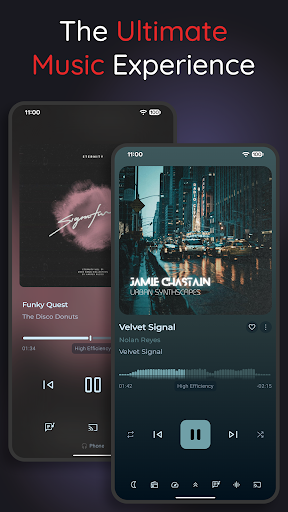
Symfonium MOD APK offers a convenient way to organize and enjoy your favorite music without being restricted to a single storage location or streaming platform. Developed by Tolriq Genimee and officially released in 2022, this music player supports local audio collections, cloud storage, and remote media servers. With advanced sound customization, multiple interface layouts, and broad device compatibility, it provides a flexible listening experience for music enthusiasts.
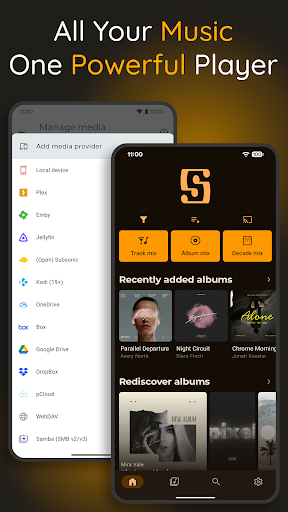
Popular services such as Spotify, Apple Music, and Amazon Music have made digital listening more accessible than ever. However, managing personal audio collections across multiple devices and storage platforms can still be inconvenient. Symfonium approaches this problem differently by allowing you to connect various music sources and access compatible content through one centralized interface.
When setting up the application, you can choose where your music is stored and configure the corresponding media connections.
Local Storage: Symfonium can scan audio files saved directly on your Android device. You can select specific folders containing your music or let the application search broader storage locations. Choosing dedicated music directories is generally more convenient because it prevents unrelated audio recordings from appearing in your library.
Media Servers And Cloud Storage: The application supports media platforms such as Plex and Emby, alongside cloud services including OneDrive, Box, Google Drive, and Dropbox. Network storage connections through WebDAV and Samba are also available, making it easier to access music collections stored on other devices or remote servers.
This centralized approach is particularly useful if you maintain separate music libraries across smartphones, computers, external storage, and online services. Instead of repeatedly switching applications, you can manage compatible sources from a single music player.
Beyond organizing music, Symfonium provides a collection of playback features designed to improve listening quality and accommodate different audio preferences. Its compatibility with numerous formats makes it suitable for users who maintain diverse music libraries, including high-resolution recordings and compressed audio files.
Some notable playback capabilities include:
Gapless Playback: Moves between consecutive tracks without unwanted pauses, making albums and continuous mixes more enjoyable.
Silence Skipping: Automatically skips silent portions where supported, helping maintain a smoother listening session.
ReplayGain: Adjusts playback volume between tracks to reduce noticeable differences in loudness.
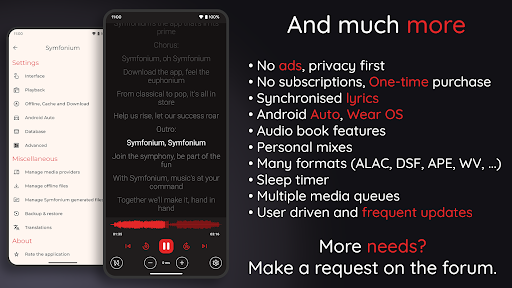
Broad Audio Compatibility: Supports popular formats such as ALAC, FLAC, AAC, Opus, DSD, WMA, APE, MP3, and MP4/M4A.
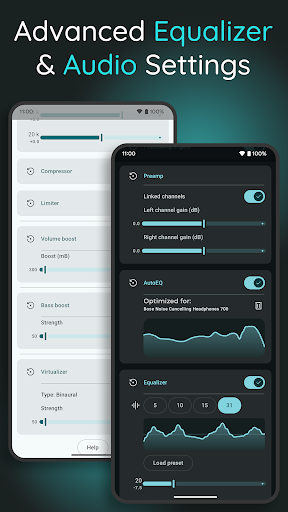
Professional Equalizer: Offers detailed sound adjustments through manual EQ controls, allowing you to customize frequencies according to your headphones and musical preferences.
AutoEQ Profiles: Provides access to more than 4,000 optimized headphone profiles, helping users find suitable audio settings without manually adjusting every parameter.
The application also places considerable emphasis on headphone compatibility. With the appropriate playback configuration, you can fine-tune your listening experience to suit different audio equipment rather than relying entirely on default sound settings.
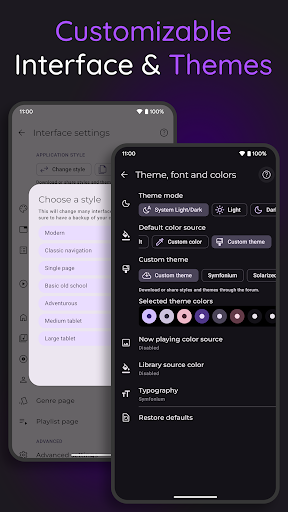
A music player’s layout can influence how quickly you find albums, playlists, and favorite tracks. Symfonium addresses this by offering several interface styles instead of forcing everyone to use the same navigation structure. You can switch between different arrangements depending on your screen size and preferred browsing habits.
The available styles include:
Modern: Features a contemporary appearance with a clean layout and clearly arranged navigation elements.
Universal: Uses relatively compact icons to display more information without making browsing unnecessarily complicated.
Classic Navigation: Organizes music categories into familiar sections, similar to traditional music player applications.
Single Page: Places different content categories into one vertically arranged screen for quick access.
Basic Old School: Offers a more compact layout that prioritizes frequently accessed music and personal favorites.
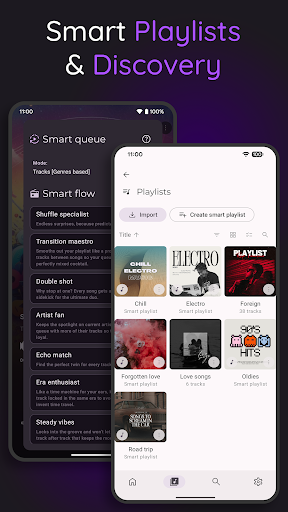
Adventurous: Introduces randomly suggested songs and albums to make music discovery more spontaneous.
Medium Tablet And Large Tablet: Provides layouts adapted to larger displays, allowing tablet users to make better use of available screen space.
These options give you greater control over the overall appearance of the application. Whether you prefer a traditional library structure or a more modern browsing experience, there is a layout to suit different listening habits.
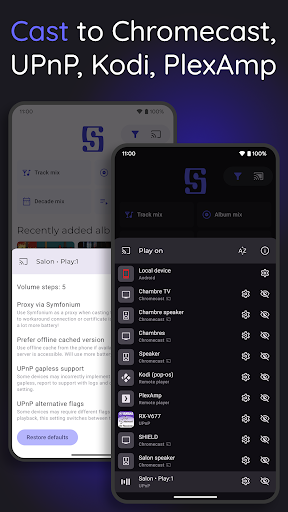
Symfonium is not limited to playing audio through your smartphone’s built-in speakers. The application supports several external devices and connected platforms, allowing you to enjoy music through different listening environments.
External Audio Equipment: Connect compatible speakers, televisions, and sound systems to enjoy music through larger audio setups.
Android Auto: Access supported music controls through your vehicle’s compatible infotainment system.
Wear OS: Control music playback through compatible smartwatches, making listening more convenient during daily activities.
Android TV: Use a dedicated television interface when accessing the application on supported Android TV devices.
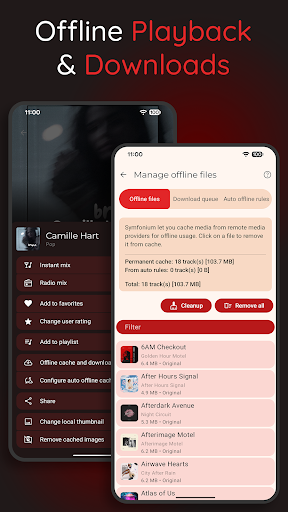
Offline Listening: Play compatible music through locally stored or cached content without requiring a continuous internet connection for every playback session.
Online Radio: Explore internet radio stations and enjoy additional audio content whenever an internet connection is available.
These integrations make Symfonium suitable for more than casual smartphone listening. You can move between different devices while maintaining convenient access to your music collection, provided the relevant hardware and services are supported.
Despite its extensive functionality, Symfonium is not necessarily the ideal choice for every Android user. Its advanced tools and extensive configuration options come with a few inconveniences worth considering.
Advantages:
Combines music from local storage, cloud platforms, and compatible media servers.
Supports a wide selection of audio formats, including lossless options.
Provides advanced equalizer settings and extensive AutoEQ profiles.
Offers multiple interface layouts for different screen sizes.
Integrates with Android Auto, Wear OS, and Android TV.
Supports offline playback and external audio equipment.
Disadvantages:
Access to the full range of features requires purchasing the application.
The licensing verification and restoration process may occasionally encounter problems, depending on the device or installation.
Certain online functions and license-related operations require an internet connection, even though locally available music can be played offline.
Compatibility and performance may vary across Android devices.
Background playback and continuous media synchronization may consume considerable battery power on some devices.
The large number of settings can make the application challenging for first-time users.
The modified edition of Symfonium advertises an unlocked Premium feature, allowing users to access premium functionality without following the application’s standard payment process. This may appeal to people who want to explore its advanced playback controls, customization options, and music management tools.
However, MOD APK files are modified versions rather than official releases from the developer. Their functionality, licensing behavior, and compatibility may differ from the original application. You should also consider potential security risks before installing an unofficial package.
Symfonium stands out by bringing music from different storage locations and media platforms into one flexible listening environment. Its advanced equalizer, extensive audio compatibility, customizable layouts, and device integrations make it a compelling option for people who want greater control over their music libraries. If you are interested in exploring the modified edition, you can look for Symfonium MOD APK through APKMODY.
Use this alternative installation method to get started:
Open the APKMODY website through your preferred browser on Android.
Browse to the application search section and enter Symfonium MOD APK.
Open the matching result and inspect the application description, available release, and Premium Unlocked information.
Navigate to the download area and select the APK package compatible with your device.
Once the file has been saved, open your Android file manager and locate the downloaded package.
Check the file before proceeding. If Android requests permission to install applications from your browser or file manager, enable it only if you trust the source.
Complete the installation by following the on-screen instructions, then launch Symfonium and configure your preferred music sources.