home chevron_right Apps chevron_right Photos & Videos chevron_right Remini
mcpro24fps
v044
• Photos & Videos








| Updated On | |
|---|---|
| Google Play ID | com.bigwinepot.nwdn.international |
| Category | Photos & Videos |
| Version | 3.7.1481.202527002 |
| Size | 247 MB |
| MOD Features | Premium Unlocked |
| Requires | Android 7.0 |
| Rating Score | |
| Price | |
| Free | |
| Content Rating | |
| Everyone | |
| Internet Required | |
| Required | |

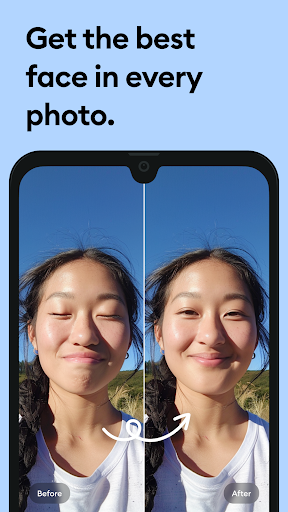
Remini APK helps Android users improve the appearance of old, blurry, and low-quality pictures through AI-powered editing tools. The application can sharpen facial details, restore damaged photographs, add color to selected black-and-white images, and enhance compatible video clips. Its automated processing makes photo restoration accessible without requiring advanced editing knowledge. Whether you want to preserve family memories or improve pictures for social media, Remini offers several practical tools to explore.
Give old memories a clearer and more polished appearance!
Remini is an AI-powered photo and video enhancement application launched in 2019. It analyzes visual information in uploaded media and attempts to reconstruct details that may be difficult to recognize in the original files.
The app is particularly useful for portraits, old photographs, and images affected by low resolution or compression. Instead of manually adjusting multiple editing parameters, users can select an enhancement tool and let the AI process the content automatically.
Old photographs often lose their original quality because of scratches, fading, moisture, or improper storage. Remini provides restoration tools that can improve these images by sharpening visible details and refining facial features.
Selected black-and-white photographs can also be colorized through AI processing. This creates a more modern appearance while preserving the general composition of the original picture. However, generated colors may not accurately represent the photograph’s original tones, so the result should be treated as an enhanced interpretation rather than an exact restoration.
Pictures captured with older smartphones or compressed before sharing may appear soft, pixelated, or lacking in detail. Remini uses AI processing to improve their clarity and make important elements more noticeable.
For instance, a low-resolution image around 360p may receive an enhancement intended to produce a clearer, higher-resolution result. The actual output depends on the original file, and processing cannot always recover details that were never captured.
This feature is useful when you want to improve old portraits, social media pictures, or other images that need a little visual refinement.
Remini also offers enhancement tools for compatible video clips. Users can select footage from their devices and apply AI processing to make certain details appear sharper.
Video enhancement requires more processing than editing a single photograph because multiple frames must remain visually consistent. Consequently, results can vary depending on resolution, lighting, movement, and compression. Clips with severe blur or poor exposure may still retain some visual imperfections after editing.
Once an image has been processed, you can save the result to your device or share it through supported social platforms and messaging applications. This makes it convenient to send restored family photographs to relatives or post improved portraits online.
Remini also provides account options that may include supported sign-in methods such as Google or Facebook, depending on the current version. Before uploading personal photographs, remember to review the app’s privacy information and consider which images you want to process.
The Remini MOD APK is an unofficial modified release that claims to provide access to selected Premium features. Its functionality may differ from the official application, depending on the package version and device compatibility.
Premium Unlocked: Claims to provide broader access to paid photo and video enhancement tools.
Extended Editing Access: May reduce certain restrictions associated with premium functions, depending on the specific build.
Keep in mind that not every modified version includes the same features. AI Lab tools are not necessarily unlocked, so check the release information before installation. Unofficial APK files may also introduce security risks and should be scanned before use.
Remini uses AI to enhance blurry pictures, restore old photographs, improve low-resolution images, and colorize selected black-and-white photos. It also offers tools for processing compatible videos.
Yes. The application can attempt to sharpen low-quality images and generate a clearer result. However, the outcome depends on the source file, and enhancement does not guarantee that every missing detail can be recovered.
Yes. Remini includes tools for improving compatible video clips. Processing quality may vary according to the footage’s resolution, lighting, movement, and compression level.
The app can improve photographs affected by fading, scratches, blur, and other quality issues. It can also generate color for selected black-and-white images, although the reconstructed details and colors may not perfectly match the original photograph.
Yes. Android users can install Remini on compatible devices and process photos directly from their phones. Performance may depend on the operating system, available storage, hardware, and internet connection.
Remini offers paid features that expand the available editing experience. Subscription prices, usage limits, and included tools can change depending on the region and application version. Check the latest details in the official app before purchasing a plan.
Remini is a useful option for anyone who wants to restore old memories or improve everyday photographs without complicated editing software. Its AI enhancement tools cover portraits, low-resolution images, and selected videos, making the application suitable for different creative needs.
To get the APK, visit APKMODY and search for Remini. Review the available release, Android requirements, and package details before choosing the download option. After the file is saved, open it on your device and follow the installation prompts. If you choose a modified version, scan the package with a trusted security tool and check its requested permissions before proceeding.