

ImageSearchMan – Image Search
v3.73
• Unlocked
| Updated On | |
|---|---|
| Google Play ID | com.emanuelef.remote_capture |
| Category | Tools |
| Version | 2.0.2 |
| Size | 9 MB |
| MOD Features | Premium |
| Requires | Android 6.0 |
| Price | |
| Free | |
| Content Rating | |
| Everyone | |
| Internet Required | |
| Unknow | |

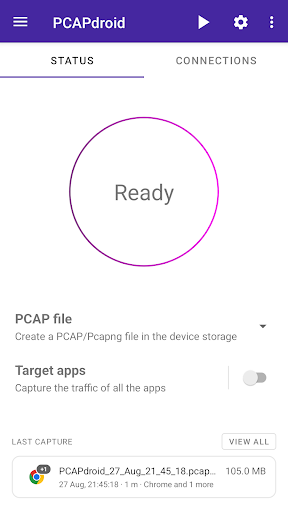
PCAPdroid – network monitor is an open-source network monitoring tool for Android that helps users track, analyze, and control network connections created by applications on their devices. It can capture traffic without root access by creating a local VPN interface instead of sending data through a remote VPN server. The app provides detailed connection information, traffic statistics, PCAP recording, HTTP inspection, TLS analysis, and optional firewall and malware detection features. This makes it useful for users who want to understand what their Android applications are doing on the network.
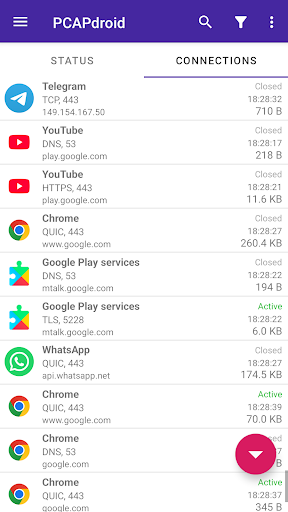
The main purpose of PCAPdroid is to show network activity generated by user and system applications. Instead of viewing the connection as an invisible background process, users can examine which applications communicate with remote servers. The app can provide information such as remote IP addresses, DNS queries, SNI data, and HTTP URLs.
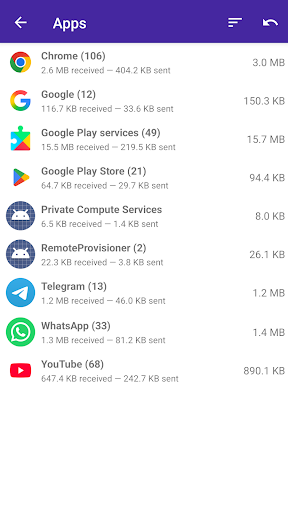
PCAPdroid can also summarize how much data each application sends and receives. This can help users investigate unusual traffic, understand data usage, or identify applications that maintain frequent network connections. The app can operate continuously while keeping battery consumption relatively low according to its Google Play description.
One of the important features of PCAPdroid – network monitor is its ability to capture Android traffic without root access. It simulates a VPN locally to intercept and process network traffic on the device. Unlike a conventional VPN service, the application does not rely on a remote VPN server for this capture process.
This approach makes the app more accessible to ordinary Android users. Advanced users can also use rooted devices for additional capture scenarios, including capturing traffic while another VPN application is running.
PCAPdroid can record captured traffic into PCAP files for later analysis. Users can also stream traffic through PCAP-over-IP to another computer for real-time inspection with tools such as Wireshark. Additional application metadata can be included with recorded traffic, making the files more useful for troubleshooting and security analysis.
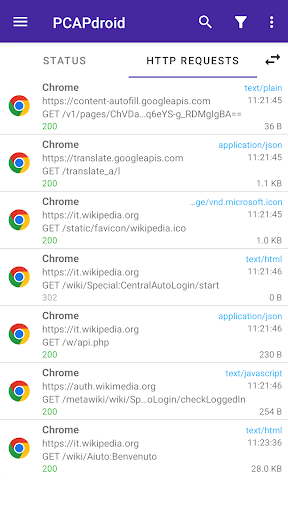
The application includes built-in decoders for inspecting HTTP requests and replies. Depending on the configuration, users can examine connection payloads and export HTTP information to HAR files. These functions can be useful when developers need to troubleshoot application communication or when advanced users want to understand network behavior.
For more advanced analysis, PCAPdroid can decrypt HTTPS and TLS traffic when the required configuration is available. It can extract URLs and save an SSLKEYLOGFILE for supported analysis workflows. This feature requires more technical knowledge because encrypted traffic inspection involves certificates and application security restrictions.
The app can also identify the country and Autonomous System Number of remote servers through offline database lookups. These details provide additional context when investigating connections to unfamiliar infrastructure.
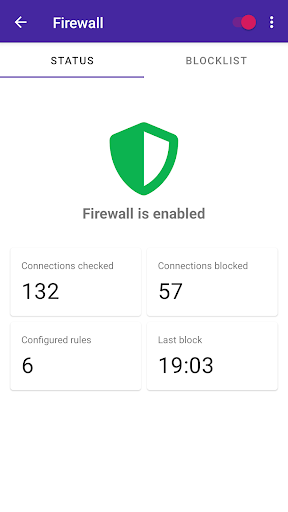
PCAPdroid also includes optional security features. Its firewall can create rules for blocking individual applications, domains, and IP addresses. This gives users more control over which connections are allowed from the device.
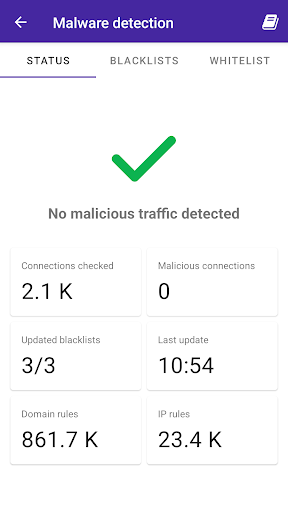
A malware detection feature can use third-party blacklists to identify potentially malicious connections. These tools should be treated as additional security aids rather than complete replacements for dedicated security software. The paid features also include PcapNG support, which can simplify the export and analysis of decrypted traffic.
Install PCAPdroid – network monitor and start a capture session from the main interface. Android will request permission to create the local VPN connection used for traffic capture. Once monitoring begins, browse the device normally and return to PCAPdroid to review the recorded connections. Select an application or connection to inspect its network activity, remote hosts, IP addresses, and available protocol information.
For deeper analysis, save the capture as a PCAP file or stream it to a computer running Wireshark. Advanced users can explore HTTP and TLS inspection after configuring the required certificates or addons. If firewall functionality is enabled, create rules carefully and test them with individual applications or domains.
PCAPdroid – network monitor provides a powerful set of network analysis tools directly on Android. Its no-root traffic capture, application-level connection logs, PCAP export, HTTP inspection, TLS analysis, and optional firewall make it suitable for both troubleshooting and advanced network investigation. The local processing approach also gives users a way to inspect traffic without relying on a remote VPN server. Recent updates have continued to improve Android compatibility, capture management, firewall functionality, and TLS-related components. For users who want detailed visibility into Android network activity, PCAPdroid offers a flexible environment for monitoring and analyzing connections.