home chevron_right Apps chevron_right Productivity chevron_right iHour

Jnotes:Note-Taking&Editor PDF
v3.6.4.2-gp
• Premium
| Updated On | |
|---|---|
| Google Play ID | com.clover.ihour |
| Category | Productivity |
| Version | 7.5.1 |
| Size | 99 MB |
| MOD Feature | Not available |
| Requires | Android 5.0 |
| Price | |
| Free | |
| Content Rating | |
| Everyone | |
| Internet Required | |
| Unknow | |

iHour APK offers a practical way to record the time you dedicate to personal development, whether you’re learning an instrument, studying a foreign language, drawing, or building better daily habits. Rather than functioning as an ordinary stopwatch, the app turns every practice session into measurable progress through milestones, detailed records, and achievement rewards. With a clean interface and flexible tracking options, iHour gives you a motivating space to stay committed to the activities that matter most.
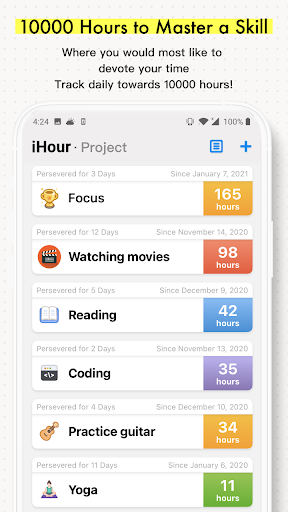
One of iHour’s central ideas revolves around the famous 10,000-hour concept popularized by Malcolm Gladwell in Outliers. This theory suggests that reaching an exceptional level of expertise requires extensive deliberate practice. Although the figure isn’t a universal scientific rule for mastering every discipline, it provides an interesting reference point for anyone who wants to take personal improvement seriously.
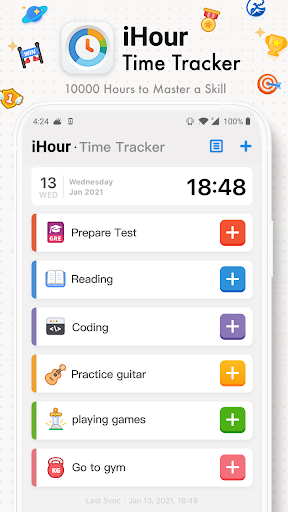
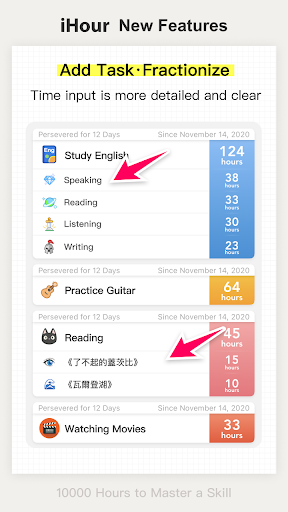
Whenever you add a new skill, iHour creates a dedicated progress tracker with 10,000 hours as its long-term target. Instead of leaving you overwhelmed by such a massive number, the application divides your journey into smaller checkpoints, including 1, 10, 50, 100, 200, and 500 hours. Reaching these stages triggers celebratory visual effects, giving you a reason to appreciate every achievement along the way.
More importantly, you’re not restricted to professional ambitions or complicated learning programs. Practicing the ukulele, improving your handwriting, reading regularly, or developing a consistent sleep schedule can all become individual activities. You decide what deserves attention, while iHour helps transform those intentions into a record of consistent effort.
iHour keeps its visual presentation straightforward without sacrificing personalization. When creating a skill, you can choose from nearly 40 colors and various icons to distinguish one activity from another. This makes it easier to recognize your priorities at a glance, especially when managing several interests simultaneously.
The main dashboard organizes your activities into colored progress bars accompanied by completion percentages. As you accumulate practice hours, these indicators gradually expand, providing an immediate overview of your development. The uncluttered layout also avoids unnecessary distractions, allowing you to concentrate on recording your efforts instead of navigating complicated menus.
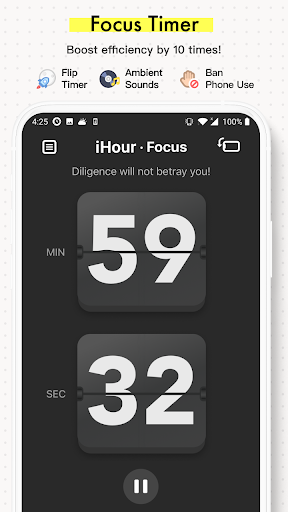
Keeping an accurate practice history is straightforward thanks to two recording methods: manual entry and a built-in timer. You can start the timer before an activity or enter the duration afterward, depending on how you prefer to organize your routine. Manual records also let you select a specific date, making it convenient to update sessions that weren’t logged immediately.
Each entry supports additional descriptions, so you can document what happened during a particular practice period. For example, language learners might record the lesson they completed, while musicians can identify the songs or techniques they worked on. Emojis, line breaks, and bullet points are also supported, giving you room to organize notes in a way that feels natural.
If you make a mistake, individual records can be edited or deleted without rebuilding your entire history. There’s also an Excel import option for bringing existing tracking data into the application, which is particularly helpful when transitioning from spreadsheets or other time-management tools.
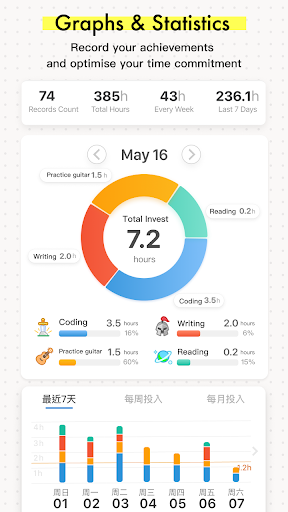
Recording hours becomes much more meaningful when you can understand how they’re distributed. iHour includes a statistics section that summarizes the time spent on individual skills as well as your overall practice activities. Rather than relying on memory, you can use these figures to evaluate your routine and identify areas that deserve more attention.
The statistical overview features weekly and monthly bar charts alongside average daily practice time. These visual reports make it easier to recognize consistent patterns, compare different periods, and determine whether you’re maintaining your intended schedule. Even when your progress slows down, having a clear record helps you appreciate the work you’ve already completed.
Staying motivated is often harder than starting a new activity, particularly when your schedule becomes busy. To address this problem, iHour allows you to configure reminders at specific times of the day. You might choose an evening notification to remind yourself to practice piano, review vocabulary, or spend a few minutes reading.
These alerts provide a simple prompt to return to your goals without turning personal development into an overwhelming obligation. Combined with the progress dashboard and historical records, the reminder system helps establish a more predictable routine while leaving you in control of your schedule.
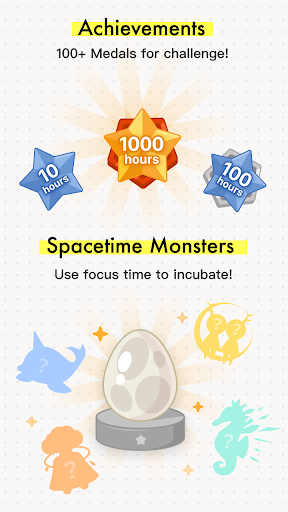
Beyond tracking numbers, iHour introduces an achievement system that recognizes different aspects of your commitment. You can unlock badges by accumulating practice hours, maintaining consecutive logging streaks, or recording activities on special occasions such as Christmas Day.
Every unlocked achievement appears in a dedicated section with its own decorative icon. Although these rewards don’t unlock additional tools or change the application’s core functionality, they offer a satisfying way to recognize personal accomplishments. Looking back at your collection can also remind you how much effort you’ve invested, especially during periods when progress feels less noticeable.
If you want to organize your learning schedule and keep a record of every practice session, downloading iHour for Android is a convenient starting point. Follow these steps to find the application through APKMODY:
Open the APKMODY website using your Android browser.
Enter iHour APK in the search bar and select the corresponding application page.
Review the available app information, then tap the download option to obtain the APK file.
Once the download finishes, open the file and follow Android’s installation instructions. If prompted, allow installation from the relevant source in your device settings.
Launch iHour, create your first skill category, and start recording your progress.