

Stargon Browser
v6.5.4
• Utilities
| Updated On | |
|---|---|
| Google Play ID | com.tafayor.hibernator |
| Category | Utilities |
| Version | 2.57.0 |
| Size | 23 MB |
| MOD Features | Pro Unlocked |
| Requires | Android 7.0 |
| Price | |
| Free | |
| Content Rating | |
| Everyone | |
| Internet Required | |
| Not Required | |

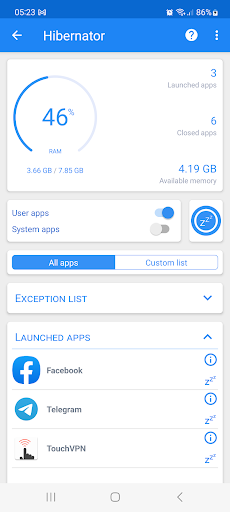
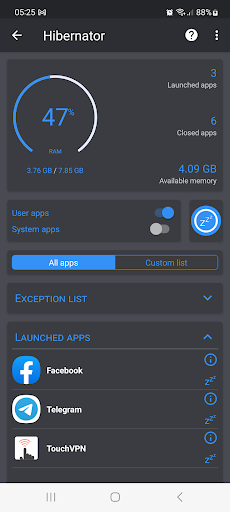
Hibernator is a utility application designed to help Android users manage running applications and reduce unnecessary background activity. By automatically closing selected apps when the screen turns off, it makes routine device maintenance more convenient while helping free up memory and reduce CPU workload. With customizable automation and support for managing both user and system applications, Hibernator offers a practical way to keep your phone organized.
Modern smartphones allow users to switch between numerous applications, run background services, and perform multiple tasks simultaneously. Although these capabilities make everyday activities more convenient, some applications continue running after you have finished using them. Depending on their background activity, they may consume memory, processing resources, and battery power unnecessarily.
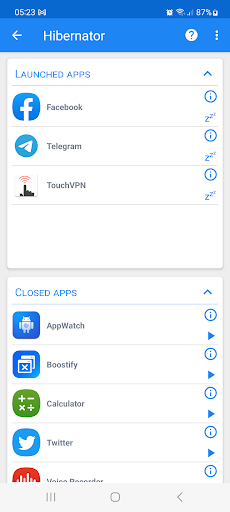
Hibernator addresses this situation by providing a centralized way to stop running applications. Instead of opening the recent apps screen and closing programs individually, you can use this application to perform the process more conveniently. It also supports automatic app closing when your phone’s screen turns off, reducing the need for repeated manual actions.
The main function of Hibernator is to put applications into a stopped or inactive state by closing their running processes. You can choose to manage applications manually or configure automatic operations based on your preferences. This is particularly useful when several programs remain active even though you no longer need them.
Its main benefits include:
Improve device responsiveness: Reduce unnecessary background activity that competes for system resources.
Free up memory: Close supported applications to release RAM for other tasks.
Manage battery consumption: Limit battery usage caused by applications that continue performing background activities.
Reduce CPU workload: Stop unnecessary processes that may contribute to device heating.
Keep in mind that the actual results depend on your Android version, device configuration, and the applications being managed. Some apps may restart automatically because they rely on background services or scheduled activities.
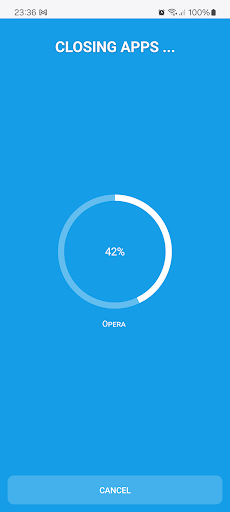
One of Hibernator’s most convenient features is its ability to close multiple running applications without requiring you to handle each one separately. After configuring the necessary permissions, you can initiate the process through the app and let it handle supported closing operations.
The application can manage both installed user applications and certain system apps, depending on Android restrictions and the permissions granted. It also provides options related to widgets, shortcuts, and application management, helping you organize which processes should remain active.
Another useful capability is automatic closing when the screen turns off. Once enabled, Hibernator can perform its configured operations whenever you stop using your phone. This helps reduce the number of applications left running in the background, especially when you frequently forget to close them yourself.
When too many applications perform background operations simultaneously, they can compete for processing resources and memory. Although modern Android devices are designed to handle multitasking efficiently, certain applications may continue consuming resources even when they are not actively being used.
Hibernator helps address this issue by stopping supported processes that you no longer need. Freeing up memory can make additional resources available for your current activities, while reducing unnecessary CPU usage may also help limit heat generation under certain conditions.
The application can additionally automate the closing process whenever the screen turns off, so you do not have to repeat the same maintenance routine throughout the day. However, closing background apps does not always improve performance or battery life because Android already manages memory automatically. Some applications may also consume additional resources when repeatedly restarted, so it is worth selecting which apps should be included in your configuration.
Hibernator is particularly useful for people who find repetitive screen interactions inconvenient. Closing several applications individually can become a frustrating routine, especially when performed frequently throughout the day.
With its automation capabilities, the app reduces the number of manual steps required to manage running applications. You can configure the desired behavior in advance and allow Hibernator to carry out supported actions automatically. This may be helpful for users with limited mobility, muscle fatigue, or difficulty performing repeated touchscreen interactions.
Nevertheless, automation requires certain accessibility-related permissions to recognize interface elements and perform actions. Because these permissions may provide access to information displayed on your screen, you should understand what they allow before enabling them. Avoid entering sensitive information while using features that require interface observation, and only grant permissions that you are comfortable providing.
To perform automatic application management, Hibernator needs access to several Android system features. These permissions allow it to interact with the interface and complete operations that would otherwise require manual input.
The main permissions described for the application include:
| Permission | Purpose |
|---|---|
| Accessibility access | Allows the app to inspect interface content, locate relevant system controls, and perform supported interactions. |
| Display over other apps | Allows Hibernator to show its interface or overlays during the closing process. |
| Modify system settings | Allows supported system adjustments, including turning off the screen after completing certain operations. |
These permissions are important for understanding how the automation works. In particular, accessibility access can expose information displayed in applications, so review the permission description carefully before granting it.
You should also remember that Android applies restrictions to background processes and system applications. Consequently, certain closing functions may behave differently depending on your device manufacturer and operating system version.
For users who want to explore the premium experience, the MOD version of Hibernator offers an alternative installation option. According to the provided modification information, this edition includes:
Pro Unlocked: Unlocks the Pro features of the application, providing access to its premium functionality.
The MOD version focuses on unlocking existing application features rather than introducing an entirely different app experience. Specific functions and compatibility may vary depending on the APK build.
Getting Hibernator onto your Android device through APKMODY is straightforward. Follow this installation checklist to find the correct package and complete the setup.
1. Locate the application
Open your preferred web browser and visit APKMODY. Use the website’s search function to find the Hibernator download page.
2. Review the available editions
Check the application information and available versions. Choose the regular APK if you prefer the original experience, or select the MOD edition with Pro Unlocked if that is your preference.
3. Download the installation package
Tap the corresponding download link on APKMODY. Wait until the APK file has been saved successfully to your device.
4. Prepare Android for installation
If your phone blocks the installation, open Settings and find the option that allows your browser or file manager to install unknown applications. Enable permission for the relevant source.
5. Install and configure Hibernator
Open the downloaded APK file and follow the installation prompts. After launching the application, review its instructions and grant only the permissions required for the functions you intend to use.
6. Set up automatic app management
Choose the applications you want Hibernator to manage, then configure automatic closing when the screen turns off if needed. Test the settings to ensure important applications continue working as expected.