
Location Changer
v3.58
• Pro Unlocked
| Updated On | |
|---|---|
| Google Play ID | com.gaminik.i18n |
| Category | Utilities |
| Version | 6.0.1 |
| Size | 88 MB |
| MOD Feature | Not available |
| Requires | Android 8.0 |
| Price | |
| Free | |
| Content Rating | |
| Everyone | |
| Internet Required | |
| Required | |

Struggling to understand foreign-language content while reading comics, browsing websites, or playing games? Gaminik: Auto Screen Translate offers a convenient solution by translating text directly on your smartphone screen without constantly switching between applications. With floating translation controls, automatic text recognition, and support for numerous languages, this tool makes exploring unfamiliar content much easier.
Language barriers can make even simple activities frustrating, especially when your favorite games, stories, or online resources are unavailable in your native language. Copying individual sentences into a translation application is one possible solution, but repeating this process can interrupt your experience.
Gaminik: Auto Screen Translate was developed to address this inconvenience through real-time screen translation. Released in 2022, the application provides several tools for recognizing and converting visible text into your preferred language. Its main advantage is the ability to work alongside other applications, making it particularly useful for people who regularly interact with foreign-language content.
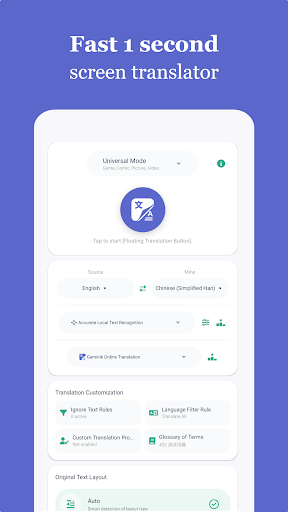
One of Gaminik’s most convenient features is its floating translation window. Instead of taking screenshots, copying sentences, and opening another application, you can keep a small translation control visible while using your phone.
Once the necessary permissions are enabled, the floating icon can operate over supported applications. Simply tap or double-tap the control, depending on the selected mode, to initiate text recognition and display the translated content. This approach reduces unnecessary switching between screens and helps you maintain your current activity.
Whether you are reading an online article or exploring a game with unfamiliar dialogue, the floating window provides a more direct way to understand what appears on your display.
Gaminik does more than convert ordinary text into another language. It includes several translation methods designed for different types of content and user preferences. You can choose a suitable approach depending on whether you want to translate an entire screen, a specific passage, or text contained in an image.
Some notable options include:
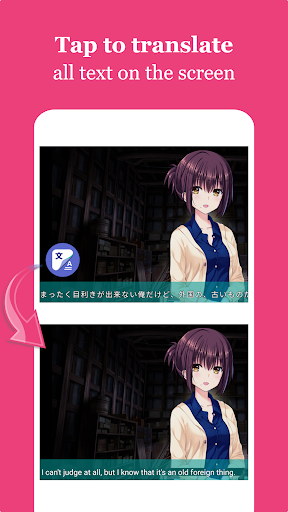
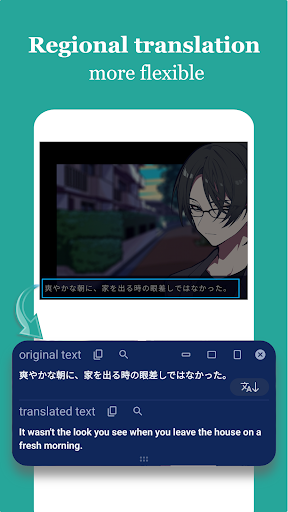
Screen Translation: Recognizes visible text and converts it into your selected language without leaving the current application.
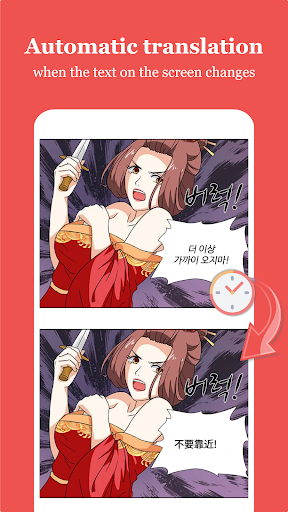
Automatic Translation: Processes on-screen content automatically, reducing the need for repeated manual actions.
Image Translation: Extracts written information from pictures and provides corresponding translations.
Text Translation: Allows you to enter or select text manually when you only need to understand a particular sentence.
Area Selection: Lets you draw a frame around a specific section of the screen so the application focuses on the content you actually want to translate.
These options make the application adaptable to different reading habits. For example, automatic translation works well when following a long story, while area selection is useful when only a few words or dialogue boxes need attention.
Not every application provides multilingual support, which can become a problem when exploring content developed for international audiences. Gaminik helps bridge this gap by recognizing text from different sources and displaying translations directly on your device.
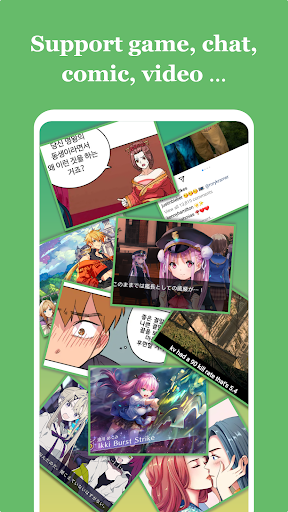
You can use it to follow foreign-language comics, read news articles, understand social media posts, or interpret dialogue in mobile games. Its screen recognition functionality is especially convenient when the original application does not allow you to select or copy written content.
However, translation quality depends on text recognition, language combinations, and contextual meaning. Game terminology, character names, abbreviations, and specialized expressions may occasionally produce imperfect results. Reviewing important phrases or learning commonly used vocabulary can help you avoid misunderstandings.
Speed is an important factor for a tool that operates alongside other applications. If every translation takes too long, reading a conversation or following a game becomes unnecessarily difficult.
Gaminik combines screen recognition with translation processing to help users obtain results quickly. Rather than manually entering every sentence, you can initiate recognition directly from the floating interface and let the application handle the selected content.
The actual processing time depends on factors such as text complexity, device performance, internet connectivity, and the translation service being used. Nevertheless, its streamlined workflow helps reduce the number of steps involved in understanding unfamiliar languages.
Another notable advantage of Gaminik is its extensive language coverage. The application is described as supporting recognition of up to 76 source languages and providing 106 output language options. This gives users considerable flexibility when translating content from different countries.
Supported languages include English, Chinese, Vietnamese, and numerous other widely used languages. You can select your preferred output language according to your needs, whether you want to understand foreign content or practice a new language.
The variety of available combinations also makes Gaminik useful for language learners. Reading translated material alongside its original version can help you become familiar with sentence structures, vocabulary, and everyday expressions. Keep in mind that available language pairs and translation quality may vary depending on the selected feature.
Many free applications rely on advertisements to maintain their services. Although this approach is common, frequent promotional pop-ups can become frustrating when you are concentrating on a story or playing a game.
Gaminik is presented as an advertising-free translation tool, allowing users to focus on their activities without dealing with conventional in-app advertising interruptions. This creates a cleaner experience, particularly when you frequently activate translation features throughout the day.
Instead of navigating through promotional screens, you can concentrate on recognizing text and reading the results. However, the availability of individual features and usage conditions may depend on the application version.
Although Gaminik provides free translation functionality, some features or language options may require translation points. These points act as an in-app resource that determines access to certain translation services. Users can collect additional points through available activities, including daily check-ins, depending on the current application policy.
Another important consideration is the AccessibilityService permission. Since Gaminik needs to recognize text displayed inside other applications, it may request accessibility access to perform its screen translation functions. You should carefully review the permission description before granting access and enable only the features you are comfortable using.
As with other applications that process screen content, it is advisable to avoid translating sensitive information such as passwords, banking details, or private conversations. Review the developer’s privacy policy to understand how collected information is handled.
Gaminik: Auto Screen Translate provides a practical way to overcome language barriers without repeatedly leaving your current application. Its floating interface, multiple recognition methods, and extensive language support make it useful for reading foreign stories, exploring international websites, and understanding games.
If you want to try this translation tool on your Android device, follow this alternative download guide through APKMODY:
Find The Application: Visit APKMODY using your Android browser and enter Gaminik: Auto Screen Translate in the website’s search bar.
Check The Release Details: Open the corresponding application page and review its version, file information, and compatibility requirements.
Save The APK: Select the available download link to obtain the installation package. Wait until the browser confirms that the download is complete.
Locate The Downloaded File: Open your phone’s Downloads folder or use the notification panel to find the APK package.
Install The Application: Tap the file, grant installation permission to your browser or file manager if Android requests it, and follow the on-screen instructions.
Configure Translation: Launch Gaminik, select your preferred languages, and review the permissions needed for floating windows and screen recognition.