home chevron_right Apps chevron_right Entertainment chevron_right Flix Vision


GoodShort – Short Dramas Hub
v3.3.0.2130
• Unlocked
| Updated On | |
|---|---|
| Package Name | flix.com.vision |
| Category | Entertainment |
| Version | 4.2.0 |
| Size | 44 MB |
| MOD Features | No Ads |
| Requires | Android |
| Price | |
| Free | |
| Content Rating | |
| Everyone | |
| Internet Required | |
| Required | |

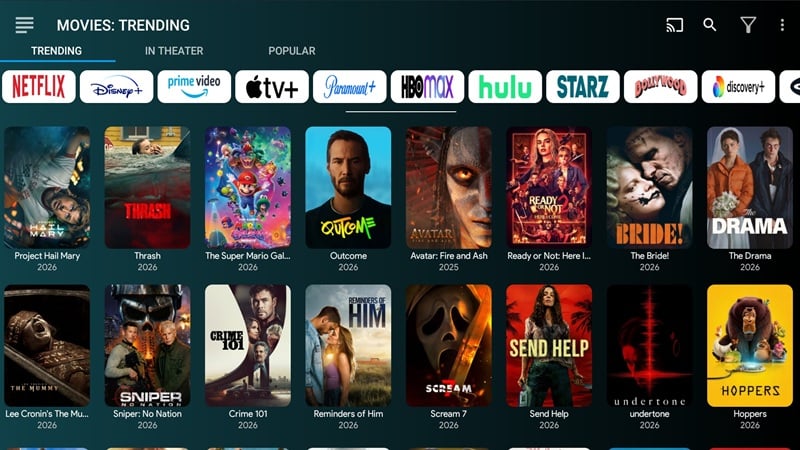
Flix Vision MOD APK is an Android streaming application that brings together movies, television series, anime, sports, and other video content in one place. It is designed for viewers who want to explore different entertainment categories without subscribing to multiple streaming services. With features such as content filtering, subtitle options, and offline viewing, Flix Vision offers an alternative way to discover and watch videos on mobile devices.
Flix Vision is an unofficial Android application distributed as an APK rather than through a conventional app store. Its installation package is relatively lightweight, reportedly occupying around 50–70MB, although the exact size may vary between releases. Despite its modest footprint, the application provides access to a broad range of entertainment categories, making it appealing to users who prefer having different types of content in a single interface.
At its core, Flix Vision functions as a video discovery and streaming application. Its content selection includes feature films, television series, documentaries, animated productions, anime, and sports programs. This variety allows users to switch between different forms of entertainment without constantly changing applications.
The interface also organizes videos into categories, helping viewers narrow down their choices based on personal interests. If you enjoy action movies, animated series, or documentary programs, you can explore the corresponding sections instead of browsing an unorganized collection. The experience may resemble familiar services such as <Link url=”https://apkmody.com/apps/netflix” title=”Netflix”/> and Amazon Prime Video, although Flix Vision operates differently and should not be considered an official replacement for licensed streaming platforms.
One of the main ideas behind Flix Vision is aggregating video sources from different places online. Rather than operating like a traditional streaming service with its own licensed content library, the application reportedly collects links to available videos and presents them through its interface.
This approach can provide access to a broad selection of titles, but it also introduces some uncertainty. Playback quality, availability, subtitles, and loading speed may differ depending on the source being used. A video that works smoothly today might become unavailable later if its original link stops functioning. Users should also remember that the legality of accessing particular videos depends on their copyright status and the laws applicable in their region.
Flix Vision offers several functions intended to make browsing and watching videos more convenient. However, their availability and performance can vary between application versions and individual content sources.
The application is designed to provide different playback options, with some sources reportedly offering resolutions up to Full HD 1080p. Actual quality depends on the original video, available streaming links, internet speed, and device capabilities. Therefore, not every title will necessarily be available in high definition.
Its categorized library is another useful feature. Users can explore movies, TV shows, anime, documentaries, children’s entertainment, and sports without having to search through unrelated results. This organization makes it easier to discover something suitable for different viewing preferences.
Some versions of Flix Vision advertise download functionality, allowing users to save supported videos for later viewing. This can be useful when traveling or when a stable internet connection is unavailable. Keep in mind that offline access depends on whether the selected source supports downloading, and saved files may consume considerable storage space.
Language support is also worth mentioning. The application and its available video sources may offer different language and subtitle options. However, subtitle availability is not guaranteed for every title, so you should check the playback options before starting a movie or episode.
Flix Vision has been associated with parental control options that help restrict access to mature content. This can make the application easier to manage in households where children share an Android device with adults. Parents should still supervise viewing activities because content filtering may not identify every unsuitable video.
The application is also promoted as an ad-free streaming experience in certain releases. Nevertheless, this should not be treated as a guarantee that every external video source is free from advertisements or interruptions. Performance can also vary depending on the version installed and the device running it.
Although Flix Vision offers a convenient collection of entertainment categories, it is important to understand its limitations before installing it.
Uncertain security and privacy: Because it is distributed through APK files and its developer information may be unclear, users cannot automatically assume that every release is safe. Unverified packages may contain unwanted code or request unnecessary permissions.
Inconsistent playback quality: Video resolution and stability depend heavily on external sources. Some links may provide HD playback, while others may be blurry, slow, or unavailable.
Battery and performance consumption: Streaming video for extended periods naturally uses processing power, network resources, and battery capacity. Certain versions may also behave inefficiently in the background.
Unclear content licensing: Not all videos accessible through third-party aggregators are necessarily distributed with permission. Users should check whether the content they watch is legally available in their region.
For better protection, avoid granting permissions that are unrelated to the application’s functions, and do not install packages from unfamiliar download pages.
Flix Vision is relatively lightweight compared with many large entertainment applications. However, installation size alone does not determine how smoothly it will operate. Streaming performance also depends on your Android version, available memory, network connection, and the quality of the selected video source.
The following specifications are suggested as a general reference rather than verified official minimum requirements:
| Component | Suggested configuration |
|---|---|
| Operating system | Android 8.0 or newer |
| Processor | Quad-core 1.4GHz or equivalent |
| RAM | 2GB or more |
| Free storage | At least 200MB, with additional space for downloads |
| Display | 720p or higher |
| Internet | Stable Wi-Fi or mobile data connection |
A device running Android 11 or a newer version may provide a more comfortable experience, particularly when multitasking or streaming higher-resolution videos. Actual compatibility should always be checked against the requirements of the specific APK release.
The MOD version is promoted as an alternative release with certain adjustments intended to improve the viewing experience. The advertised modifications include:
No Ads: Designed to reduce advertising interruptions while navigating and using the application.
Optimized: Reportedly includes adjustments intended to improve the overall app experience.
These descriptions are based on the advertised MOD features and should not be interpreted as independently verified guarantees. Modified APK files are unofficial, may differ between releases, and can introduce security or privacy risks. Use caution when choosing to install them.
If you want to explore Flix Vision, start by checking the available release information on APKMODY. Instead of installing the first file you find, take a moment to verify that it matches the application you intend to use.
Follow this checklist before installation:
Locate the correct listing: Visit APKMODY and search for Flix Vision. Check the application name carefully to avoid similarly named downloads.
Inspect the release details: Review the version number, update information, package size, and any available compatibility notes.
Compare the MOD information: If you are looking for the modified edition, check whether the listing explicitly identifies the No Ads and Optimized features.
Evaluate the download source: Only proceed if the file comes from a source you trust. Avoid pages that redirect you through suspicious advertisements or request unrelated information.
Prepare your Android device: Check available storage and review your device’s security settings before installing an APK obtained outside the official app store.
Install and review permissions: Open the downloaded package, follow Android’s installation prompts, and examine every permission request before granting access.
Test the application carefully: Once installed, open Flix Vision and check its navigation, playback options, and available content sources. Uninstall it if you notice suspicious behavior or unexpected permission requests.