

Librera PRO – Book Reader
v10.0.38
•
Premium
| Updated On | |
|---|---|
| Category | Entertainment |
| Version | 2.0.0 |
| Size | 49 MB |
| MOD Features | Premium Unlocked |
| Requires | Android |
| Rating Score | |
| Price | |
| Free | |
| Content Rating | |
| Everyone | |
| Internet Required | |
| Required | |
| Languages | |
| English, Hindi, Tamil, Bengali | |

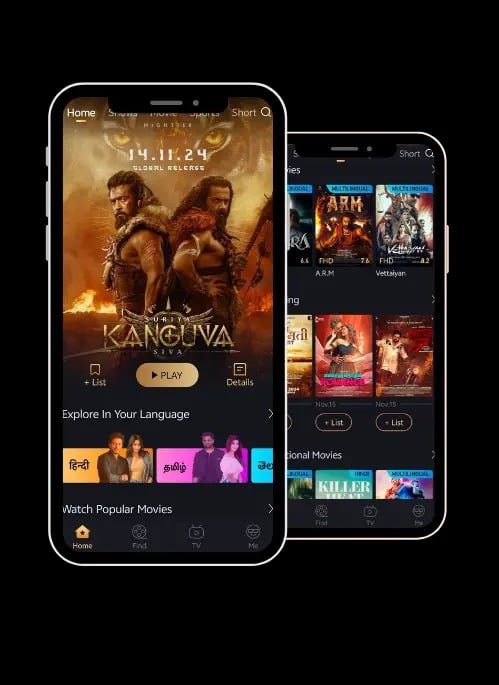
Castle MOD APK offers a broad entertainment library featuring movies, television programs, anime and live sports in one convenient application. Its multilingual options, personalized recommendations and offline viewing tools make discovering new content easier. Explore the main features, premium benefits and installation process with APKMODY in this article.
Castle is an entertainment application designed to bring different types of video content together in one place. Its library covers movies, television series, reality programs, animated titles and sports broadcasts, giving viewers several options whenever they want something to watch. Instead of switching between multiple platforms, users can browse different categories through a single interface.
The application also emphasizes accessibility with a straightforward layout and support for several languages. Depending on the available release and content source, viewers may find titles from different countries alongside language and subtitle options. Another notable aspect is that some content can be accessed without creating an account, although signing in may unlock additional personalization tools.
One of Castle’s main attractions is its varied content collection. The library brings together entertainment from different regions and categories, making it easier to discover titles beyond familiar Hollywood productions. Whether you prefer scripted dramas, lighthearted programs or animated adventures, there are several sections worth exploring.
The main content categories include:
Movies and series: Browse films and episodic productions from countries such as the United States, South Korea and Japan, alongside selections from Bollywood and other international film industries.
Television programs: Discover reality competitions, comedy shows, crime-related programs and other formats. The available selection may include titles such as Hip Hop India and Laughter Chefs Unlimited Entertainment.
Anime and animation: Explore animated entertainment ranging from familiar classics to more recent productions, with options suited to different age groups.
Live sports: Access sports-related broadcasts covering popular competitions and disciplines such as football, cricket and hockey, depending on content availability.
The library is organized into separate sections to make browsing more manageable. Rather than scrolling through an unstructured collection, users can start with a category that matches their interests and narrow down their choices from there.
Castle’s multilingual approach makes the application more accessible to viewers who prefer watching content in languages other than English. Its interface supports several language options, helping users navigate menus and understand available categories more comfortably.
The supported languages listed for the application include:
English
Hindi
Tamil
Bengali
Some titles may also provide subtitles or alternative language options, depending on the source and release. This is particularly useful when exploring international films or television programs. However, subtitle availability is not necessarily consistent across the entire library, so it is worth checking the playback options for each title.
You do not necessarily need to register before exploring Castle’s available content. However, signing in may provide additional tools for organizing your entertainment preferences and keeping relevant information associated with your account.
The application may offer several sign-in methods, including Google, Facebook or a phone number, depending on the version being used. Once logged in, you can take advantage of features such as:
Build a favorites list: Save interesting movies and shows so you can return to them without searching again.
Receive tailored suggestions: Use your viewing preferences to discover content that better matches your interests.
Keep track of entertainment choices: Make it easier to revisit titles and manage your personal viewing activity.
Watch content offline: Download supported movies or programs for viewing when an internet connection is unavailable.
Synchronize personal information: Keep certain account-related preferences and saved items through cloud-based storage, where supported.
These options make Castle more convenient for people who regularly watch content across different categories. Keep in mind that individual features may depend on account status, application version and the availability of the relevant service.
Castle provides access to certain entertainment features without requiring a paid subscription. However, the free experience may include advertisements or restrictions on selected content and playback options. Premium access is designed to reduce some of these limitations while providing additional benefits.
Depending on the subscription and application release, Castle Premium may include:
Fewer advertising interruptions: Reduce the appearance of pop-up advertisements while browsing or watching content.
Higher playback quality: Access improved video resolution, with some versions advertising support for quality up to 4K.
Additional entertainment options: Explore selected exclusive programs or sports-related content when available.
Extra platform features: Gain access to certain tools or improvements that may not be included in the standard experience.
Actual benefits can vary between versions and regions. A 4K playback option, for example, does not guarantee that every title is available in that resolution. Your device, internet connection and the quality of the original video source also affect the viewing experience.
Before using Castle, it is worth considering a few important points. The application may not be distributed through official app stores in every region, so users should pay attention to where they obtain the installation package and what permissions it requests.
Content licensing is another consideration. Movies, television programs and sports broadcasts may be subject to copyright restrictions, and availability through an application does not automatically mean that every title has been authorized for distribution. Check the applicable rules in your country and prioritize legitimate content sources to avoid potential legal issues.
Castle MOD APK is presented as a modified version that advertises additional access to selected premium functions. These changes may appeal to users who want fewer interruptions or more playback options, although the actual features can differ between releases.
Premium Unlocked: Provides access to selected premium features without the standard subscription process, depending on the build.
No Ads: Aims to remove or reduce advertisements displayed in the application.
1080 FHD: Advertises Full HD playback options for supported content.
Download: Includes an option to save supported videos for offline viewing.
Because this is a modified application, its reliability, update schedule and security cannot be guaranteed. Avoid entering sensitive account information, review requested permissions carefully and understand the risks before installing unofficial software.
Castle brings together movies, anime, television programs and sports content in a single entertainment hub. Its category-based library, language options and account-based personalization tools offer several ways to discover and organize videos. The MOD edition also advertises premium-related additions, although users should carefully consider the security and copyright implications before choosing an unofficial release.
Instead of installing through Google Play, you may need to handle the APK package manually. Prepare your Android device with the following steps:
Check your device: Confirm that your Android version and available storage are suitable for the APK release you intend to use.
Find the application page: Visit APKMODY.COM and enter Castle MOD APK in the website’s search field.
Review the package: Check the version details, file information and any compatibility notes displayed on the download page.
Save the APK: Choose the available download option and wait for the installation file to finish downloading.
Authorize the installation source: If Android blocks the package, open your device’s security settings and allow your browser or file manager to install unknown apps. Only grant this permission to a source you trust.
Complete setup: Open the downloaded APK, follow the on-screen instructions and launch Castle after installation finishes.