
Mini Militia Classic: DA2 MMC
v0.14.4
• Action
| Updated On | |
|---|---|
| Google Play ID | com.redantz.game.za3p |
| Category | Action |
| Version | 1.4.3 |
| Size | 92 MB |
| MOD Features | Unlimited Money |
| Requires | Android 6.0 |
| Price | |
| $0.99 | |
| Content Rating | |
| Teen | |
| Internet Required | |
| Unknow | |

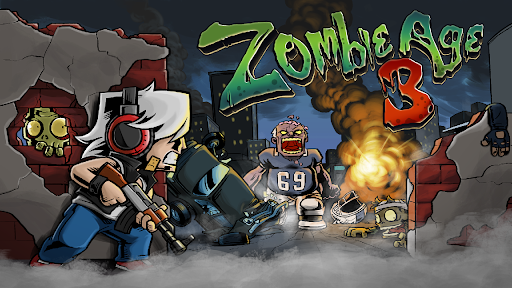
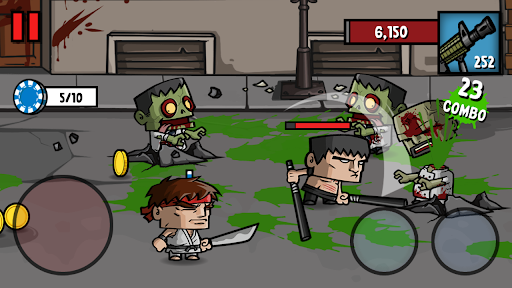
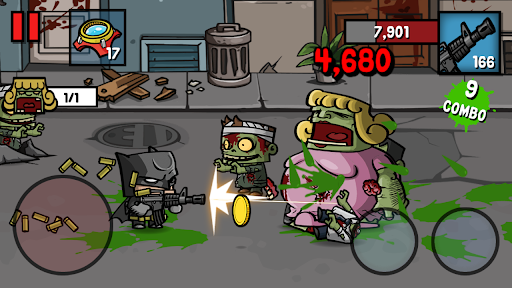
Zombie Age 3 Premium: Survival is an entertaining 2D action game that combines side-scrolling shooting with hack-and-slash combat in a world overrun by the undead. Developed by RedAntz, the game challenges you to control powerful survivors, complete dangerous missions, and eliminate countless zombies using an extensive collection of weapons. With multiple characters, upgrade options, special events, and different combat challenges, it offers an exciting experience for fans of classic zombie survival games.
Zombie Age 3 Premium: Survival takes place in a devastated world where civilization has collapsed and zombies have become a constant threat. Most people have disappeared or turned into the undead, leaving scattered groups of survivors struggling to stay alive. You take control of a capable warrior whose mission is to eliminate dangerous creatures, protect fellow survivors, and gradually reclaim areas occupied by zombies.
Rather than focusing entirely on a complicated storyline, the game emphasizes action and survival. Each mission sends you into dangerous environments filled with different types of undead enemies. Your ability to choose suitable equipment, react quickly, and manage incoming threats determines how long you can survive. The colorful 2D graphics and humorous character designs also create a distinctive atmosphere that balances the horror theme with entertaining arcade-style action.
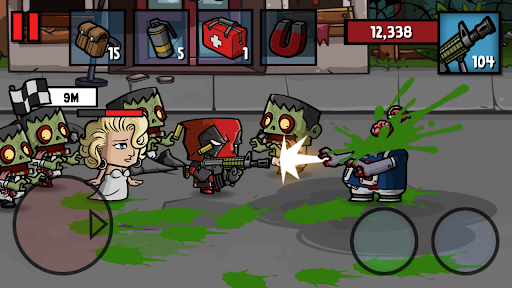
The gameplay in Zombie Age 3 Premium: Survival uses a familiar side-scrolling control system. You move your character across the battlefield, shoot approaching zombies, and switch to melee attacks whenever enemies get too close. Having both ranged and close-combat options gives you greater flexibility when dealing with different situations.
The game also provides considerable freedom in character development. You are not restricted to following a strictly linear progression path, as you can improve your favorite fighters, purchase stronger equipment, and select missions that match your current capabilities. Special activities and events provide additional opportunities to collect resources, making character development an important part of the overall experience.
Before entering a mission, you should carefully prepare your character and available equipment. Each fighter can carry up to two weapon types, allowing you to combine different approaches depending on your preferred combat style. Firearms are useful for eliminating enemies from a distance, while melee weapons provide an alternative when ammunition becomes limited or zombies get too close.
Additional equipment can make difficult missions easier. Your preparation options include:
Weapons: Select suitable firearms, such as pistols and rifles, alongside melee equipment.
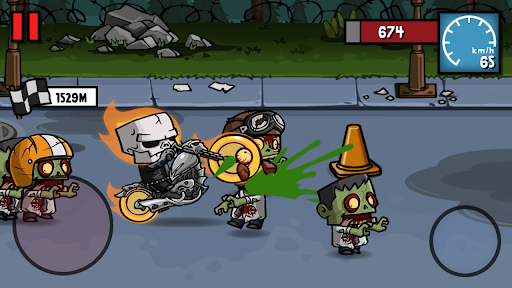
Motorcycles: Use these vehicles in special stages that introduce different gameplay situations.
Support items: Bring ammunition boxes, first-aid kits, and energy drinks to improve your chances of survival.
Companion characters: Recruit one additional fighter to accompany you and provide support during missions.
Once your equipment is ready, select a suitable stage and begin fighting. Different levels offer varying difficulty and rewards, so choosing missions that match your current strength is important. Eliminating more zombies can increase your earnings, but failing to complete a mission may cost you valuable progress. Knowing when to push forward and when to play defensively is essential.
Character progression is not limited to collecting weapons and upgrading equipment. Zombie Age 3 Premium: Survival also includes an achievement-based mission system that rewards players for performing specific activities. Some objectives involve firing a certain number of bullets or defeating a required number of zombies.
Completing these challenges helps you gain experience and advance through the game’s progression system. Reaching certain milestones also unlocks additional fighters, including Bich and Hawky at levels 4 and 5, respectively. Each new character gives you another option to experiment with different combat approaches.
Besides regular achievements, you can participate in Objective and Event missions to earn additional resources. Although individual tasks are generally straightforward, completing the entire collection requires persistence. These activities provide useful incentives to keep playing even after you have become familiar with the main combat mechanics.
The MOD version introduces additional resource advantages that can make character development and equipment purchases more convenient. Instead of spending as much time collecting currency through regular missions, players can access the following modified features:
Unlimited Money: Provides a significantly larger money supply for purchasing equipment and developing characters.
Unlimited Gold: Removes many of the usual resource limitations associated with gold-based purchases.
These features can change the original progression balance, making it easier to experiment with different characters and equipment combinations.
Although the controls are simple, surviving later missions requires better preparation and combat awareness. Zombies can approach from different directions, and careless movement may quickly put your character in danger. Consider these suggestions when developing your survival strategy:
Choose weapons strategically: Combine ranged firearms with effective melee equipment to handle different enemy situations.
Upgrade your favorite fighter: Invest resources in characters you frequently use instead of spreading upgrades too thinly.
Carry essential supplies: First-aid kits and ammunition support can help you stay in combat longer.
Use companions effectively: Bring a suitable partner to provide additional support during challenging missions.
Complete daily objectives: Take advantage of available challenges and events to collect useful progression resources.
Respect mission difficulty: Start with stages suited to your current equipment before attempting more demanding encounters.
With the right combination of equipment, character upgrades, and combat techniques, you can gradually overcome tougher stages and build a stronger team of survivors.
Zombie Age 3 Premium: Survival remains an enjoyable choice for players who appreciate classic 2D zombie action. Its combination of shooting, melee combat, character collection, and mission-based progression provides plenty of activities without requiring complicated controls. The MOD version also offers additional currency advantages for players who want to explore equipment and character upgrades with fewer resource restrictions.
To find the game on APKMODY, use this version-selection approach:
Step 1: Open the APKMODY website
Use your Android browser to access APKMODY and navigate to its game catalog.
Step 2: Search for the Premium MOD edition
Enter Zombie Age 3 Premium: Survival into the search field. Check the displayed results carefully to identify the MOD listing rather than selecting an unrelated version.
Step 3: Compare the available download details
Open the game page and examine the version number, MOD description, Android compatibility, and listed file information. Pay particular attention to whether the unlimited money and gold features are included in that specific release.
Step 4: Select and save the APK file
Choose the appropriate download option on the APKMODY page. Wait until the browser finishes downloading the installation package before opening it.
Step 5: Check the installation permissions
Locate the APK in your device’s file manager. If Android blocks installation, open the relevant system settings and review the permission for installing applications from that source.
Step 6: Install and test the game
Return to the downloaded file, complete the installation prompts, and launch Zombie Age 3 Premium: Survival. Check the available resources and game features to confirm that the installed version works as expected.