Talking Tom Hero Dash
v26.5.9.20389
• Free Shopping
| Updated On | |
|---|---|
| Google Play ID | com.appsomniacs.mmc |
| Category | Action |
| Version | 0.14.4 |
| Size | 81 MB |
| MOD Feature | Not available |
| Requires | Android |
| Price | |
| Free | |
| Content Rating | |
| Teen | |
| Internet Required | |
| Required | |

Mini Militia Classic: DA2 MMC APK brings chaotic shooting action to mobile with colorful 2D graphics, responsive controls, and plenty of opportunities to challenge other players. Developed by Appsomniacs LLC, this action-packed title combines jetpack movement, flexible weapon choices, and entertaining multiplayer matches. Whether you prefer competing against friends or testing your shooting skills, let’s explore the gameplay mechanics and customization features that make this classic shooter enjoyable.
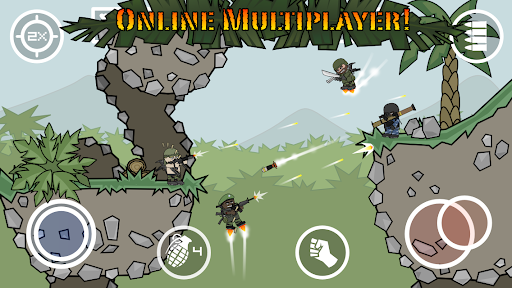
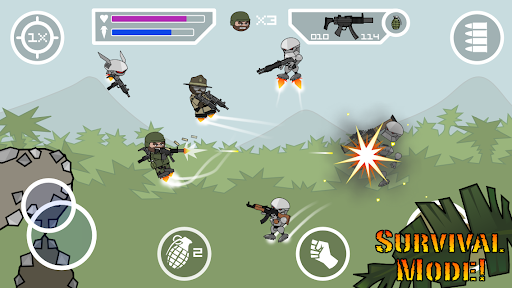
Movement in Mini Militia Classic: DA2 MMC goes beyond ordinary running and jumping. The game places a virtual joystick in the lower-left corner of the screen, allowing you to move horizontally or crouch when necessary. By pushing the joystick upward, your character activates a jetpack and takes off into the air, creating additional movement possibilities during combat.
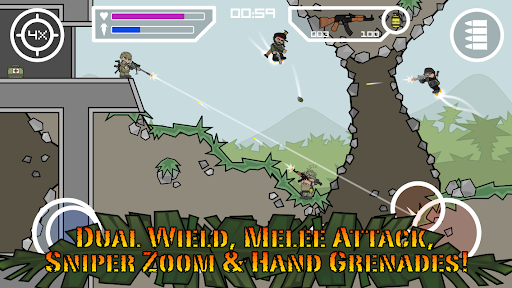
Flying consumes fuel, which is represented by a dedicated bar beneath the health indicator. You can remain airborne as long as sufficient fuel is available, but managing this resource is essential when navigating dangerous situations. Fortunately, fuel automatically regenerates whenever the jetpack is inactive, even if your character is still floating in the air. Learning when to fly, land, and conserve fuel will help you avoid enemy attacks while maintaining control of the battlefield.
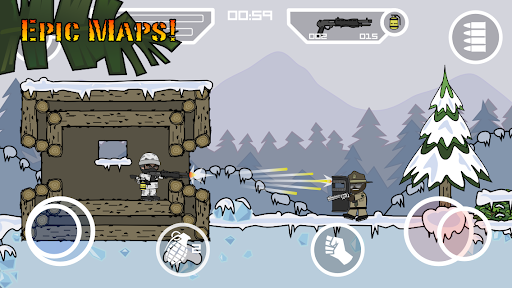
The battlefield contains numerous narrow passages that require more than ordinary movement skills. Some openings lead into buildings or hidden sections where useful weapons are placed, making them worth exploring instead of ignoring. However, your character must adjust their position carefully to pass through these restricted spaces.
For ground-level openings, simply pull the movement joystick downward to crouch and move through the gap. Higher passages require a slightly different approach: activate the jetpack and adjust your character’s position until you can squeeze through. Mastering these small movement techniques gives you access to additional areas and equipment that may provide an advantage during firefights.
Unlike many conventional mobile shooters, Mini Militia Classic: DA2 MMC does not rely on a separate fire button. Instead, the right-side joystick handles both aiming and shooting, allowing you to control your weapon without moving your finger between different buttons.
You can aim in a complete 360-degree range, making it possible to attack enemies above, below, or directly beside your character. To fire, pull the aiming joystick outward to its maximum position. This control design makes combat feel continuous because aiming and shooting are handled through the same input. With practice, you can quickly adjust your firing angle, track moving opponents, and respond to attacks from unexpected directions.
Weapon selection is another important part of the combat experience. Each character can carry two weapons simultaneously, while grenades are handled separately. There are no strict restrictions on combining different weapon categories, so you can select two large firearms, pair a gun with a knife, or experiment with other combinations that suit your preferences.
The weapon slots are displayed at the top of the screen, allowing you to switch between equipped firearms with a simple tap. You can also collect weapons scattered throughout the battlefield by approaching them and selecting the pickup icon. The replacement system works as follows:
Empty inventory: A newly collected weapon automatically occupies the first available slot.
One weapon equipped: The additional firearm goes into the remaining empty slot.
Both slots occupied: The new weapon replaces the firearm currently held in your character’s hands, while the replaced item drops onto the ground.
This flexible system encourages experimentation during matches. You can change your equipment whenever you discover something more suitable, rather than remaining stuck with your initial weapon selection.
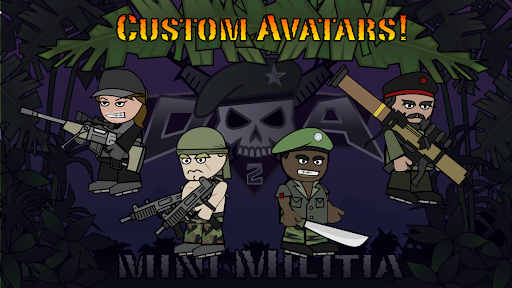
Beyond shooting and multiplayer competition, Mini Militia Classic: DA2 MMC offers a character editor that lets you personalize your soldier. Instead of using a fixed appearance, you can modify numerous visual details to create an avatar that reflects your preferred style.
The customization system covers almost every visible part of the character, including:
Facial features: Head shape, skin tone, eyes, eyebrows, and mouth.
Hair and facial hair: Hairstyles, beards, and mustaches.
Clothing: Shirts, trousers, and underwear.
Accessories: Facial decorations, hats, and other headwear.
Additional details: Gloves and footwear.
With so many adjustable elements, you can create a funny-looking soldier, a traditional military-inspired character, or something completely unusual. This feature also offers a relaxing activity between intense matches.
One appealing aspect of the character editor is that the available customization components can be used without purchasing each individual cosmetic item. You can freely experiment with different combinations and spend time designing your preferred appearance.
However, there is one limitation worth remembering: the game initially provides only one Avatar slot for saving your customized character. If you want to preserve additional designs, you need to purchase extra Avatar slots using 100 tokens per slot. This means you can still explore different appearances without spending tokens on every cosmetic component, although storing several completed designs requires additional resources.
Ready to jump into chaotic shooting matches and customize your own soldier? You can find Mini Militia Classic: DA2 MMC on APKMODY by following this quick navigation guide:
Open your Android browser and access the APKMODY website.
Enter Mini Militia Classic: DA2 MMC into the search field.
Choose the correct game listing from the search results and scroll to its download section.
Select the available APK download option and wait until the file is saved to your device.
Open your Downloads folder, tap the downloaded APK, and follow the Android installation prompts.
Once installation finishes, launch the game, customize your soldier, and get ready for battle.