
Sorry! World
v0.75.0
• Board




| Updated On | |
|---|---|
| Google Play ID | com.ludo.king |
| Category | Board |
| Version | 10.7.0.425 |
| Size | 258 MB |
| MOD Features | Unlocked |
| Requires | Android 7.0 |
| Price | |
| Free | |
| Content Rating | |
| Everyone | |
| Internet Required | |
| Required | |

Ludo King brings the timeless fun of traditional board games to mobile devices, allowing players to challenge friends, family members, or opponents from around the world. With familiar dice mechanics, colorful boards, and several multiplayer options, every match offers opportunities for competition and unexpected twists. Explore its gameplay, special features, and MOD edition before downloading Ludo King APK through APKMODY.
Board games have remained popular across generations because they combine straightforward rules with social interaction and friendly competition. Ludo King takes inspiration from traditional Ludo and the Indian board game Pachisi, transforming their familiar mechanics into a digital experience developed by Gametion Technologies.
The game retains the recognizable dice-based movement system while introducing online matchmaking, customizable boards, and additional entertainment options. Its accessible design makes it suitable for casual players, while the competitive nature of each match provides enough excitement to keep experienced fans interested.
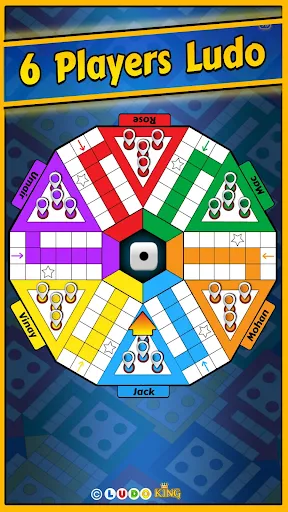
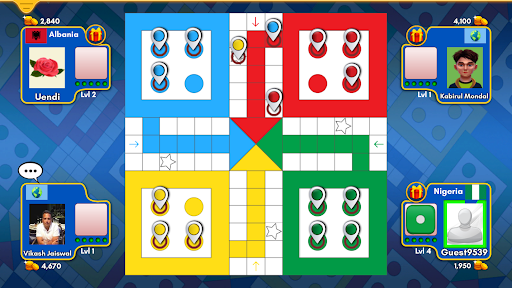
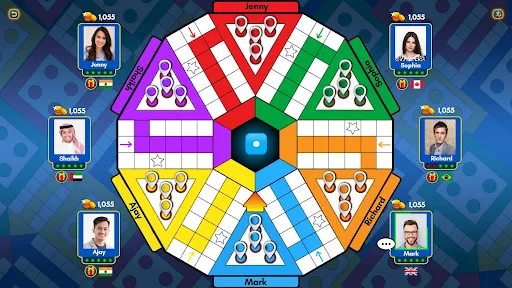
The main objective in Ludo King is to move all four of your pieces from the starting area to the designated finishing section before your opponents do. Each participant receives a specific color and takes turns rolling a six-sided dice to determine how far their pieces can travel around the board.
Rolling a six generally allows a piece to leave its starting area, while subsequent dice results determine its movement. Landing on an opponent’s unprotected piece sends it back to its starting position, creating opportunities to disrupt rival strategies. Players must also consider safe squares, positioning, and the final route toward the home area. Although the mechanics are easy to learn, choosing which piece to move at the right moment can make a significant difference.
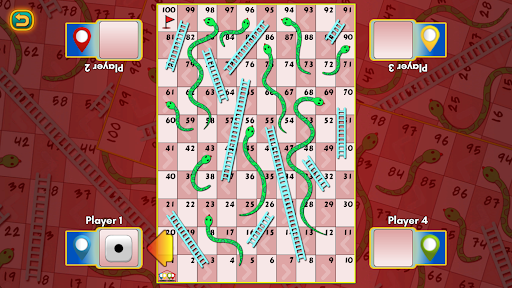
Beyond its main Ludo gameplay, the application includes Snakes and Ladders, another familiar board game that adds variety to the overall experience. Instead of racing around a circular track, participants move across a numbered board containing ladders and snakes, with the ultimate objective of reaching square 100 first.
Every movement depends on the dice result. Landing at the bottom of a ladder allows you to climb toward a higher position, while encountering a snake sends your piece backward. These unexpected changes can quickly alter the rankings, making even a seemingly comfortable lead less secure. The combination of both board games gives players more ways to enjoy traditional entertainment without installing separate applications.
Ludo King offers several ways to participate in matches, whether you prefer practicing alone or competing against other people. Each mode serves a different purpose, giving players greater control over how they spend their time.
Quick Mode: Practice against computer-controlled opponents and become familiar with the rules. Availability of offline play depends on the selected game configuration.
Online Multiplayer: Join matches against other players through an internet connection and test your skills against opponents from different locations.
Local Multiplayer: Play with people nearby using supported local connection options, such as the same Wi-Fi network.
Play With Friends: Create or join private rooms to organize matches with friends and family members.
These options make the game suitable for different occasions. You can practice when nobody is available, arrange a private competition with familiar opponents, or enter online matches whenever you want a new challenge.
Ludo King follows a cheerful visual direction rather than pursuing realistic graphics. Its bright color combinations, recognizable board layouts, and simple character designs create an inviting atmosphere that works well for a casual game.
The sound design complements this presentation through background music and gameplay effects that accompany dice rolls and piece movements. Although the audio does not dominate the experience, it adds feedback to important actions and makes matches feel more lively. Players looking for a straightforward board game will appreciate this uncomplicated presentation.
The MOD edition introduces additional benefits intended to change certain aspects of the standard experience. Depending on the specific release, the following features may be available:
Unlimited XP: Provides expanded experience progression without the usual limitations.
Unlocked Themes: Gives access to additional visual themes for customizing the board.
No Ads: Removes supported advertising interruptions for a cleaner interface.
Keep in mind that MOD functionality can vary between releases. Unofficial modified packages may also carry security risks or compatibility issues, and their features are not guaranteed by the original developer.
Want to try the classic board game on your smartphone? You can find the available Ludo King releases on APKMODY by following this alternative installation process:
Visit APKMODY through your Android browser and search for Ludo King.
Open the game page and compare the standard APK with the available MOD release.
Check the version information, Android requirements, and listed modifications before choosing a package.
Select the appropriate download link and wait until the APK file is saved to your device.
Open your Downloads folder, tap the downloaded file, and follow Android’s installation instructions. If necessary, enable permission to install apps from that specific source.
Launch the game after installation and configure your preferred settings before starting a match.