home chevron_right Games chevron_right Simulation chevron_right Demolish!


Truck Masters: India Simulator
v2026.3.6
• Unlimited Money
| Updated On | |
|---|---|
| Google Play ID | com.LightBeam.Demolish |
| Category | Simulation |
| Version | 2.54 |
| Size | 204 MB |
| MOD Features | Unlimited Rockets |
| Requires | Android 8.0 |
| Price | |
| Free | |
| Content Rating | |
| Everyone | |
| Internet Required | |
| Not Required | |

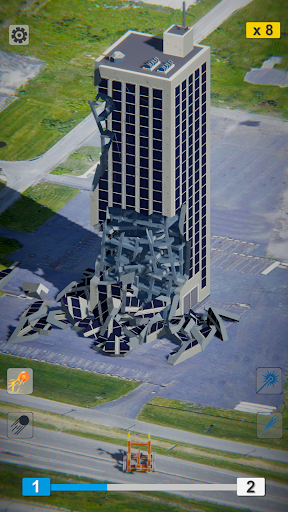
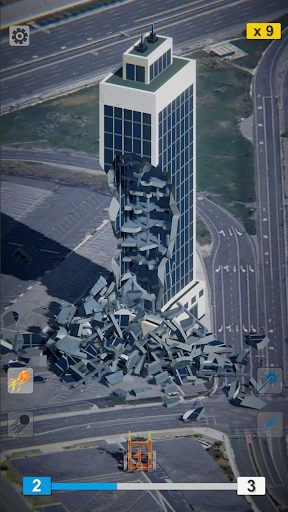
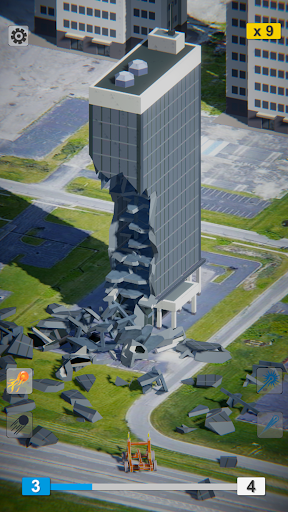
Demolish! is a casual destruction game from Voodoo that lets players bring down entire buildings using a variety of powerful weapons. Instead of following traditional construction or combat mechanics, your objective is to aim carefully, fire projectiles, and watch structures collapse through physics-based interactions. With straightforward controls, different demolition tools, and plenty of targets to destroy, the game offers a satisfying way to enjoy some explosive entertainment.
Mobile games often focus on running, building, racing, or fighting, but Demolish! takes a different approach. Developed by Voodoo, this casual arcade title revolves around one simple activity: destroying buildings as efficiently as possible.
Each level presents a structure that you must demolish using the weapons available. You do not need to protect buildings or worry about people nearby, as the environments are designed around unoccupied structures and isolated demolition areas.
The appeal comes from watching different parts of a building break apart and collapse after each successful shot. Although the concept sounds straightforward, choosing the right target and calculating your shots can make a noticeable difference in how quickly you complete a mission.
Demolish! uses an accessible control system that feels familiar to players who have experienced physics-based shooting games. You operate a weapon positioned on the ground, adjust its direction, and fire projectiles toward the target.
Your objective is to bring the entire structure down while using as few shots as possible. Completing a level earns you stars, with a maximum of three stars available for each mission. Faster demolitions and efficient weapon usage help you achieve better results.
The controls are simple, but successful demolition requires some planning. Randomly firing at a building may eventually destroy it, yet carefully selecting your shooting angle can save ammunition and reduce the number of attempts needed.
One of the more interesting elements of Demolish! is its physics-based destruction system. Buildings do not simply disappear after receiving a certain amount of damage. Instead, different sections break apart and interact with the remaining structure.
For example, attacking the lower floors might initially seem like the fastest way to make a building collapse. However, the falling bricks and debris can accumulate around the base, potentially creating a barrier that makes further destruction more difficult.
This means you need to examine each structure before deciding where to shoot. Depending on its shape and height, targeting the upper or middle sections first may produce better results than attacking the foundation immediately.
Learning how the structures react to different impacts is an important part of improving your performance. As you experiment with various approaches, you will discover more efficient ways to complete each demolition mission.
Demolish! introduces a variety of environments and architectural structures as you progress. Although the basic objective remains unchanged, the scenery and building designs provide some visual variety between missions.
Unlike games that constantly introduce harder enemies or increasingly complicated objectives, Demolish! places more emphasis on changing the demolition targets and surroundings. This keeps the gameplay accessible, allowing players to enjoy the destruction without having to learn a completely new mechanic at every stage.
However, the relatively consistent difficulty may make the experience feel repetitive after completing several levels. Once you understand the basic demolition strategies, some missions may become easier to predict.
Your performance in each mission determines how many stars you receive. These rewards give you a reason to complete levels more efficiently and improve your demolition techniques.
Accumulating enough stars also allows you to unlock additional weapons. Each option offers a different approach to destroying structures, giving you more flexibility when dealing with various targets.
Although the weapons share the same overall purpose, their destructive capabilities and firing effects make them suitable for different situations. Experimenting with the available equipment can help you discover which option works best for your preferred playstyle.
The Cannon is the most straightforward weapon available in Demolish!. It offers an unlimited supply of shots, making it convenient for players who prefer taking their time and gradually breaking apart structures.
Its destructive power is relatively limited compared with the other weapons. Each projectile damages a smaller section, so demolishing a large building may require multiple shots.
However, the Cannon is useful when you want to control the demolition process rather than destroy everything in one powerful attack.
The Nuclear Bomb provides greater destructive power than the standard Cannon. It can damage larger portions of a structure, helping you complete certain missions with fewer attacks.
Its strength places it between the Cannon and Laser in the weapon lineup described in the supplied game information. This makes it an alternative for players who want more explosive impact without immediately relying on the strongest available option.
The Laser is presented as the most powerful weapon in Demolish!. Its high damage output makes it suitable for large structures that would otherwise require several ordinary shots.
Rather than slowly breaking down a building, you can use the Laser to destroy substantial sections with a single attack. This makes it particularly appealing when speed and convenience matter more than carefully managing each shot.
Choosing between the three weapons depends on your objective. The Cannon offers unlimited basic attacks, the Nuclear Bomb provides stronger explosive damage, and the Laser delivers the greatest destructive force.
The modified version of Demolish! introduces an additional resource advantage that can make demolition missions more convenient.
Unlimited Rockets: Provides an unlimited supply of rockets, allowing you to continue firing without the usual resource restrictions associated with this ammunition.
With this feature, you can experiment with different shooting angles and demolition strategies without worrying as much about running out of rockets.
Keep in mind that MOD APK files are unofficial modifications. The listed feature may vary between versions, and modified applications can involve security or compatibility risks. Always check the source and requested permissions before installing.
To install Demolish! through APKMODY, start by identifying the correct edition and checking its compatibility with your device. The following process separates the download and installation stages so you can verify the package before opening it.
Before downloading: Make sure your Android device has enough free storage and that you have selected the intended version.
Open the APKMODY website: Use your preferred Android browser to access APKMODY and navigate to its application search page.
Find Demolish!: Enter the game’s name in the search field. Select the matching result to view its description and available files.
Compare the editions: Check whether the page offers the original APK or MOD APK. If you want the modified version, look for the Unlimited Rockets feature in its description.
Inspect the file details: Review the version number, APK size, and Android compatibility information. Avoid downloading a package if its details do not match the game you are looking for.
Download the selected package: Use the corresponding download option on the page and wait for the file to finish saving to your device.
Install through your file manager: Open the Downloads folder, select the APK file, and follow Android’s installation prompts. If necessary, review the permission request for installing applications from that source.
Launch and test the game: Once installation is complete, open Demolish! and check that it works properly before starting your demolition missions.