home chevron_right Apps chevron_right Art & Design chevron_right Stick Nodes Pro
Andalusi: Design Photo & Video
v10.6.1
• Premium
| Updated On | |
|---|---|
| Google Play ID | org.fortheloss.sticknodespro |
| Category | Art & Design |
| Version | 4.3.4 |
| Size | 79 MB |
| MOD Feature | Not available |
| Requires | Android 6.0 |
| Price | |
| $3.99 | |
| Content Rating | |
| Everyone | |
| Internet Required | |
| Unknow | |

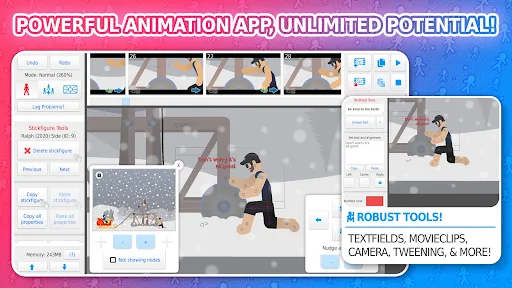
Stick Nodes Pro APK is a mobile animation application that lets you turn simple stick figures into entertaining animated videos. Developed by ForTheLoss Games, this creative tool provides a collection of editing features, including frame-by-frame controls, automatic interpolation, and customizable character models. Whether you are experimenting with animation for the first time or looking to develop your own cartoon projects, Stick Nodes Pro offers a convenient starting point.
Creating animations on a smartphone might sound complicated, especially when every movement needs to be adjusted carefully. Stick Nodes Pro simplifies this process by providing an accessible workspace where users can manipulate individual character parts, organize frames, and preview their creations.
Instead of requiring advanced drawing skills, the application focuses on assembling and moving stickman models. Its collection of practical tools makes it possible to create everything from simple gestures to longer action sequences.
Stick Nodes Pro builds animations through a combination of rotation and movement adjustments. Each body section, including the arms, legs, neck, and head, has its own pivot point that determines how the part moves. Simply tap the desired section and drag your finger to create the pose you want.
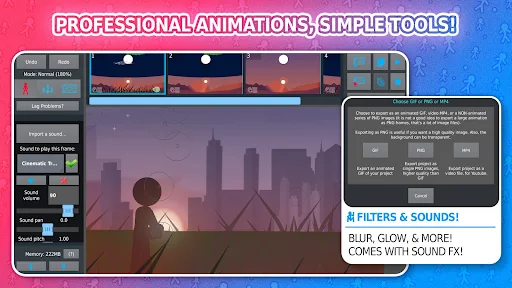
After completing a frame, move to the next one and adjust the character’s position to continue the action. You can repeat this process until the entire sequence is finished. The built-in playback function automatically moves through your frames, allowing you to review the animation without checking each image individually.
One useful detail is that newly created frames retain the character poses and properties from the preceding frame. However, backgrounds and other non-character elements are not automatically duplicated. To preserve an entire scene, including its additional objects, remember to use the copy-and-paste functions before continuing your work.
Maintaining consistent movement between frames is essential when creating smooth animations. Stick Nodes Pro addresses this challenge with its onion skin feature, which displays neighboring frames as translucent shadows behind the current image.
These visual references help you compare character positions and identify unnecessary movement between consecutive frames. Instead of repeatedly switching between images, you can adjust the current pose while keeping earlier or upcoming movements in sight.
You can also customize how many previous and next frames appear through the View Options menu. Although displaying more references provides additional guidance, using too many at once may consume more resources and cause performance issues on less powerful devices. Finding a suitable setting will help maintain a comfortable editing experience.
Drawing every single movement manually can become exhausting, particularly when working on longer projects. To reduce this workload, Stick Nodes Pro includes a tweening tool that automatically generates intermediate frames between selected keyframes.
This feature calculates the transitions between your main poses, making character movements appear smoother without requiring you to adjust every individual frame. The generated subframes function like regular frames, so you can still edit them whenever necessary. A green indicator also helps distinguish automatically generated frames from manually created ones.
However, tweening works best with relatively simple movements following straight lines, circles, or arcs. Complicated actions involving multiple changes in direction may produce unexpected results. For better accuracy, divide complex movements into smaller sequences with additional keyframes before applying interpolation.
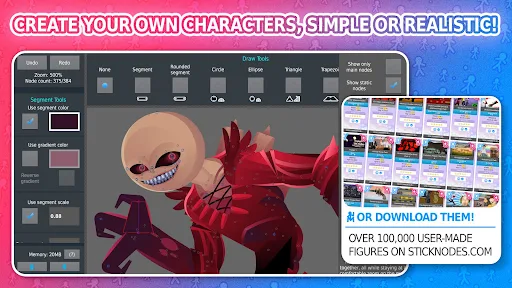
Beyond animation editing, Stick Nodes Pro allows users to build original characters through its Creation Mode Tools. This feature provides basic geometric shapes that you can combine to construct different body parts, accessories, and other visual elements.
<escape></escape>Using the available rotation, movement, zoom, and color adjustment controls, you can gradually transform simple shapes into personalized stickman models. There is also a Smart – Stretch Node option that makes selected parts more flexible, creating a rubber-like appearance during movement.
Once your design is complete, save it to the application’s library for future projects or export it to your phone’s storage as a backup. Keeping an additional copy is particularly useful if you plan to uninstall the application or switch devices.
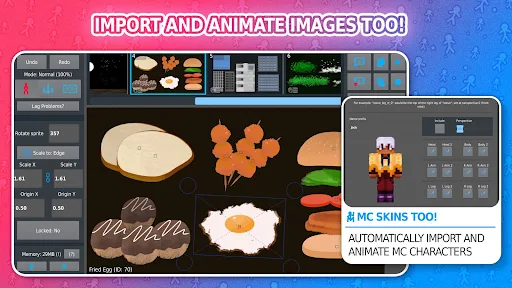
Although the character editor does not provide a dedicated bone-drawing and rigging system, its basic construction tools still offer plenty of creative possibilities. You can experiment with different character proportions or build additional assets such as airplanes, trains, fire effects, and lightning. These creations can then become reusable elements in your animation projects.
Stick Nodes Pro is a paid creative application, making it worth exploring its features before deciding whether it suits your animation needs. If you want to experience its editing tools on Android, follow this download process through APKMODY:
Step 1: Find the application
Open your browser and access the APKMODY website. Use the search function to locate the Stick Nodes Pro APK download page.
Step 2: Check the available version
Read the application information, version details, and compatibility requirements to make sure the file is suitable for your Android device.
Step 3: Get the APK file
Select the download option provided on the page and wait for the installation package to finish downloading.
Step 4: Install and start creating
Open the downloaded APK file, follow the installation prompts, and grant the necessary permission if Android requests it. Once installed, launch Stick Nodes Pro and begin designing your first stickman animation.