home chevron_right Apps chevron_right Music & Audio chevron_right SoundHound∞


Ongaku — Offline Music Player
v6.23.1-217
• Premium


| Updated On | |
|---|---|
| Google Play ID | com.melodis.midomiMusicIdentifier |
| Category | Music & Audio |
| Version | 10.5.8 |
| Size | 64 MB |
| MOD Feature | Not available |
| Requires | Android 8.0 |
| Price | |
| $5.99 | |
| Content Rating | |
| Teen | |
| Internet Required | |
| Required | |

SoundHound makes discovering unfamiliar music easier by identifying songs playing around you with just a quick tap. Beyond recognizing melodies, the application provides song information, synchronized lyrics and convenient tools for organizing your musical discoveries. Whether you hear an interesting track in a café, during a road trip or while relaxing at home, this app helps you find it and keep it for later.
Have you ever heard an incredible melody but struggled to remember its title or the artist behind it? This situation happens frequently, especially when a song appears unexpectedly in a restaurant, shopping center or passing vehicle. Trying to search for an unfamiliar track using a few remembered lyrics can be frustrating when you do not know enough information.
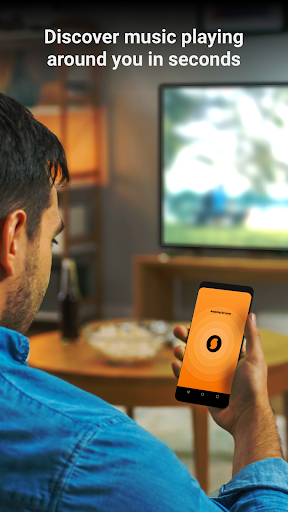
SoundHound offers a straightforward solution through its music recognition technology. Simply launch the application, tap the prominent orange Listen button in the center of the screen and allow it to capture the surrounding audio. Within moments, the system analyzes the sound and attempts to identify the corresponding track, displaying its title and other relevant details. Its extensive music database makes it easier to recognize songs across different listening environments, turning spontaneous musical encounters into discoveries worth remembering.
Sometimes, you only remember a melody without knowing a single word from the original song. SoundHound is designed to make music discovery more flexible by allowing users to hum or sing a tune directly into the application. Instead of relying exclusively on audio playing through nearby speakers, you can reproduce the melody yourself and let the recognition system search for a possible match.
This capability is especially useful when a song gets stuck in your head long after you have stopped hearing it. Although recognition accuracy depends on melody clarity and the complexity of the recording, it provides another convenient way to identify music without knowing its title, singer or lyrics.
Identifying a song is only the beginning of the experience. SoundHound also provides a personal History section where recognized tracks are collected for future reference. Rather than trying to remember every title you encounter throughout the day, you can revisit previous discoveries whenever you want to listen again.
The application also offers a Music Map feature that connects music discoveries with their geographical locations when location information is available and enabled. This creates an interesting way to revisit the places associated with particular songs. A melody discovered during a vacation, a familiar track heard at a favorite café or an unexpected musical encounter on the road can become part of a personal collection of memories.
For users who already enjoy streaming music, SoundHound provides integration with Spotify. By connecting a supported account, you can transfer recognized tracks into your listening experience and make it easier to revisit songs that caught your attention.
The integration also offers a convenient starting point for organizing music collections. Once you have gathered several discoveries, you can arrange them into playlists based on personal preferences, moods or musical styles. This reduces the effort required to search for every track individually and helps turn random discoveries into a more organized listening library.
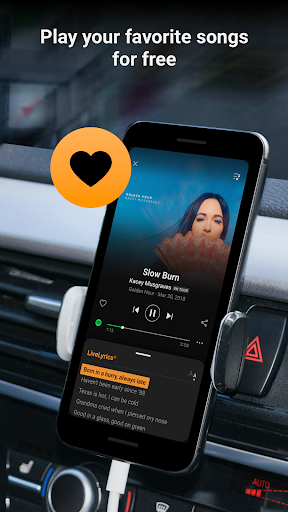
SoundHound goes beyond identifying song titles by providing lyrics for supported tracks. Once a song has been recognized, the application can display its corresponding words, allowing users to follow along while listening. The synchronized presentation makes it easier to understand unfamiliar passages and keep track of each verse without manually searching for the lyrics elsewhere.
This feature is particularly enjoyable when discovering a song for the first time. You can identify the track, learn its words and start singing along within the same application. It also makes music exploration more interactive, especially for people who enjoy learning lyrics or practicing their favorite songs.
Knowing a song’s title is useful, but learning more about its background can make the discovery even more interesting. SoundHound provides additional information for recognized tracks, helping users explore the artists and musical releases behind their favorite melodies.
Depending on the available database information, song details may include:
Track title: Identifies the exact name of the recognized recording.
Artist information: Displays the singer, band or performer associated with the song.
Album details: Helps locate the original album or release containing the track.
Composer credits: Provides information about the people responsible for creating the music.
Release information: Shows the available publication date or release details.
Lyrics: Displays the song’s words for convenient reading and sing-along sessions.
These details give users more context about the music they discover and provide useful starting points for exploring other releases from the same artists.
SoundHound is not limited to identifying music that happens to play nearby. Its music discovery experience also allows users to explore popular tracks and lyrics through available charts and collections. This makes the application useful even when you are not trying to identify a particular melody.
You can browse different musical styles, discover trending songs and find new artists based on your listening interests. Combined with recognition history and streaming integration, these features create a more complete environment for exploring music beyond your existing favorites.
Music often becomes more enjoyable when shared with other people. SoundHound includes sharing tools that allow users to send recognized tracks and musical discoveries through supported social platforms and communication applications. Instead of manually copying song titles or searching for individual links, you can use the built-in Share function to distribute information about a track.
Supported sharing destinations may include Instagram, Snapchat, Facebook, X (formerly Twitter), email and compatible messaging services. Availability depends on the applications installed on your Android device and their current integration support. Whether you want to introduce friends to an unfamiliar artist or share a song that perfectly matches your mood, the feature makes musical conversations easier.
Sharing music can also help introduce people to different genres, artists and cultural influences. A track discovered during an ordinary commute might become someone else’s new favorite, while a familiar melody can bring back memories for an entire group of friends.
By combining music recognition with convenient sharing options, SoundHound makes these small discoveries easier to spread. It encourages users to explore beyond their usual playlists and exchange musical recommendations with people who have similar interests.
If you want to try SoundHound on your Android device, you can find its application information and available installation package through APKMODY. Follow this alternative setup process to get started:
Find the application: Visit APKMODY through your mobile browser and search for SoundHound.
Review the release: Open the correct application page, check its version details and verify compatibility with your Android device.
Select the APK package: Navigate to the download section and choose the available installation file.
Save the file: Wait for the download to finish, then open your device’s file manager and locate the APK.
Complete installation: Tap the package and approve the relevant installation permission if Android displays a security notification.
Configure music access: Launch SoundHound and grant microphone access when requested so the application can recognize nearby music or your humming.
Start discovering songs: Tap Listen, test the recognition function and explore the History section to review your discoveries.