
Orrin・Budget Planner App
v1.8.0.2026112000
• Premium
| Updated On | |
|---|---|
| Google Play ID | com.monefy.app.lite |
| Category | Finance |
| Version | 1.23.1 |
| Size | 24 MB |
| MOD Feature | Not available |
| Requires | Android 7.0 |
| Price | |
| Free | |
| Content Rating | |
| Everyone | |
| Internet Required | |
| Not Required | |

Managing money effectively starts with understanding where every dollar goes. Monefy provides a straightforward way to record daily transactions, organize spending categories, and monitor your budget without complicated spreadsheets. Whether you are building your first savings plan or trying to control regular expenses, this personal finance app helps turn money management into a simple daily habit.
Monefy focuses on making financial tracking accessible, allowing users to review their spending habits and organize personal budgets through a clean, intuitive interface.
Saving money becomes easier when you understand how much you spend and which purchases consume the largest part of your income. Monefy helps you develop that awareness by providing a convenient space to record everyday transactions and review your financial activity.
Small purchases often seem insignificant on their own. A morning coffee, an occasional milk tea, online shopping, grocery bills, and other routine expenses may appear harmless, but their combined value can make a noticeable difference to your monthly budget. Without a reliable tracking method, it is easy to overlook these costs until your available balance becomes unexpectedly low.
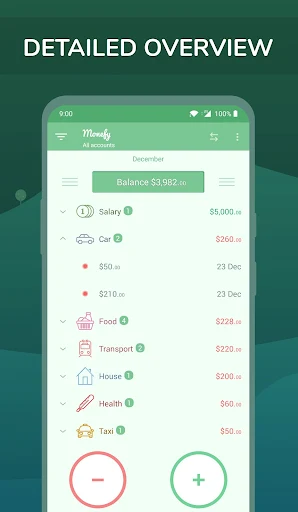
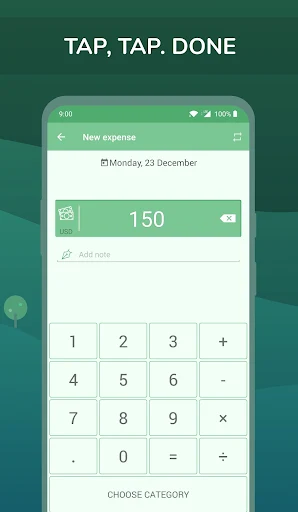
Monefy addresses this problem with a simple expense-entry process. After setting up your income and spending categories, you only need to select the appropriate category, enter the amount, and save the transaction. The application then updates your financial records, helping you see how much you have spent and how much money remains. Instead of manually calculating every purchase, you can review your current situation whenever necessary and adjust your spending before exceeding your planned limit.
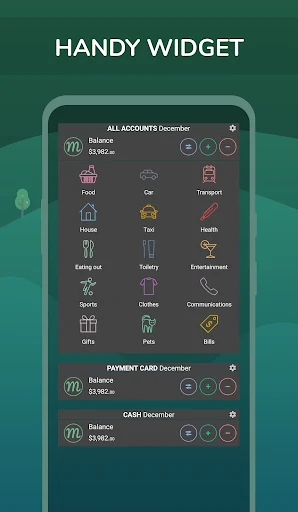
Keeping track of numerous transactions does not have to involve complicated procedures. Monefy reduces the amount of manual input by letting you prepare frequently used expense categories in advance. When you make a purchase, select the corresponding item and enter its value. For recurring costs, you can reuse familiar categories instead of creating a new entry every time.
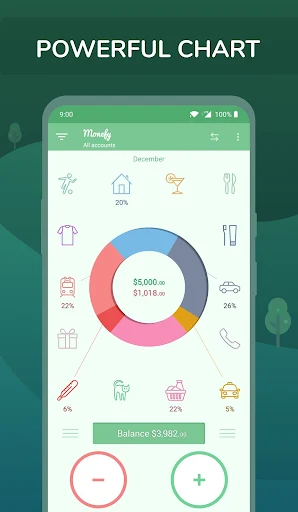
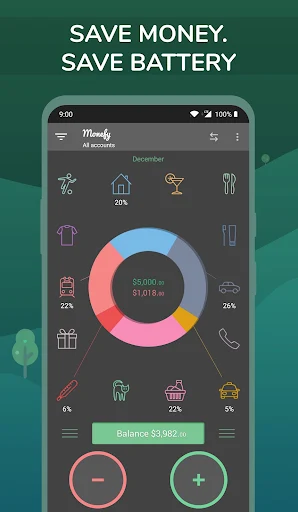
The application also turns transaction records into visual reports. Spending charts make it easier to identify which categories account for the largest share of your budget, while weekly and monthly overviews help reveal changes in your financial habits. You can use these insights to recognize unnecessary purchases, reduce excessive spending, and distribute your income more effectively.
For users who need to keep a separate record, Monefy supports exporting financial information into PDF files. This provides a convenient way to review or preserve spending reports outside the application. Rather than relying entirely on memory, you have organized records to support more informed financial decisions.
Daily purchases are only one part of personal finance management. Rent, subscriptions, utility bills, loan repayments, and other recurring obligations also need to be considered when planning a monthly budget.
Monefy provides tools for organizing regular payments and keeping track of upcoming financial commitments. Depending on the available features and settings, you can establish recurring entries, monitor payment schedules, and receive reminders when a due date approaches. This helps reduce the risk of overlooking important expenses and makes monthly planning more predictable.
By keeping routine purchases and scheduled payments in the same financial overview, you gain a clearer picture of your obligations. You can compare your regular income against expected expenses, identify how much money remains for flexible spending, and plan savings around essential payments.
People who travel frequently, shop from international stores, or receive income in different currencies may find it difficult to maintain a consistent financial record. Monefy supports multiple currencies, allowing users to organize transactions according to their preferred settings.
Currency conversion features help make financial figures easier to understand when dealing with different monetary units. You can also configure the way currencies appear in your records, depending on your needs. This flexibility is useful for keeping everyday expenses organized without having to calculate every foreign-currency transaction manually.
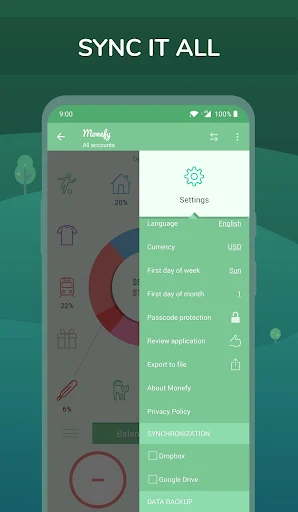
Keeping personal finance information available on different devices is convenient, especially when you switch between a phone and a tablet. Monefy supports synchronization through cloud services such as Google Drive and Dropbox, allowing compatible devices to access the same financial records when synchronization is configured.
This means you do not necessarily have to maintain separate expense lists on each device. Instead, you can continue updating your budget and reviewing transactions from different locations while keeping your information connected.
Privacy is another important consideration when handling financial data. Monefy provides optional password protection, including two-factor authentication where supported, to add another layer of security to your account. Users should still review their synchronization and security settings carefully, particularly when storing personal records through third-party cloud services.
Every person has different spending habits, so a fixed budgeting structure may not suit everyone. Monefy offers category management options that help users arrange their financial records according to their priorities.
You can start with the default expense and income categories, then customize the organization to reflect your lifestyle. For example, someone who frequently travels may want separate categories for transportation and accommodation, while another user may prefer to divide household costs, entertainment, and shopping into smaller groups.
The ability to adjust these categories makes transaction reports more meaningful. When your financial records reflect your actual habits, it becomes easier to identify spending patterns and decide where adjustments are necessary.
Building a healthy financial routine takes consistency, but the right tracking tool can make the process much easier. Monefy brings daily expenses, recurring payments, and spending reports together in one accessible interface, giving you a clearer understanding of your money.
Follow this quick download checklist to get started:
Find the app: Visit APKMODY and search for Monefy.
Check the release: Open the app page and review the available version, Android compatibility, and package details.
Get the APK: Choose the download option provided on the page and wait for the file to finish downloading.
Complete installation: Open the downloaded package, approve the installation permission if Android requests it, and follow the on-screen instructions.
Start organizing your budget: Launch Monefy, configure your preferred currency and expense categories, then begin recording your transactions.