home chevron_right Apps chevron_right Entertainment chevron_right KICK: Live Streaming


GoodShort – Short Dramas Hub
v3.3.0.2130
• Unlocked
| Updated On | |
|---|---|
| Google Play ID | com.kick.mobile |
| Category | Entertainment |
| Version | 40.35.6 |
| Size | 157 MB |
| MOD Feature | Not available |
| Requires | Android |
| Price | |
| Free | |
| Content Rating | |
| Teen | |
| Internet Required | |
| Required | |

KICK: Live Streaming APK opens the door to a diverse entertainment community where viewers and content creators can connect in real time. From gaming broadcasts and casual conversations to esports events, the platform offers plenty of content alongside tools for launching your own streaming channel. Explore its standout features, discover what makes KICK different, and learn how to get the Android app through APKMODY!
Live streaming has become an important part of modern digital entertainment, allowing people to share experiences and communicate with audiences across the world. Launched in 2022, KICK: Live Streaming emerged as a competing platform in this growing market, offering an alternative to established services such as Twitch.
The application supports various broadcasting formats, including video games, music, casual conversations, reactions, and real-life activities. Rather than focusing on a single entertainment category, KICK creates an environment where creators can experiment with different formats and build their own communities. Its combination of broadcasting tools, interactive features, and viewer-oriented content makes it appealing to people on both sides of the streaming experience.
One of KICK’s biggest advantages is its relatively straightforward streaming interface. New creators can get familiar with the essential broadcasting controls without spending too much time navigating complicated menus. Once the necessary permissions and streaming settings are configured, starting a live session becomes a simple process.
The application also provides options for adjusting broadcast quality to suit different content formats and internet conditions. Creators can focus on gaming sessions, discussions, or everyday activities while maintaining a consistent connection with their audiences. In addition to live broadcasts, KICK supports video uploads, giving channel owners another way to share content when they are not streaming.
KICK provides an open environment for creators who want to experiment with their personal broadcasting styles. Gaming is one of its recognizable categories, but the platform also accommodates talk shows, reaction videos, music-related content, and IRL streams. This variety gives newcomers more freedom to discover a suitable niche instead of following a single content formula.
Building a recognizable channel requires more than simply pressing the broadcast button. Regular streaming schedules, engaging conversations, and interesting content ideas all contribute to audience development. By interacting with viewers and maintaining an identifiable style, creators can gradually establish a community around their channels.
Monetization is another reason KICK attracts attention from aspiring streamers. The platform has promoted a 95/5 subscription revenue-sharing arrangement, under which eligible creators receive 95% of subscription revenue while KICK retains the remaining 5%. This model offers creators a particularly attractive earning opportunity compared with many traditional streaming services.
However, the actual income depends on factors such as audience size, subscription activity, eligibility, and applicable platform conditions. Creators should review the latest monetization requirements before relying on streaming as a source of income. Even so, the revenue-sharing approach makes KICK an interesting option for people who want to develop their channels commercially.
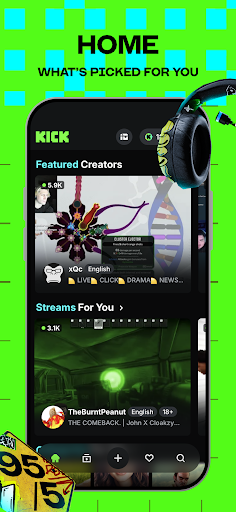
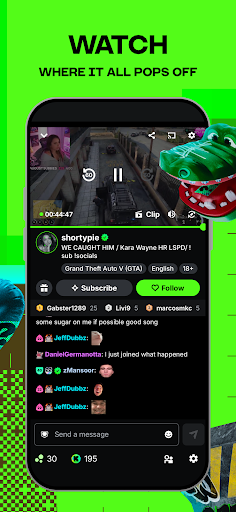
KICK is not exclusively designed for people who want to become streamers. Viewers can explore a wide range of live broadcasts and enjoy content from creators across different categories. Playback quality and available resolution depend on the stream, device, and network connection, allowing the viewing experience to adapt to different circumstances.
Whether you prefer watching competitive gaming, casual conversations, or entertainment broadcasts, the platform provides a convenient way to follow your favorite channels. Its mobile interface also makes it easier to enjoy live content while away from a computer, turning your smartphone into a portable entertainment hub.
Live interaction is an essential part of the streaming experience, and KICK incorporates a chat system that allows viewers to communicate with creators and other audience members. You can share reactions, participate in discussions, and become part of the community surrounding a particular broadcast.
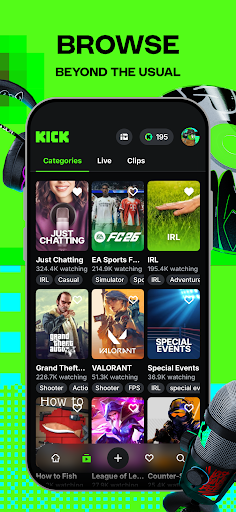
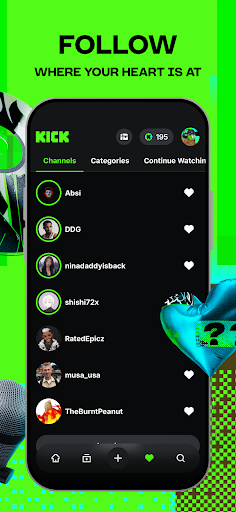
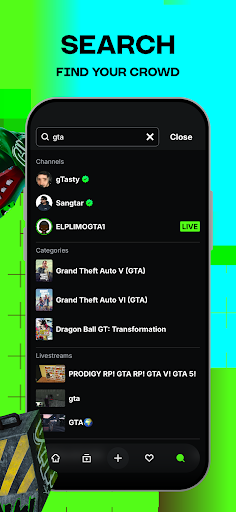
The discovery tools also help you find channels and topics that match your interests. Search for specific creators, browse available categories, and follow accounts worth watching. Turning on notifications helps you stay informed about upcoming broadcasts, while replay availability allows you to catch up on supported content you missed earlier.
Beyond individual creators, KICK also provides access to selected professional sporting and esports broadcasts. Its partnerships and broadcasting arrangements have included organizations and events associated with UFC, BLAST, and PGL. This gives viewers opportunities to discover competitive entertainment alongside regular community streams.
For esports enthusiasts, tournament broadcasts offer another reason to explore the platform. You can follow competitive matches, watch participating teams, and enjoy the excitement of professional gaming events when they are available in your region. Event availability and broadcasting rights may vary, so checking the platform’s current schedule is recommended.
Although KICK provides the essential features needed to broadcast and interact with viewers, its creator ecosystem may not offer the same depth as more established platforms. Streamers who require extensive customization, advanced channel management, or specialized production integrations may need additional software and external tools.
This does not necessarily make KICK unsuitable for experienced creators. However, beginners may find it easier to get started than to build a highly customized streaming operation entirely within the application. Considering your long-term content goals before choosing a primary platform can help you avoid unnecessary limitations later.
An open streaming environment encourages creativity, but it also creates challenges related to inappropriate broadcasts and community behavior. Some categories may contain mature discussions or sensitive material that is not suitable for every audience. Viewers should pay attention to age ratings, content labels, and individual channel information before watching unfamiliar streams.
Parents and younger users should also be aware that an application’s age rating does not guarantee that every broadcast will be appropriate. Reporting tools, moderation policies, and personal viewing settings are important parts of maintaining a safer experience. Users should review the current community guidelines and apply suitable content restrictions whenever necessary.
Compared with long-established streaming services, KICK is still developing its wider collection of creator tools, community features, and platform integrations. Some functions may evolve as the service expands, while availability can differ between the mobile application and other supported versions.
Nevertheless, its combination of accessible broadcasting, interactive entertainment, and creator-focused monetization gives it a recognizable position in the live streaming market. Keeping the application updated is a practical way to access new features and improvements as they become available.
Want to explore live broadcasts or start building your own streaming channel? Follow this alternative download guide to find the application on APKMODY:
Open APKMODY: Visit the website through Chrome or another browser on your Android device.
Find the application: Use the website’s search function and enter the exact name KICK: Live Streaming.
Review the download page: Check the application description, version details, Android compatibility, and available file information.
Get the installation package: Choose the appropriate APK download option and wait for the file to finish downloading.
Complete the installation: Open the downloaded package, grant installation permission if requested by Android, and follow the instructions displayed on your screen.
Start exploring: Launch KICK, sign in or create an account if needed, and discover the available live streams.