home chevron_right Apps chevron_right Art & Design chevron_right HiPaint

PixVerse
v3.18.6
• Art & Design
| Updated On | |
|---|---|
| Google Play ID | com.aige.hipaint |
| Category | Art & Design |
| Version | 6.3.3 |
| Size | 121 MB |
| MOD Features | Pro Unlocked |
| Requires | Android 9 |
| Price | |
| Free | |
| Content Rating | |
| Everyone | |
| Internet Required | |
| Unknow | |
HiPaint is a professional painting application for mobile devices. The application is developed and published by Aige (Wuhan) Technology, headquartered in China. HiPaint is currently distributed on Android via Google Play and on IOS via the App Store.
Besides features such as brush, eraser, color fill, and shape moving that any painting application must have, HiPaint also provides unique features to support you in the painting process such as:
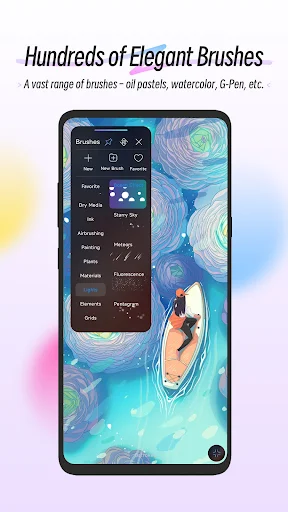
HiPaint provides you with 90 different brush tips, from simple ones like “pencil”, “brush”, “spray gun” to complex ones like “pattern”, “flower”, “star”. In addition, you can create your own brush tip by using the Import Assets –> Import Brushes feature, then select a picture in your device. The brush in HiPaint is very compatible with the brushes on mid-range and high-end phones. The application can recognize up to 8000 pressure levels from the brush, allowing you to comfortably draw light and bold lines. However, even if you don’t have a brush, as long as you adjust your finger speed appropriately when drawing, you can still draw light and bold lines.
3D is a very unique feature that HiPaint offers, very few drawing applications have this feature. You can add a 3D model by using the Import Assets -> Import Models feature. After adding it to the drawing page, you can move, rotate, and resize it as you like. In addition, the application also has the feature of adding borders to your model, giving the model a cartoon style like characters in games like Genshin Impact or Wuthering Waves.
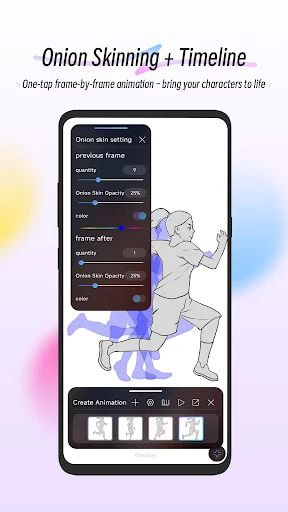
With HiPaint, by tapping the “Create Animation” button on the interface, you can use the hand-drawn animation feature. Tap the “+” button to create another frame, you can freely draw on each frame without affecting the other frames. The frame created later will be located to the right of the previously created frames. You can hold a frame and drag it left or right to move the frame position.
Tap once to select the frame to draw. Tap twice, the screen will display a feature selection box including:
The frame on the leftmost side has a “Background” toggle, and will always be displayed at the bottom of all other frames. Conversely, the frame on the left with a “Foreground” toggle will always be displayed at the top of all frames.
Additionally, the app offers a few notable animation support features as follows:
Recording the drawing process is a very popular feature among digital artists. If you are a fan of painting, you must have seen many videos sharing the process of completing the work of artists on YouTube or TikTok. Now with HiPaint, you do not need any recording software, just turn on the Time-lapse Replay feature, the application will automatically record your entire drawing process as a video.
Once you’ve finished your work, you can save it or share it on social media. HiPaint also lets you adjust the length of the video, so you can export a short video to post on TikTok, or a long video to post on YouTube.
Pro Unlocked
Despite being a professional digital painting tool and offering a lot of unique features, HiPaint is very friendly to both amateur and professional artists. If you have a passion for drawing, HiPaint deserves a place on your mobile.