

Nicegram: AI x Dual Telegram
v1.65.0
• Unlocked




| Updated On | |
|---|---|
| Google Play ID | com.yy.hiyo |
| Category | Social |
| Version | 5.58.0 |
| Size | 246 MB |
| MOD Feature | Not available |
| Requires | Android 6.0 |
| Price | |
| Free | |
| Content Rating | |
| Teen | |
| Internet Required | |
| Required | |

HAGO APK combines online social interaction with casual entertainment, giving users a place to meet people, exchange messages, and enjoy games together. Instead of focusing exclusively on chatting or gaming, the application brings several activities into one community where you can connect with friends and discover new acquaintances. From themed chat rooms and multiplayer challenges to video calls and live broadcasts, HAGO offers different ways to spend your free time.
HAGO is more than a conventional messaging application or a collection of mobile games. It brings together communication tools, interactive activities, and community features to create a shared entertainment environment.
Traditional social platforms usually concentrate on posting content, sending messages, or following other users. HAGO takes a broader approach by combining these familiar activities with games and real-time entertainment.
You can enter the community to talk about personal interests, meet people with similar hobbies, or find someone to play with. The platform also offers different ways to interact, so conversations do not have to remain limited to text messages.
This combination makes HAGO suitable for users who enjoy socializing but also want something entertaining to do while communicating. Whether you prefer casual conversations or competitive mini-games, you can explore different activities without constantly switching between applications.
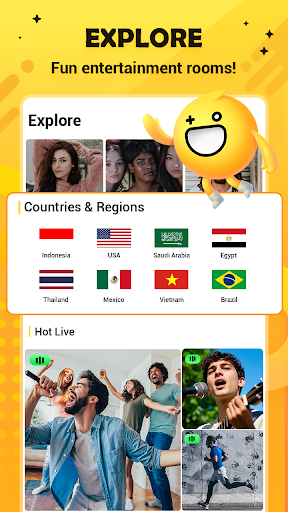
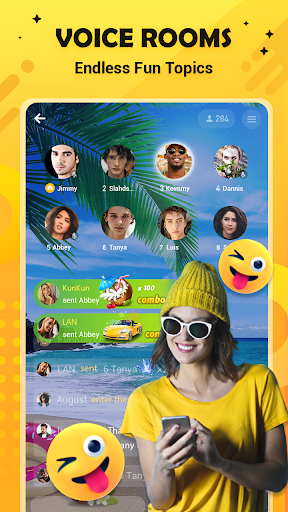
One of HAGO’s main attractions is its collection of chat rooms. These spaces allow users to communicate with people they may not have met otherwise, creating opportunities to discover new friendships and shared interests.
HAGO provides themed chat rooms where participants can gather around different topics. You can explore available rooms, join conversations, and interact with other members according to your preferences.
Some people enter these spaces to discuss hobbies, while others simply want to relax and talk after a busy day. The variety of conversations makes it easier to find communities that match your interests.
You are not limited to sending ordinary text messages, either. Depending on the available room features, participants can use emojis, stickers, and other interactive activities to make conversations more engaging.
Chat rooms in HAGO can also become places for shared entertainment. Users may participate in karaoke sessions, drawing activities, or informal group events instead of relying entirely on written conversations.
These features encourage members to interact in a more playful way. For example, you can join a drawing challenge with other participants or take part in a music-related gathering.
Such activities help create a lively atmosphere and give people more opportunities to connect. Even if you enter a room without knowing anyone, joining a shared activity can be an easy way to start interacting.
HAGO is also known for integrating casual games into its social environment. Rather than downloading a separate game for every activity, users can explore different mini-games through the platform.
The game collection includes various casual entertainment styles, from simple puzzles and brain-training challenges to action-oriented experiences. Many of these games feature straightforward rules and short sessions, making them suitable for quick breaks.
This variety is useful when you want to try something different without committing to a lengthy gaming experience. You can browse the available options, select a game that interests you, and start playing.
The selection may change over time depending on the application’s version and available content. Therefore, the number and types of mini-games you can access may vary.
Playing with other people adds another layer of entertainment to HAGO. You can invite friends to join a game or connect with other community members who are looking for opponents and teammates.
Real-time communication helps make multiplayer sessions more interactive. Instead of concentrating only on the result, you can chat, exchange reactions, and enjoy the experience together.
Some activities may also include rewards or collectible items that encourage continued participation. These elements give players additional goals while exploring the platform’s game collection.
Beyond public chat rooms, HAGO provides communication features that help users maintain closer connections with friends and acquaintances.
The messaging system allows you to exchange messages and share reactions through emojis and animated stickers. These small additions make conversations feel more personal than plain text exchanges.
You can use the available communication tools to stay in touch, discuss shared interests, or coordinate multiplayer sessions. This makes messaging an important part of the overall social experience.
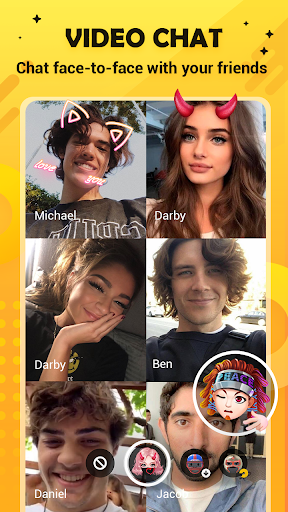
For users who prefer direct interaction, HAGO also offers video communication features. Video calls provide a more personal way to talk with friends compared with traditional messaging.
Additional visual effects, filters, and other available features can make these conversations more entertaining. Whether you want to catch up with someone or simply enjoy a casual video chat, the application offers another way to stay connected.
As with any social platform, it is worth being careful when communicating with people you have just met. Avoid sharing private information with unfamiliar users.
HAGO extends its social features through live rooms and community-sharing tools. These areas allow users to discover entertainment created by other members and participate in activities beyond ordinary conversations.
Live rooms provide opportunities to watch and interact with content creators in real time. Depending on the available broadcasts, you may find sessions involving singing, dancing, beauty-related topics, or casual entertainment.
Users can enter rooms that match their interests, follow ongoing activities, and interact with hosts or other viewers. This creates a more dynamic experience than simply browsing prerecorded content.
The selection of live broadcasts depends on what creators are currently hosting. You can explore different rooms to discover content that suits your mood.
The Square feature gives users another way to share content and connect with people who have similar interests. You can use this community space to post moments, discover other members’ updates, and participate in discussions.
It can be useful when you want to share something beyond a private message or join conversations with a wider audience. Over time, interacting with different posts and users may help you discover new communities and potential friendships.
If you want to try HAGO on your Android device, you can find its installation package through APKMODY. Follow this alternative download route to get started:
Before downloading: Make sure you have a stable internet connection and enough free storage space on your device.
Open your Android browser and go to the APKMODY website.
Use the search function to look up HAGO and access its application page.
Read through the available release information, including the version number, file size, and compatibility details.
Select the appropriate APK download option and wait for the file to finish downloading.
Open your device’s Downloads folder and locate the HAGO installation package.
Tap the APK file to begin installation. If Android asks for permission to install applications from that source, review the request and enable it only if you trust the download source.
Once installation is complete, launch HAGO, review the requested permissions, and follow the account setup instructions to explore its social features.