home chevron_right Apps chevron_right Music & Audio chevron_right G-Stomper Studio


Waazy
v4.3.9.3
• Premium Unlocked
| Updated On | |
|---|---|
| Google Play ID | com.planeth.gstomper |
| Category | Music & Audio |
| Version | 6.2.3.3 |
| Size | 72 MB |
| MOD Feature | Not available |
| Requires | Android 8.0 |
| Price | |
| $13.99 | |
| Content Rating | |
| Everyone | |
| Internet Required | |
| Unknow | |

G-Stomper Studio APK turns your Android device into a versatile music production workstation, giving you access to professional-style instruments and audio tools without purchasing expensive studio equipment. Designed for electronic music enthusiasts, this application combines drum machines, synthesizers, samplers, and advanced sequencing functions in one environment. Whether you compose at home or experiment with sounds while traveling, it provides a flexible space to turn creative ideas into complete musical arrangements.
Professional audio equipment can require a substantial investment, with physical studio setups ranging from a few hundred to several thousand dollars. G-Stomper Studio offers a more accessible alternative by bringing multiple music production tools directly to your smartphone or tablet. Instead of purchasing separate hardware devices, you can work with virtual instruments and audio controls through a single application.
Although anyone interested in music can explore its functions, G-Stomper Studio is particularly useful for several groups:
Electronic Music Producers: Musicians working with genres such as Techno, House, Minimal, Drum & Bass, and Dubstep can use its sequencing and synthesis tools to develop complex compositions.
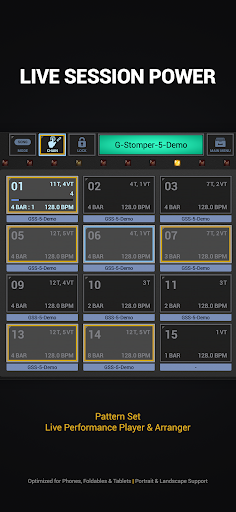
Live Performers: Its hardware-inspired controls and pattern-based workflow make it suitable for live electronic performances, improvisation, and loop-based arrangements.
Sound Designers And Students: People learning about sound creation can experiment with different samples, effects, synthesizers, and audio processing techniques.
Mobile Music Creators: Producers who travel frequently can use the application to record ideas, arrange patterns, and develop tracks without carrying a complete studio setup.
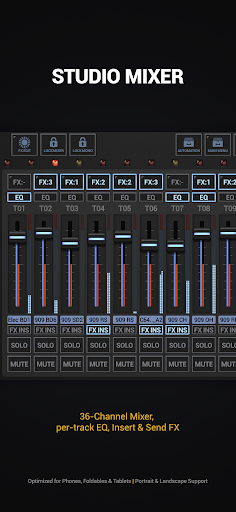
G-Stomper Studio brings several essential production components together, allowing you to manage different stages of the creative process without constantly switching between applications. Its workflow revolves around sequencing, sampling, sound generation, recording, and external device connectivity.
Here are some of its most important capabilities:
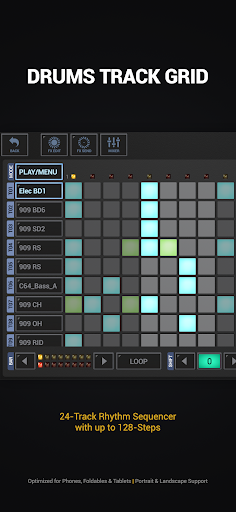
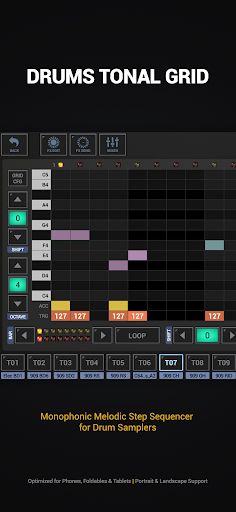
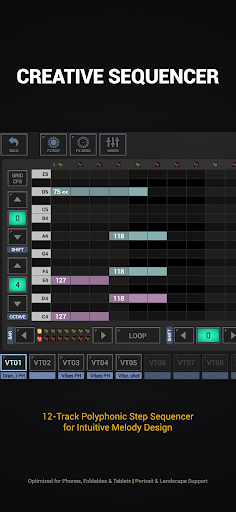
Groovebox And Step Sequencer: The central workspace provides a multi-track sequencing environment for arranging beats and musical patterns. You can control individual steps, organize patterns, and adjust timing parameters such as swing and shuffle to create different rhythmic styles.
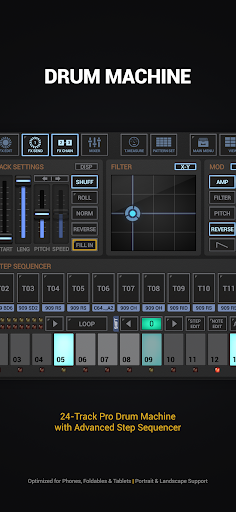
Drum Machine And Sample Engine: Import audio files in formats including WAV, AIFF, FLAC, OGG, and MP3. Available editing functions include sample trimming, normalization, pitch adjustment, and reverse playback. You can also layer multiple samples within individual tracks to create richer percussion sounds.
Audio Output And Recording: Export finished compositions as WAV files with supported bit depths ranging from 8 to 32 bits and sample rates of up to 96 kHz. Real-time recording also allows you to capture performances and musical ideas.
MIDI And Synchronization: Connect compatible external controllers through supported USB or Bluetooth MIDI configurations. The application also offers synchronization options such as MIDI clock and Ableton Link for coordinating musical equipment and software.
Live Performance Functions: Arrange patterns, manipulate sounds, and control different musical elements during performances. These features make it possible to create electronic music without depending on a laptop-based setup.
A major advantage of G-Stomper Studio is its selection of virtual instruments, which cover several important aspects of electronic music production. Each instrument serves a different purpose, allowing you to combine rhythmic elements, melodic sequences, atmospheric sounds, and special effects into one composition.
The available instrument categories include:
Drum Sampler – Drum Tracks: Provides dedicated tracks for percussion instruments such as kick drums, snares, and hi-hats. You can build rhythmic foundations and customize individual drum sounds to match your preferred style.
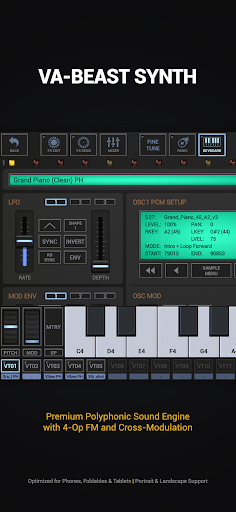
VA-Beast Synth – Virtual Analog Synthesizer: Creates electronic sounds such as basslines, lead melodies, atmospheric pads, drones, and various sound effects through virtual analog synthesis.
Polyphonic Synth Tracks: Supports multiple simultaneous notes, making it suitable for chord progressions, layered harmonies, ambient arrangements, and expressive musical passages.
Melodic Sampler – Sample-Based Instrument: Uses imported vocal recordings, instrument samples, and synthesizer sounds to create melodic parts, vocal chops, simulated instruments, and unusual sound textures.
FX And One-Shot Instruments: Includes short audio elements such as risers, impacts, sweeps, and noise effects to add transitions and dramatic moments to your arrangements.
Internal Sound Sets – Presets And Factory Sounds: Offers built-in sounds and presets that provide starting points for experimentation, helping you develop ideas without building every instrument from scratch.
Because G-Stomper Studio handles multiple audio tracks, instruments, and real-time processing operations, device performance can influence the overall experience. A compatible Android device with sufficient processing power and memory will help reduce interruptions when working with complex arrangements.
The following specifications serve as a reference for choosing suitable hardware:
| Component | Suggested specification |
|---|---|
| Operating system | Android 8.0 or newer |
| Processor | Dual-core 1 GHz or better |
| RAM | At least 2 GB |
| Screen resolution | Minimum 800 × 480 pixels |
| Audio equipment | Headphones or external speakers recommended |
| Connectivity | USB-MIDI or Bluetooth MIDI support recommended |
For a more comfortable production experience, a mid-range device with a quad-core processor running at 2 GHz or higher, 4 GB of RAM, and a 1080 × 1920 display is preferable. A compatible USB or Bluetooth MIDI connection is also useful if you plan to work with external controllers.
G-Stomper Studio offers considerable creative freedom, but its extensive controls and production tools may not appeal to everyone. Understanding both sides will help you decide whether this application matches your musical interests and technical experience.
Advantages:
Offers an extensive collection of electronic music production tools on Android.
Provides versatile sound creation and audio processing capabilities.
Includes a capable drum machine and sample editing environment.
Supports live performances through smartphones and tablets.
Works with compatible MIDI equipment and Ableton Link synchronization.
Provides a more affordable alternative to purchasing multiple physical studio devices.
Disadvantages:
Beginners may need considerable time to understand the interface and production workflow.
The interface can feel crowded, particularly on smartphones with smaller displays.
Its main strengths focus on electronic music rather than traditional acoustic arrangements.
The limited selection of built-in presets may require users to create or import additional sounds.
Complex projects may perform better on mid-range or high-end Android devices.
G-Stomper Studio is an appealing choice for anyone interested in producing electronic music without investing in an expensive collection of physical equipment. Its combination of synthesizers, drum samplers, sequencing functions, and recording tools creates a versatile environment for both experimentation and serious music projects. Although mastering its interface takes practice, the creative possibilities make the learning process worthwhile.
Install the application through APKMODY using this step-by-step approach:
Open your Android browser and navigate to the APKMODY website.
Enter G-Stomper Studio APK into the search field to find the application’s dedicated page.
Check the available release details, Android compatibility, and file information before choosing a download.
Tap the corresponding download option and wait until the APK package has been saved to your device.
Open your Downloads folder and select the newly downloaded installation file.
If Android displays a security prompt, review the source and grant the required installation permission only when appropriate.
Follow the remaining setup instructions, then open G-Stomper Studio to explore its instruments and production workspace.