

JumpJumpVPN
v3.5.2
• Utilities
| Updated On | |
|---|---|
| Google Play ID | com.itemstudio.castro.pro |
| Category | Utilities |
| Version | 4.10.1 |
| Size | 14 MB |
| MOD Feature | Not available |
| Requires | Android 8.0 |
| Price | |
| $2.99 | |
| Content Rating | |
| Everyone | |
| Internet Required | |
| Unknow | |

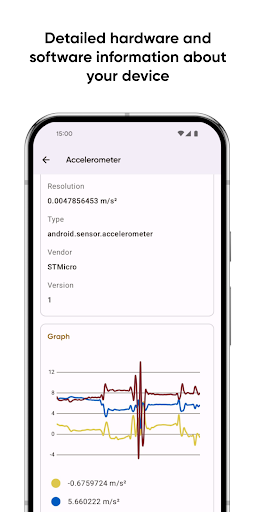
Are you curious about what’s happening inside your Android phone? Knowing its processor speed, memory usage, battery condition, and other hardware details can help you understand how your device performs. While Android provides some basic system information, finding specific details often means navigating through several menus. Castro Premium offers a more convenient alternative by gathering important device statistics in one place. The app focuses on monitoring and displaying technical information, making it useful for anyone who wants a closer look at their phone’s condition.
Castro Premium is a device information utility designed to present hardware and system data in an accessible format. Instead of checking individual settings menus, users can open the app and explore different categories from a centralized dashboard. It also includes practical tools for examining touchscreen responsiveness and checking whether a device has root access.
One of Castro Premium’s strengths is its straightforward interface. Most of the screen is reserved for displaying information, while a navigation area at the bottom provides access to the app’s main sections. This arrangement keeps important statistics visible without overwhelming the user with unnecessary menus.
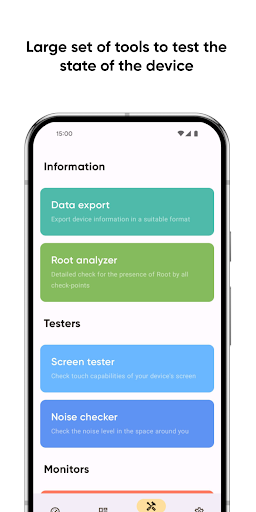
The navigation area contains three main options: Overview, Tools, and Settings. Overview presents device information, Tools contains diagnostic utilities, and Settings lets you adjust how the application behaves. Rather than displaying every parameter as plain text, Castro Premium also uses visual elements such as pie charts, horizontal bars, and other graphs to make technical data easier to understand.
Another useful detail is the automatic refresh system. Information is updated at a default interval of one second, allowing you to observe changes while monitoring your device. If you prefer a different update frequency, you can adjust the interval through the settings menu.
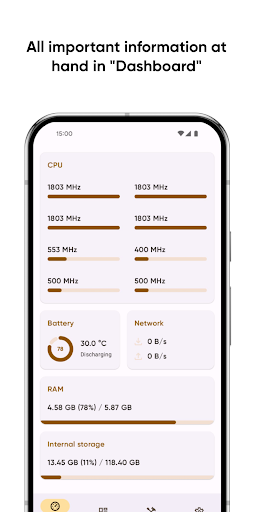
The Overview section brings together several important specifications and live system readings. This makes it easier to check how different components are performing without switching between multiple Android menus.
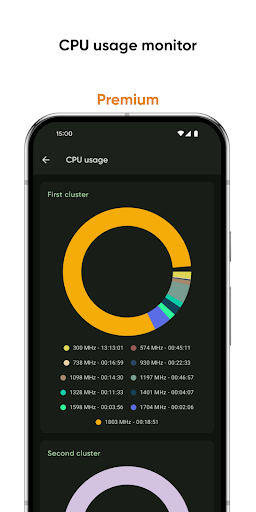
CPU Frequency: Displays the operating frequencies of individual processor cores through horizontal graphs. For example, an eight-core processor can have eight separate indicators, with frequencies measured in MHz.
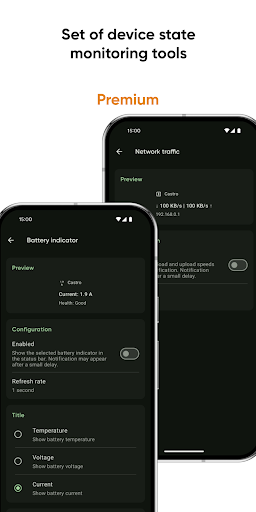
Battery Information: Shows details such as battery capacity, temperature, and charging status. A pie chart provides a quick visual representation of the available battery capacity, while temperature readings are displayed in degrees Celsius.
Network Activity: Tracks the amount of data being transmitted and received. The information is presented in Bytes per second, helping you observe network activity as it changes.
RAM Usage: Compares the amount of memory currently in use with the device’s total available RAM. A progress bar and percentage make it easier to identify how much memory remains available.
Internal Storage: Presents storage usage in a format similar to the RAM section, allowing you to review occupied and available space.
Keep in mind that storage figures may differ slightly from the numbers printed on your phone’s packaging. This is because manufacturers and software utilities may use different measurement conventions. Castro Premium displays storage using binary units, so the reported capacity may appear lower than the advertised figure.
A phone’s display may look perfectly normal while certain areas of its touch panel are no longer responding correctly. Castro Premium includes a touchscreen testing tool that helps you identify these potential problems without requiring additional equipment.
When you activate the test, the application prepares the screen for touch input. Simply tap different areas of the display and observe the visual feedback. A marker appears wherever the screen successfully registers a touch. If a particular location does not produce a marker, that area may not be responding as expected.
The tool can also show the number of simultaneous touch points detected by the device. This is useful for checking multi-touch functionality, especially if you want to evaluate a phone before purchasing it or investigate possible screen issues.
Root access allows users to obtain elevated privileges within Android’s operating system. Although this can provide greater control over the device, it may also affect security, software compatibility, and system stability depending on how the phone is configured.
Castro Premium provides a dedicated root analysis feature that lets you check the device’s root status with a single action. This can be particularly helpful when inspecting a second-hand phone, since you may want to know whether its system has been modified before making a purchase.
The result offers a convenient starting point for understanding the device’s configuration. However, a root status check should not be treated as a complete security assessment, as other system modifications may exist even when a device is not rooted.
Castro Premium brings several useful monitoring and diagnostic functions together in one lightweight interface. From checking processor frequencies and battery readings to examining storage usage and touchscreen response, the application helps you understand your Android device without digging through complicated settings. Its root analysis tool also adds value when you need to inspect a phone’s system configuration.
To get the APK through APKMODY, follow this navigation guide:
Find the app: Open your browser and visit the APKMODY website.
Search by name: Use the site’s search function to look for Castro Premium, then enter its dedicated download page.
Check the release details: Review the available version, app information, and compatibility notes before choosing a file.
Save and install: Start the APK download, open the completed file from your device’s Downloads folder, and follow Android’s installation prompts. If requested, allow installation from your browser or file manager.