Genie
v10.7.2
• Premium Unlocked

| Updated On | |
|---|---|
| Google Play ID | com.cloudflare.onedotonedotonedotone |
| Category | Utilities |
| Version | 6.38.11 |
| Size | 52 MB |
| MOD Features | Premium Unlocked |
| Requires | Android 7.0 |
| Price | |
| Free | |
| Content Rating | |
| Everyone | |
| Internet Required | |
| Required | |
| Languages | |
| English, Arabic, Armenian, Czech, Dutch, French, German, Indonesian, Italian, Japanese, Korean, Polish, Portuguese, Russian, Simplified Chinese, Spanish, Traditional Chinese, Turkish | |

1.1.1.1 + WARP offers a convenient way to improve Internet connectivity while adding protection to everyday online activities. Developed by Cloudflare, the application combines the company’s public DNS service with WARP technology to encrypt network traffic and provide a more private connection. With a simple activation process and support for Android devices, it is suitable for users who want a straightforward alternative to traditional VPN applications.
Instead of relying entirely on default DNS settings, 1.1.1.1 + WARP uses Cloudflare’s network to handle DNS requests and optimize certain aspects of Internet connectivity. Here are its most notable features.
One of the main advantages of 1.1.1.1 + WARP is its ability to encrypt DNS requests and protect network traffic when WARP is enabled. This helps prevent other parties on the local network from easily inspecting the contents of your connection.
Cloudflare also emphasizes its privacy-focused approach to handling user information. Its DNS service follows a policy of deleting certain identifying logs within 24 hours, providing an additional layer of privacy during everyday browsing. However, encryption does not make users completely anonymous or prevent every form of online tracking.
WARP routes compatible network traffic through Cloudflare’s infrastructure instead of relying solely on a conventional Internet connection. This approach can improve connection stability and reduce certain network-related delays, depending on the user’s location and Internet provider.
Unlike traditional VPN services that primarily focus on changing virtual locations, WARP emphasizes connection protection and performance. It does not guarantee access to every blocked website or allow users to select arbitrary countries as VPN locations.
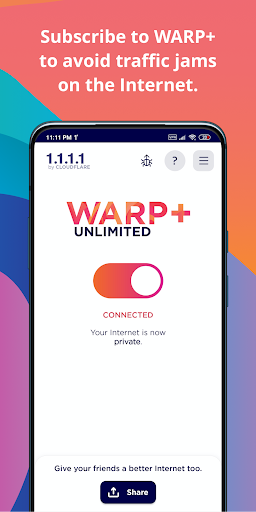
The standard 1.1.1.1 application is free to download and use, making its basic DNS and WARP functions accessible to a wide audience. Users who want additional performance benefits can explore WARP+, a paid upgrade that uses Cloudflare’s Argo technology to optimize network routing.
This premium option is designed to improve connection performance under suitable conditions. Actual results depend on network congestion, server availability, and geographical distance.
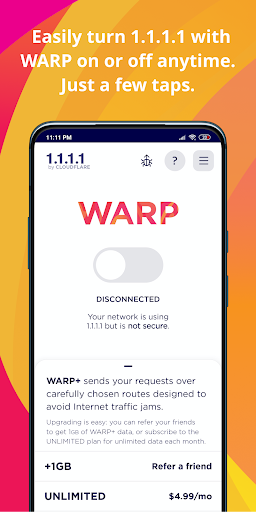
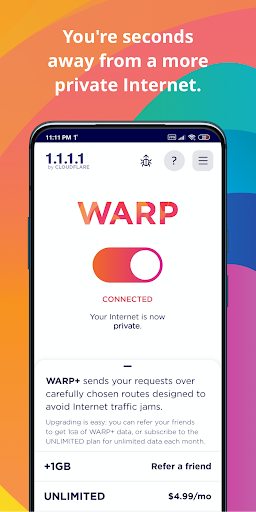
Simplicity is another reason why 1.1.1.1 + WARP appeals to everyday users. Its interface centers around a large connection switch, allowing users to activate or deactivate the service without navigating complicated configuration menus.
After granting the required VPN permission, simply tap the switch to establish a connection. The application handles the technical setup in the background, making it accessible even to people unfamiliar with DNS settings or network protocols.
The modified APK advertises additional functions that are normally associated with paid or restricted service options. These modifications focus on expanding access to Cloudflare’s connectivity features.
Premium Unlocked: Advertises access to additional premium functions.
WARP+ Unlocked: Claims to unlock WARP+ connectivity features for improved network routing.
Zero Trust Unlocked: Advertises access to additional Zero Trust-related options.
Keep in mind that these modifications are unofficial and may not provide genuine subscription entitlements. Modified applications can also introduce security risks or connection instability. For reliable protection, the official application is the safer choice.
Before installing the application, consider these common questions about its pricing and operation.
Yes. Cloudflare provides the standard 1.1.1.1 application without requiring users to purchase a subscription for its basic DNS and WARP functions. WARP+ is an optional paid upgrade that offers additional network optimization.
Pricing and available subscription options may vary by region and platform, so check the application for the latest information.
Getting started does not require advanced technical knowledge. After installing the application, follow these instructions:
Launch 1.1.1.1 + WARP and review the introductory information.
Accept the required terms and privacy information.
Tap the connection switch displayed on the main screen.
Approve Android’s VPN connection request when prompted.
Wait for the application to establish the connection. The interface will indicate when WARP is active.
You can return to the main screen whenever you want to disconnect or switch between the available connection modes.
If you want to explore Cloudflare’s connectivity tools, visit APKMODY to find the 1.1.1.1 + WARP APK download page. Before choosing a file, check its version information and compatibility with your Android device.
Here is another way to complete the installation:
Locate the APK: Open APKMODY in your mobile browser and search for 1.1.1.1 + WARP.
Check the package: Review the available version, file size, and installation details before proceeding.
Save the file: Select the appropriate download option and wait for the package to finish downloading.
Install the application: Open the downloaded APK and allow installation from your browser or file manager if Android requests permission.
Start using WARP: Launch the app, grant the necessary permissions, and activate your preferred connection mode.
For better security, prioritize the official Cloudflare release instead of unofficial modified packages. Avoid granting unnecessary permissions or installing files from unverified sources.