Hyper Light Drifter
v1.1.99
• Action
| Updated On | |
|---|---|
| Google Play ID | com.fungames.battletanksbeta |
| Category | Action |
| Version | 9.0.6 |
| Size | 173 MB |
| MOD Features | Hack Map |
| Requires | Android 7.1 |
| Price | |
| Free | |
| Content Rating | |
| Everyone 10+ | |
| Internet Required | |
| Required | |

War Machines puts you behind the controls of powerful combat vehicles in fast-paced multiplayer tank battles against players worldwide. Developed by Fun Games For Free, this action game combines diverse battle modes, detailed 3D environments, extensive vehicle customization, and strategic upgrades. Discover its most exciting features, explore the MOD edition, and follow our instructions to download War Machines through APKMODY.
Tank combat games have entertained generations of players, with Battle City remaining one of the most recognizable examples of the genre. Its simple controls, pixel-based battlefields, and familiar mission structure created countless memorable gaming moments. However, modern mobile games have taken this concept much further by introducing online competition, detailed environments, and more sophisticated vehicle mechanics.
War Machines brings a fresh approach to this familiar formula. Developed by Fun Games For Free, the studio behind the popular Sniper 3D, the game replaces traditional arcade-style encounters with large-scale tank confrontations. Instead of simply destroying computer-controlled targets, you enter competitive arenas where other players can challenge your positioning, accuracy, and combat decisions.
War Machines is an online action game that revolves around controlling armored vehicles in real-time battles. You take the role of a tank commander, entering combat zones where opponents from different parts of the world compete for victory.
Each match is designed to deliver intense action within a relatively short period, often lasting around three minutes. This compact format keeps the pace energetic while encouraging players to make quick decisions instead of spending too much time waiting for an engagement.
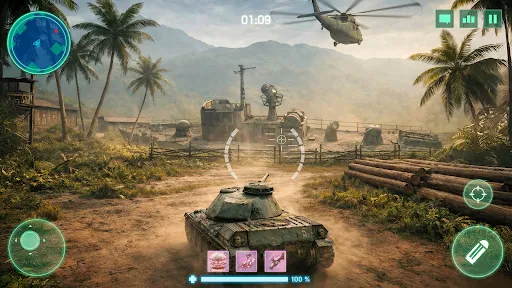
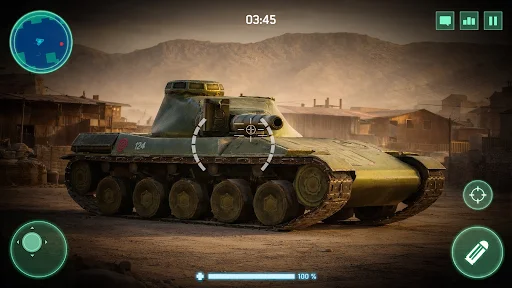
The controls are also designed to make vehicle operation accessible on mobile devices. A third-person camera provides a broad view of the surrounding battlefield, helping you observe enemy movements, navigate obstacles, and aim at opposing tanks. Learning how to combine movement, positioning, and accurate shooting becomes essential as you encounter more experienced competitors.
Variety plays an important role in keeping multiplayer combat entertaining. War Machines offers several game modes that introduce different objectives and encourage players to adjust their strategies.
Some notable modes include:
Free For All: Every commander fights independently, competing against all other players to secure the highest number of eliminations.
Team Deathmatch: Two opposing teams battle to achieve the required elimination score through coordinated attacks and defensive positioning.
Conquest: Players compete to control important areas of the battlefield, making territory management and teamwork essential.
Alongside multiplayer activities, the game also provides introductory missions that help newcomers understand its mechanics and combat systems.
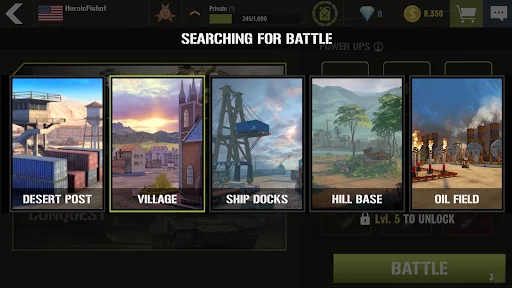
The available environments add another layer of variety. Maps feature different settings, including industrial complexes, harbors, deserts, oil facilities, and villages. Buildings, open spaces, and natural obstacles influence how you approach each encounter, making map awareness an important part of successful tank operation.
Your vehicle is the centerpiece of every confrontation, and War Machines provides an extensive collection of armored machines inspired by real-world military designs. Different tank models offer distinct characteristics, giving players opportunities to experiment with various combat approaches.
Rather than relying on a single vehicle throughout the game, you can gradually expand your collection and select tanks that match your preferred fighting style. Some situations favor mobility, while others reward stronger protection or greater offensive capabilities.
The upgrade system adds further depth to vehicle development. You can improve important characteristics and unlock additional enhancements to make your chosen machine more effective in combat. With multiple development directions available, building a suitable tank requires more thought than simply selecting the most expensive model.
A powerful tank needs more than a durable exterior to dominate the battlefield. War Machines provides additional customization options that allow players to improve their vehicles’ combat performance through equipment and ammunition choices.
Different ammunition types offer alternative ways to approach enemy encounters. Selecting suitable rounds for a particular situation can make a difference when facing heavily protected opponents or engaging targets at different distances.
Vehicle-specific improvements also help refine your tank’s overall performance. By combining equipment enhancements with suitable ammunition, you can gradually create a combat setup that complements your preferred tactics.
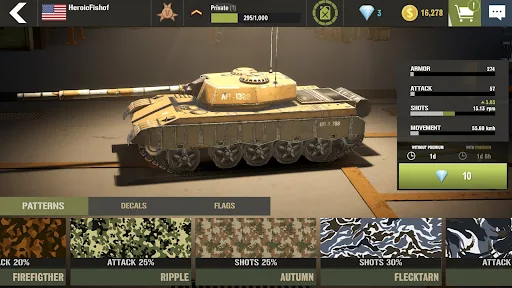
Performance is important, but personalizing your vehicle adds another enjoyable aspect to the experience. War Machines includes cosmetic options that allow you to change the appearance of your armored machine.
You can experiment with different paint colors, decorative patterns, stickers, and other visual elements. These customization choices give your tank a more recognizable identity when entering multiplayer matches.
As your collection expands, you can also create different appearances for individual vehicles instead of using the same design throughout your entire garage. This makes vehicle management more interesting while giving you additional reasons to collect new customization items.
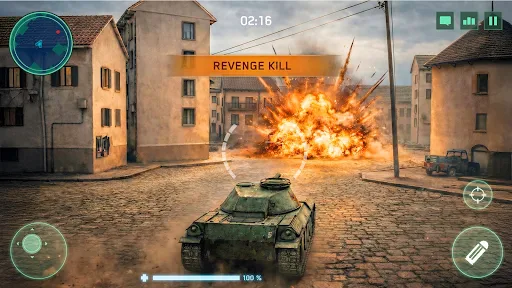
War Machines uses 3D graphics to recreate the appearance of modern tank warfare on mobile devices. The vehicles feature detailed exterior designs, while the surrounding environments include buildings, terrain variations, and other objects that contribute to the battlefield atmosphere.
Combat effects are another visual highlight. Gunfire, explosions, and vehicle damage make encounters feel more dynamic, especially when several tanks engage in the same area. The camera perspective also helps maintain a clear view of the action without making vehicle control unnecessarily complicated.
Sound design complements these visual elements through engine noises, weapon effects, explosions, and battlefield communication. Each audio detail contributes to the atmosphere of combat, making encounters more engaging as you move between different environments and face opposing commanders.
The modified edition introduces an additional feature designed to provide more information about enemy positions during combat. This option may appeal to players interested in experimenting with a different battlefield awareness setup.
– Hack Map: Reveals enemy positions on the radar, helping you identify opposing vehicles and monitor their movements across the battlefield.
Using unauthorized modifications in an online multiplayer game can violate its rules and result in account restrictions or permanent bans. Modified packages may also contain security risks, so consider these consequences before installing them.
Ready to command your own armored vehicle? Head to APKMODY to find the Android installation package for War Machines. Before downloading, review the available editions and check whether your device meets the game’s requirements.
1. Locate the game page
Open APKMODY in your mobile browser and search for War Machines. Select the matching game listing to access its download information.
2. Compare the available editions
Review the original APK and MOD release, paying attention to their version numbers, file sizes, and advertised features. Choose the package that matches your preferences.
3. Check device compatibility
Read the Android requirements and make sure your phone has enough available storage. Since War Machines is an online 3D game, a stable internet connection is also recommended.
4. Download and verify the package
Tap the download option on APKMODY and wait for the file to finish saving. Before installation, make sure the package comes from a source you trust.
5. Install and enter the battlefield
Open the downloaded APK through your device’s file manager. Follow the Android installation prompts, granting external-source installation permission only when appropriate. Once installation is complete, launch the game and follow the initial setup instructions.
Show enemies on radar.
Careful! You may be banned.