Last Furry: Survival
v2.0.0.1793617310
• Strategy
| Updated On | |
|---|---|
| Google Play ID | com.maxgames.stickwar3 |
| Category | Strategy |
| Version | 2026.5.7736 |
| Size | 426 MB |
| MOD Features | Unlimited Money |
| Requires | Android 7.0 |
| Price | |
| Free | |
| Content Rating | |
| Everyone 10+ | |
| Internet Required | |
| Required | |
| Languages | |
| English | |

Following the popularity of Stick War: Legacy, Stick War: Saga expands the series with more competitive battles and tactical possibilities. This strategy game challenges players to build armies, manage different unit types, and defeat rival forces through careful planning. Whether you prefer solo matches or cooperating with teammates, every battle offers opportunities to test your command skills.
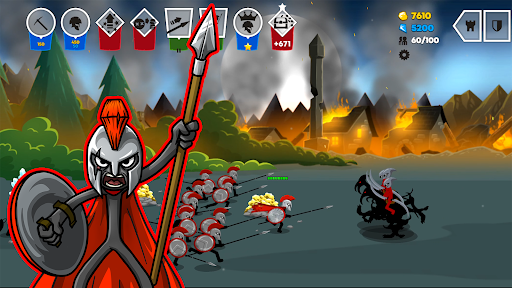
Stick War: Saga is a stickman strategy game centered on army management and real-time combat. Players recruit different units, organize their formations, and lead their forces against enemy armies. Instead of relying entirely on automatic attacks, you can influence the outcome by choosing when to deploy troops and how to use their abilities.
The game supports several ways to compete, including individual encounters and team-based matches. Each format requires a slightly different approach, so players need to adjust their tactics according to the battlefield and their opponents. Victories also provide rewards that help improve your army and unlock additional possibilities.
Stick War: Saga offers different combat formats to accommodate various playstyles. Solo battles allow you to test your decisions against another player or an AI-controlled opponent. These encounters are useful for learning unit abilities, experimenting with formations, and understanding how to respond to different enemy strategies.
For a more cooperative experience, you can participate in team battles and coordinate attacks with other players. Working together makes it possible to combine different unit roles, defend vulnerable positions, and overwhelm opposing forces. Rather than focusing only on individual strength, success often depends on how effectively each teammate contributes to the overall plan.
Each match comes with its own objectives, requiring players to manage their troops carefully. You may need to strengthen your defenses, eliminate enemy units, or push toward an opposing base. Understanding the immediate goal helps you decide which soldiers to summon and when to commit additional resources.
Reserve units are particularly useful when a battle becomes difficult. Reinforcements can help restore your formation, counter an unexpected attack, or create enough pressure to break through enemy defenses. Certain combat items and special abilities also provide tactical advantages, but using them at the right moment is more important than simply deploying everything at once.
One of the main attractions of Stick War: Saga is its competitive multiplayer experience. Players can enter individual matches or team-based encounters, facing opponents with different approaches to army building and combat. This variety keeps battles from feeling predictable, as familiar strategies may not work against every rival.
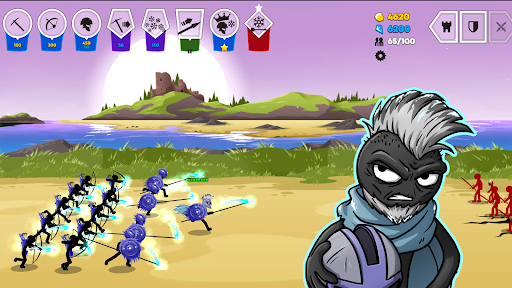
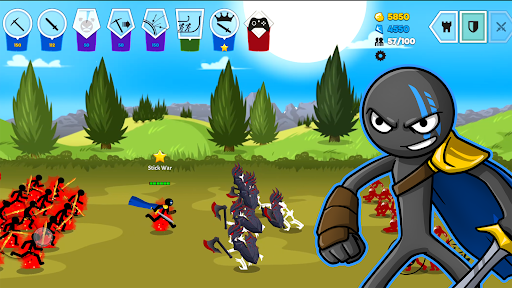
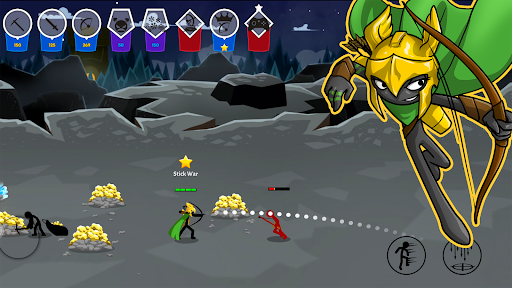
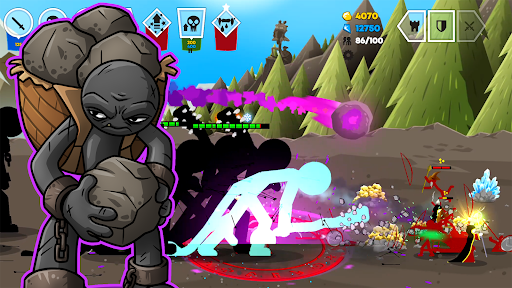
The combat takes place continuously rather than following a turn-based structure. Units advance and attack as the match progresses, while players make decisions about deployment and battlefield control. You can also take direct control of certain soldiers to influence their movements or attacks. The ultimate objective is to overcome the opposing force and capture its castle.
A successful army needs more than one type of soldier. Stick War: Saga features several familiar unit classes, including archers, miners, warriors, healers, and mages. Each group serves a specific purpose, giving players multiple ways to construct an effective formation.
Archers: Attack enemies from a distance and provide ranged support behind frontline units.
Miners: Collect resources needed to summon troops and maintain your army.
Warriors: Engage opponents at close range and help protect more vulnerable units.
Healers: Restore the health of allied soldiers and improve their ability to remain in combat.
Mages: Use magical abilities to disrupt enemy formations and deal damage through special attacks.
The key is to understand how these roles complement one another. Archers can provide consistent damage while warriors hold the frontline, and healers help keep the formation alive. Mages add another layer of tactical flexibility through their special abilities. Experimenting with different combinations allows you to develop a squad that suits your preferred approach.
Stick War: Saga features three major game modes, each offering a different type of challenge.
The game retains the recognizable stickman art style of earlier entries while introducing different environments and visual details. Battles can take place across varied landscapes, including deserts, hills, coastal areas, and icy regions. These settings give each encounter a slightly different atmosphere without making the interface difficult to follow.
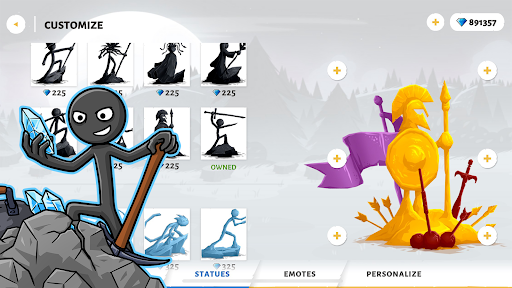
Players can also customize their armies with different skins, giving their units a more distinctive appearance. Combat animations and ability effects add visual impact to battles, while the sound design helps emphasize attacks and important moments. The overall presentation remains simple, but it fits the fast-moving nature of the gameplay.
The MOD edition offers additional advantages that change how players access certain in-game resources and content. Its available functions may differ depending on the specific release.
Unlimited Money: Provides a larger supply of in-game currency, making it easier to access resources and develop your army without following the usual earning process.
Unlocked Content: Gives access to selected features or content that may otherwise require additional progression.
Please remember that modified versions are unofficial and may not support every feature of the original release. Check the version details before installing, particularly if you already have the standard game on your device.
Is Stick War: Saga free to play?
The game can be downloaded for free where supported. However, optional purchases may be available for certain items or additional content. Prices and purchase options can vary depending on the platform and region.
Who is Stick War: Saga suitable for?
The game is designed for players who enjoy strategy, army management, and cartoon-style combat. Although its stickman presentation is relatively simple, battles involve weapons and fighting, so parents should review the game’s age rating and content before allowing younger children to play.
APKMODY provides access to the available Stick War: Saga APK releases for Android users. Before choosing a file, compare the package details to make sure you select the edition you actually want.
| Preparation | What to do |
|---|---|
| Find the game | Search for Stick War: Saga on APKMODY. |
| Select a package | Choose the standard APK or the MOD version based on your preference. |
| Review the details | Check the version information, file size, and compatibility notes. |
| Download the file | Save the selected package to your Android device. |
| Install and launch | Open the APK, follow the system prompts, then start playing. |