
Grapple Hook Hero: Zip Action
v7.4
• No Ads

| Updated On | |
|---|---|
| Category | Action |
| Version | 1.0 |
| Size | 1 GB |
| MOD Feature | Not available |
| Requires | Android |
| Price | |
| Free | |
| Content Rating | |
| Everyone | |
| Internet Required | |
| Unknow | |

Spider-Man 3 APK gives Android users a way to experience the classic superhero adventure originally released in 2007. Developed for several platforms, including PlayStation Portable (PSP), the game follows Peter Parker as he protects New York City from dangerous enemies. Although there is no official native Android version, you can play the PSP edition on a smartphone with a compatible emulator and the required game file.
Few superheroes have a world as recognizable as Spider-Man. His stories combine spectacular action with the personal struggles of Peter Parker, creating adventures that appeal to fans of all ages. Spider-Man 3 brings these elements into a video game, allowing you to swing through the city, fight familiar enemies, and experience a story inspired by the movie. Let’s take a closer look at its main features.
The adventure takes place in New York City, where Spider-Man continues his mission to protect ordinary people from criminal organizations and dangerous supervillains. However, this responsibility becomes increasingly difficult as new threats emerge. Peter must deal with more than physical battles, especially when the mysterious black suit begins to influence his behavior.
The story explores the conflict between Spider-Man’s growing power and the responsibility that comes with it. As the city faces one crisis after another, you must help the hero overcome his enemies while dealing with the consequences of his choices. Familiar characters and dramatic encounters give the adventure a strong connection to the Spider-Man universe.
Spider-Man 3 combines third-person action with exploration across the city. You control the superhero as he travels between mission locations, uses his web abilities, and confronts enemies in close-range combat. The main storyline provides a clear sequence of objectives, making it relatively easy to follow the adventure without losing track of your next task.
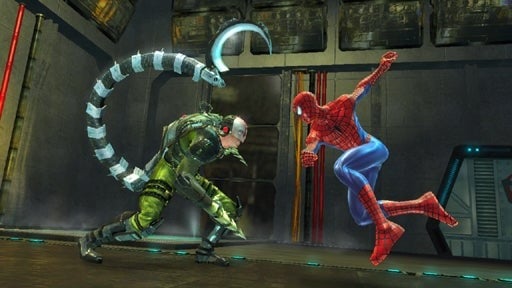
Combat is built around punches, kicks, web attacks, and chained combos. Timing your moves helps you deal with groups of enemies more effectively, while Spider-Man’s mobility gives you additional ways to approach encounters. Besides the main missions, optional activities provide extra challenges and opportunities to earn rewards. This combination keeps the experience varied instead of limiting every encounter to a simple fight.
The campaign features several recognizable villains from the Spider-Man universe. Each major encounter presents a different threat, requiring you to adapt your fighting style and make good use of your abilities.
Some of the notable enemies include:
Sandman: A formidable opponent whose body can transform into sand. His enormous strength makes encounters with him particularly challenging.
Venom: The symbiote creates a powerful black suit that enhances Spider-Man’s abilities but also affects his personality. Venom becomes one of the central threats in the adventure.
Lizard: Dr. Curt Connors transforms into a dangerous reptilian creature. His physical strength makes him a difficult opponent to overcome.
These encounters add variety to the campaign, with larger confrontations requiring more than simply repeating basic attacks. Learning how to use Spider-Man’s abilities effectively will help you handle the toughest fights.
Spider-Man’s combat options change depending on the suit he wears. His traditional red-and-blue outfit focuses on familiar web-based techniques, allowing him to control enemies and move around the battlefield. Web Shot, Web Zip, Web Cocoon, and Web Swing represent different ways to use his web powers during combat and exploration.
The black Symbiote suit introduces a more aggressive fighting style. Its enhanced physical abilities make heavy attacks especially effective against opponents. Moves such as Symbiote Slam, Dark Web Whip, and Ground Smash emphasize raw strength, while Rage Mode temporarily increases Spider-Man’s offensive power. The suit also changes the feel of combat, encouraging you to experiment with stronger combos and more direct attacks.
Choosing the right abilities for each situation makes battles more engaging. The contrast between the two suits also reflects the story’s central conflict: greater power comes with consequences.
Spider-Man 3 was created for the hardware available in the late 2000s, so its presentation naturally differs from modern superhero games. Character models, city environments, and animations may look dated by current standards. Nevertheless, the game captures the recognizable appearance of Spider-Man and features plenty of action to keep its world lively.
The audio also contributes to the atmosphere. Background music shifts to match different situations, while character dialogue helps deliver the story between missions. Although the overall presentation is limited by the technology of its original platforms, it still offers a nostalgic experience for players who enjoy older action games.
The PSP edition of Spider-Man 3 was not released as a native Android application. To play it on your phone, you need a compatible PSP emulator, such as PPSSPP, along with a legally obtained copy of the game’s PSP disc image. The APK alone does not contain the original PSP game.
Spider-Man 3 remains an enjoyable choice for fans who want to revisit a classic superhero adventure. Its web-based movement, recognizable villains, suit-specific combat, and story-driven missions offer plenty of nostalgic appeal, even if the graphics show their age.
To get started on Android, prepare the necessary files first:
Emulator: Install a compatible PSP emulator from a trusted source, such as the official PPSSPP website.
Game file: Obtain a legally created or acquired copy of the Spider-Man 3 PSP game in a format supported by your emulator, typically ISO or CSO.
Storage: Keep enough free space on your device for the emulator and game file.
Setup: Open the emulator, locate the game image in your storage, then select it from the available game list to launch the adventure.
Visit APKMODY for more information about the Android gaming experience. Remember that downloading an emulator does not automatically provide the original game, so you must obtain the required game file separately. Performance also depends on your phone’s hardware and emulator settings.